Best AI Image Generators for Content Creators (2026): 8 Tools Worth Trying
Creating content is one thing.
Creating all the visuals that go with it is another.
For many bloggers, marketers, and solo creators, the best AI image generators for content creators can make that visual work much faster.
A single blog post might need a featured image, a few illustrations, a comparison graphic, a Pinterest pin, and maybe a social media image. If you’re also making YouTube videos, newsletters, or digital products, the list gets even longer.
That used to mean stock-photo subscriptions, design software, freelance designers, or a lot of time spent learning Photoshop.
AI image generators have changed that.
You can now describe an idea in plain English and get an original visual in seconds. Some tools are especially good at realistic images. Others are better for typography, illustration, branding, editing, or working inside an existing design workflow.
But that’s also where things get confusing.
There are a lot of AI image generators, and they don’t all solve the same problem.
This guide focuses on the best AI image generators for content creators, rather than simply listing every new image model available.
Quick answer: For most content creators, a general-purpose tool such as ChatGPT Images or a creative-focused platform such as Midjourney is a good starting point. Adobe Firefly is useful for creators already working inside Adobe’s ecosystem, Canva works well when image generation needs to flow directly into design, Ideogram is useful when text inside an image matters, Leonardo gives creators more control and consistency, Recraft is interesting for design and vector workflows, and Krea is built around fast iteration and real-time creative exploration.
Affiliate disclosure: Some links in this article may be affiliate links. If you purchase through one of those links, SoloBizStack may earn a commission at no extra cost to you. This does not affect how we compare the tools.
Best AI Image Generators for Content Creators at a Glance
| Tool | Best For | What Makes It Useful |
|---|---|---|
| ChatGPT Images | General content creation | Prompting, editing, variations, flexible aspect ratios |
| Midjourney | Artistic and cinematic visuals | Strong creative direction and visual style |
| Adobe Firefly | Professional creative workflows | Image, video, audio, editing, and Adobe integration |
| Canva AI | Blog and social content | Generate and immediately design inside Canva |
| Ideogram | Text-heavy graphics | Strong focus on image text and design precision |
| Leonardo AI | Control and consistency | References, editing, upscaling, character/style consistency |
| Recraft | Design and vector work | Image and vector generation with editing tools |
| Krea | Fast visual experimentation | Real-time generation, variations, editing, and upscaling |
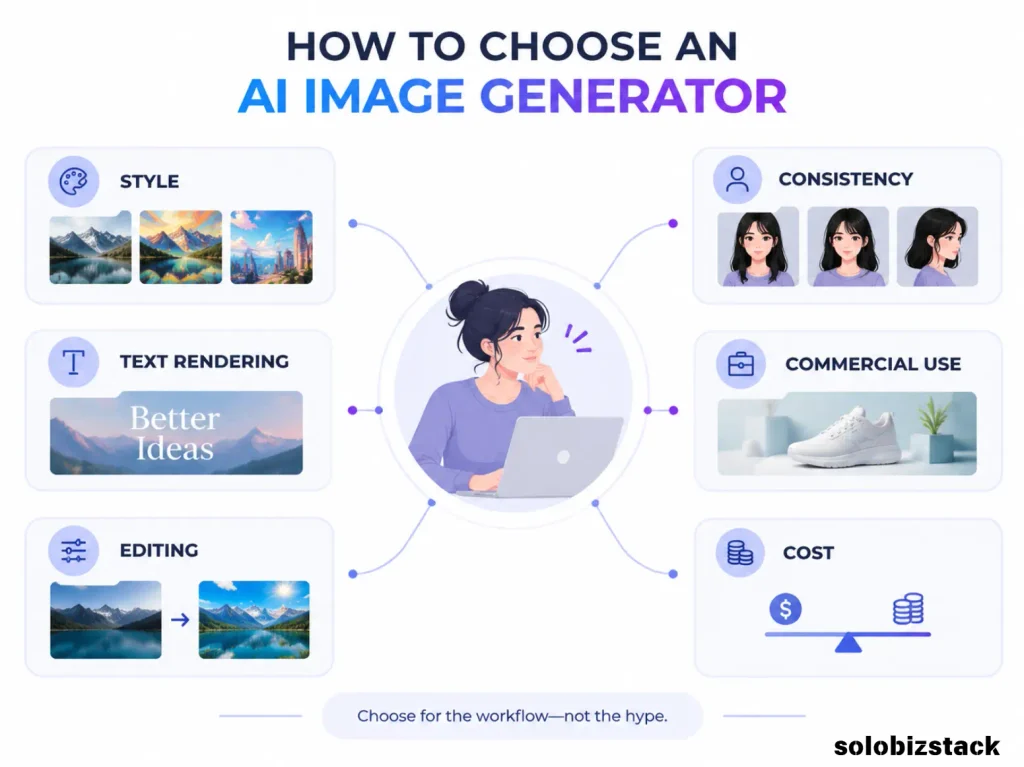
The important part is that these tools overlap, but they’re not identical.
A blogger creating five Pinterest graphics a week may care much more about Canva than a digital artist who wants precise style control.
A creator making branded social posts may care about text rendering and templates.
Someone building a recurring character may care more about consistency.
So instead of asking “Which AI image generator is the best?”, start with a better question:
“What do I need to create every week?”
1. ChatGPT Images — Best All-Around Option for Content Creators
ChatGPT is no longer limited to text. Its current image experience can create and edit images, follow detailed instructions, work at different aspect ratios, add text to images, and edit specific parts of an existing image. ChatGPT Images 2.5 is the current image experience as of September 2026, and OpenAI says image generation is available across ChatGPT plans.
For content creators, that flexibility is a big deal.
You don’t always need a dedicated image generator.
Sometimes you already know what you want and just need to explain it clearly:
“Create a realistic hero image for a blog post about website hosting. Show a solo entrepreneur working on a laptop in a bright minimalist office. Leave negative space on the left for a headline.”
Then you can refine it:
“Make the scene warmer.”
“Move the laptop to the right.”
“Create a 16:9 version.”
“Keep the same composition but change the setting to a coffee shop.”
That conversational workflow can be much easier than starting from scratch each time.
ChatGPT is also useful when your image task is connected to the rest of your content workflow. You might already be using it to outline the article, develop the visual concept, write the Pinterest headline, and then create the image.
That’s particularly convenient for solo bloggers.
Best use cases
- Blog hero images
- Simple illustrations
- Content graphics
- Concept visuals
- Image editing
- Social media graphics
- Pinterest concepts
- Quick variations
Watch out for
The fact that a tool can generate an image does not mean the result should be published immediately.
Check hands, text, logos, tiny details, and whether the composition actually works with your website layout.
[Create Images with ChatGPT →]
Best for: Creators who want one flexible tool for generating and editing visuals without jumping between multiple apps.
2. Midjourney — Best for Artistic and Cinematic Visuals
Midjourney has long been associated with highly stylized AI imagery, and its current V8.1 model is the platform’s default model. Midjourney says V8.1 improves instruction following, coherence, text rendering, and generation speed.
What makes Midjourney interesting for content creators is not just “pretty pictures.”
It’s the ability to establish a visual direction.
For example, imagine you’re building a blog around entrepreneurship.
You could create a consistent look for:
- Editorial hero images
- Lifestyle scenes
- Abstract business concepts
- Product mockups
- Social media visuals
- Brand campaigns
Midjourney’s current plans range from $10/month for Basic to $120/month for Mega when billed monthly, with lower effective monthly pricing on annual plans. Standard, Pro, and Mega include unlimited image generations in Relax Mode, while Stealth Mode is available on Pro and Mega.
That pricing structure makes it more useful for creators who generate a lot of images rather than someone who needs one image every few weeks.
One thing to remember: Midjourney is a subscription service, and plans automatically renew unless canceled.
Best use cases
- Cinematic blog images
- Editorial visuals
- Creative campaigns
- Mood boards
- Brand concepts
- Highly stylized social content
Watch out for
Midjourney can be more than you need if your main goal is simply to create a few straightforward blog images every month.
Best for: Creators who care about distinctive visual style and cinematic or artistic results.
3. Adobe Firefly — Best for Creators Already Using Adobe
Adobe Firefly takes a slightly different approach.
Instead of being just an image generator, Firefly is positioned as a broader creative AI platform for generating and editing images, video, audio, and other creative assets.
Adobe’s current plans include a free tier with limited daily generations, while paid plans start at $9.99/month for Firefly Standard. Higher plans provide more generative credits and access to additional creative features and partner models.
For someone already using Photoshop, Adobe Express, or other Adobe products, that integration can matter more than the raw image quality of a single generation.
Imagine you’re preparing a product campaign.
You might:
- Generate a background.
- Remove an object.
- Adjust the image.
- Create additional creative assets.
- Move everything into your existing Adobe workflow.
That is a different proposition from simply generating one standalone image.
Firefly also provides access to partner models inside some plans, so the current product is becoming more of a creative AI workspace rather than one single image model.
Best use cases
- Professional creative workflows
- Marketing visuals
- Image editing
- Adobe-based production
- Social and campaign graphics
- Image + video workflows
Watch out for
If you just want to generate a simple blog image, you may not need the broader Adobe ecosystem.
Best for: Content creators who already work in Adobe products or want a broader creative-production environment.
4. Canva AI — Best for Bloggers, Pinterest, and Social Content
For many bloggers, the image generator isn’t actually the biggest problem.
The bigger problem is:
“Okay, I made the image. Now how do I turn it into something I can publish?”
That’s where Canva is useful.
Canva lets you generate AI images and then continue editing them inside the Canva editor. Canva’s AI tools can also handle things such as background removal and other creative tasks.
That makes it especially practical for content creators.
For example:
Blog post →
AI image
→ resize
→ headline
→ website branding
→ Pinterest version
→ Instagram version
→ downloadable checklist
You don’t have to move the generated image between several different tools.
Canva also supports AI image generation through its dedicated tools, and its current AI system can be used conversationally to refine images and styles.
For a site like SoloBizStack, this is particularly useful because you can build one visual system and keep reusing it.
Best use cases
- Blog featured images
- Pinterest Pins
- Social media graphics
- Lead magnets
- Simple infographics
- Content templates
- Branded visuals
Watch out for
Canva is more than an image generator, which is a strength—but also means it may not be the first tool I’d choose if your main goal is advanced image generation and creative control.
Best for: Bloggers, Pinterest creators, marketers, and anyone who wants to go from AI-generated image to finished content asset in one place.
5. Ideogram — Best for Text Inside Images
One of the easiest ways to tell an AI image tool apart is to give it a design that actually contains text.
That is where Ideogram becomes interesting.
Ideogram’s current platform specifically includes image-generation features such as Magic Prompt, style references, character references, Remix, negative prompts, and different rendering modes. Its current paid plans include Plus, Pro, and Team tiers, while the free plan has more limited usage.
For content creators, that makes it useful for things such as:
- Posters
- Quote graphics
- Thumbnail concepts
- Product labels
- Headline-driven social graphics
- Simple promotional artwork
- Typography-heavy designs
If the main goal is a beautiful landscape photo, there are plenty of tools you could use.
If the main goal is:
“I need the words on the image to actually look intentional.”
Ideogram is worth testing.
It also offers image upload and reference-based workflows on paid plans, which can be useful when you’re trying to keep a visual direction consistent.
Best use cases
- Text-heavy visuals
- Posters
- Thumbnails
- Quote graphics
- Social graphics
- Concept advertising
Watch out for
If your images rarely contain text, many of Ideogram’s strengths may not matter as much to you.
Best for: Creators who frequently need readable, designed text inside their images.
6. Leonardo AI — Best for Consistency and Creative Control
Leonardo is particularly interesting for creators who need more control than a simple text-to-image workflow.
Its current platform supports text-to-image, image-to-image, image-to-video, AI Canvas, image guidance, background removal, upscaling, and tools designed to keep characters and styles consistent across outputs. Leonardo also says its generated images can be used commercially, subject to its terms.
That last part is important for content creators.
Imagine you’re creating a recurring fictional character for your website.
You don’t want:
Image 1: brown hair
Image 2: blonde hair
Image 3: completely different face
Consistency matters.
The same idea applies to branded illustrations, product concepts, recurring visual themes, or a series of social graphics.
Leonardo is also useful when you already have an image and want to transform or refine it rather than start from a blank prompt.
Best use cases
- Character consistency
- Brand visual systems
- Image-to-image workflows
- Creative experimentation
- Product concepts
- Image enhancement
- Social graphics
Watch out for
Its larger feature set means there’s a little more to learn than with a simple conversational image generator.
Best for: Creators who want more creative control and visual consistency across a series of assets.
7. Recraft — Best for Graphic Design and Vector-Style Work
Recraft is worth paying attention to if you’re creating graphics rather than purely photographic images.
Its current platform supports image and vector generation, editing, background removal, inpainting, outpainting, batch jobs, and API access. Recraft also distinguishes between its free and paid plans: free-plan images are publicly visible and not licensed for commercial use, while paid plans provide ownership and commercial rights for generated images under its terms.
That’s a meaningful distinction for content creators.
A free experiment is one thing.
A logo, branded illustration, paid product graphic, or downloadable asset is another.
If you plan to use the output commercially, check the current license rather than assuming that every free AI image tool gives you unrestricted commercial rights.
Recraft is particularly useful for:
- Icons
- Illustrations
- Posters
- Brand graphics
- Vector-style artwork
- Simple marketing visuals
- Design systems
It also supports API-based image and vector generation if you eventually want to build higher-volume workflows.
Best use cases
- Graphic design
- Vector-style visuals
- Illustrations
- Branding
- Marketing graphics
Watch out for
The licensing difference between free and paid output is important enough that you should check it before using free generations in commercial work.
Best for: Designers and content creators producing graphics, illustrations, vectors, and branded visual assets.
8. Krea — Best for Fast Iteration and Real-Time Visual Work
Krea is a little different from the “type prompt, wait, get image” model.
Its Realtime tools let you change prompts, composition, colors, and styles while watching the image update. Krea also supports image variations, editing, upscaling, image-to-video workflows, and multiple models.
That makes it particularly interesting when you’re still figuring out what you want.
Instead of:
Prompt → wait → don’t like it → start again
you can work more interactively.
Krea’s current free plan includes daily compute units, while its Basic plan starts at $9/month and its Pro plan at $35/month.
For content creators, that workflow can be useful when developing:
- Hero images
- Art direction
- Campaign concepts
- Mood boards
- Creative experiments
- Visual variations
Krea also includes upscaling and video-related tools, so it can work as more than a simple image generator.
Best use cases
- Rapid experimentation
- Real-time image generation
- Creative direction
- Image variations
- Upscaling
- Image-to-video workflows
Watch out for
Krea makes the most sense when you enjoy experimenting. If you want the simplest possible “give me an image for this article” workflow, another tool may feel easier.
Best for: Creators who want to iterate visually and explore several directions quickly.
Which AI Image Generator Should Content Creators Start With?
This is where I would keep things simple.
You don’t need eight subscriptions.
If you mostly create blog images
Start with:
ChatGPT Images or Canva AI
They cover the basic workflow well, and Canva becomes especially useful when the image needs to turn into a finished graphic.
If you care about artistic style
Look at:
It’s built around strong creative direction and visual style.
If you already use Adobe
Start with:
The broader creative ecosystem can be more valuable than using a standalone image generator.
If your graphics contain lots of text
Try:
Especially for posters, thumbnails, quote graphics, and promotional visuals.
If consistency matters
Look at:
This becomes more useful when you’re building recurring characters, styles, or branded visuals.
If you’re creating illustrations or vector-style designs
Try:
Its image and vector workflow makes it different from a purely photographic image generator.
If you like experimenting in real time
Try:
Especially when you’re exploring composition and visual direction rather than starting with one fixed idea.
AI Image Generators vs. Canva: Do You Need Both?
This comes up a lot.
And for content creators, the answer is often yes.
An AI image generator creates the visual.
Canva helps you turn that visual into the thing you actually publish.
For example:
AI generator
→ Create the hero image
Canva
→ Add headline
→ Add logo
→ Crop for Pinterest
→ Create social version
→ Add CTA
→ Export
That’s why I wouldn’t necessarily think of Canva as competing directly with Midjourney, Leonardo, or Krea.
They can play different roles in the same workflow.
How to Use AI Images for a Blog Without Making the Site Look Generic
This is where a lot of websites go wrong.
They generate:
- person with laptop
- person with laptop
- person with laptop
- person with laptop
And suddenly every article looks exactly the same.
You can do better with a simple visual system.
Give different article types different visual styles
How-to articles
Use realistic workspace or step-by-step visuals.
Reviews
Use product screenshots and interface elements.
Comparisons
Use clean diagrams and comparison graphics.
Guides
Use illustrations and explanatory diagrams.
Lists
Use more editorial hero images.
Your images should support the article—not just fill empty space.
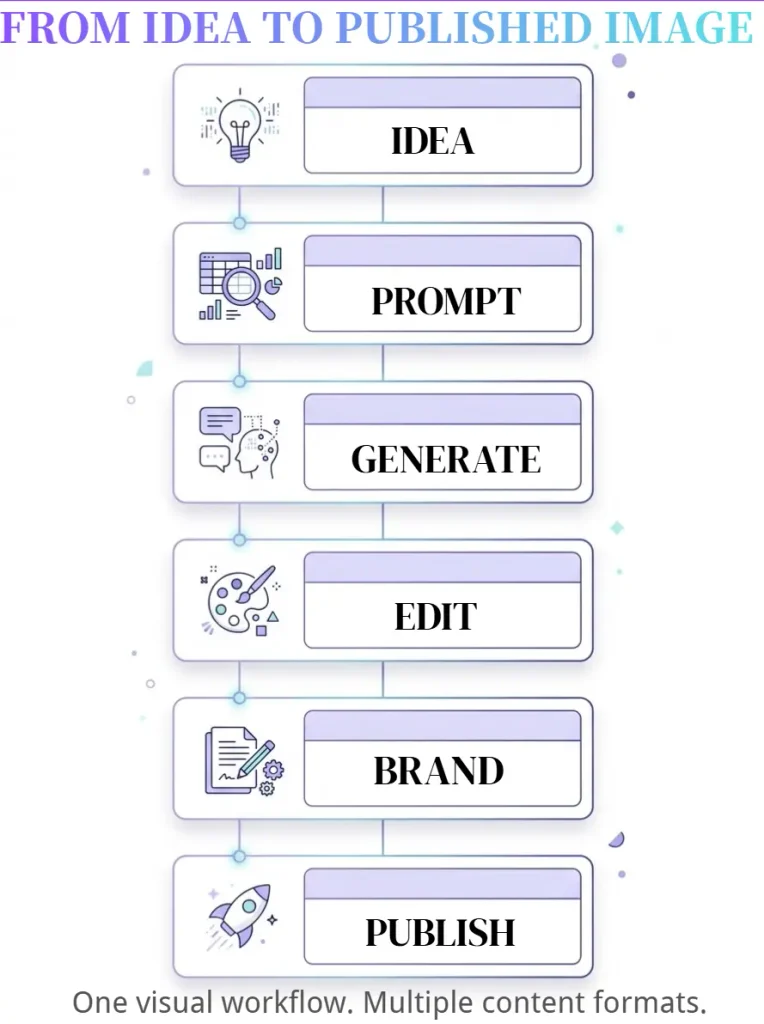
A Simple AI Image Workflow for Content Creators
Here’s a workflow that works well for a blog like SoloBizStack.
Step 1: Decide what the image needs to explain
Don’t start with:
“I need an AI image.”
Start with:
“What should this image help the reader understand?”
Step 2: Choose the format
For example:
Blog hero: 16:9
Inline infographic: 4:3
Pinterest: 2:3
Social post: 1:1 or 4:5
Step 3: Generate the visual
Use ChatGPT, Midjourney, Firefly, Leonardo, Krea, or another tool depending on the job.
Step 4: Edit
Fix the composition, crop, background, or unwanted details.
Step 5: Add text in Canva
For blog graphics and Pinterest pins, I generally recommend adding important readable text during the design stage rather than relying entirely on generated text.
Step 6: Optimize for WordPress
Compress the file, choose an appropriate format such as WebP, use a descriptive filename, and write useful ALT text.
Step 7: Make a second asset
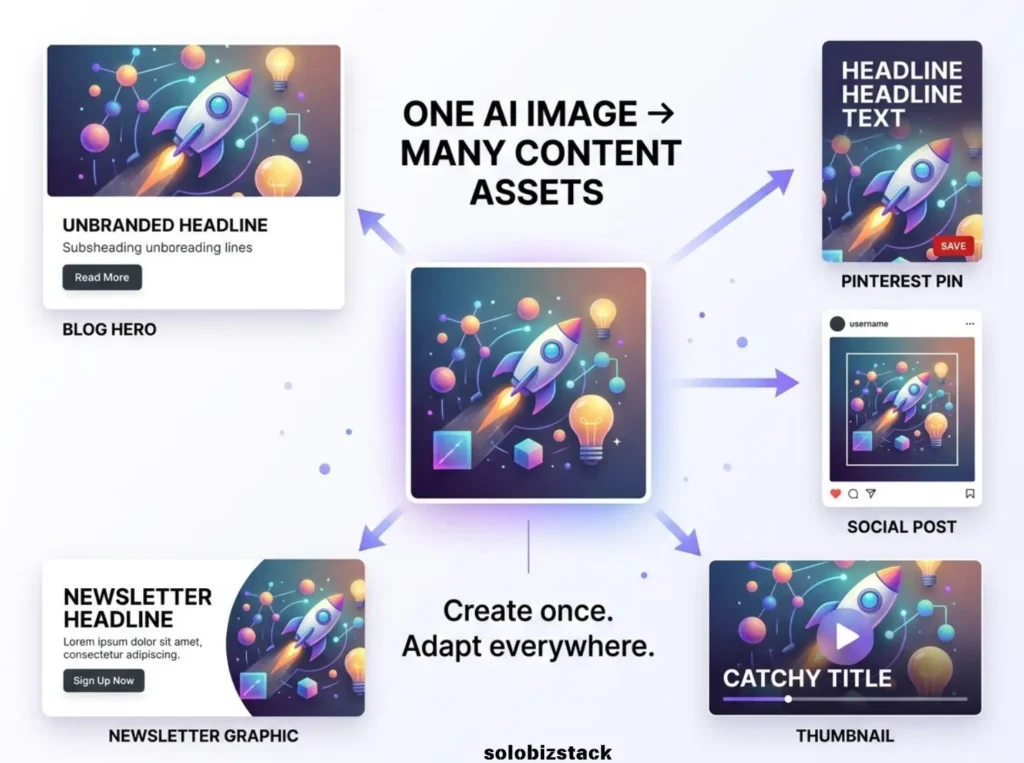
Turn the same visual into a Pinterest Pin or social graphic.
One image doesn’t have to be used only once.
Do AI-Generated Images Need Alt Text?
Yes, when the image adds meaningful information.
ALT text should describe what the image actually shows.
For example:
Weak:
best AI image generator
Better:
Solo creator using AI tools to create blog graphics on a laptop
If the image is purely decorative and adds no useful information, the accessibility approach may be different.
The goal isn’t to stuff keywords into every ALT field.
Describe the image.
Can You Use AI-Generated Images Commercially?
Sometimes—but don’t assume the answer is automatically yes.
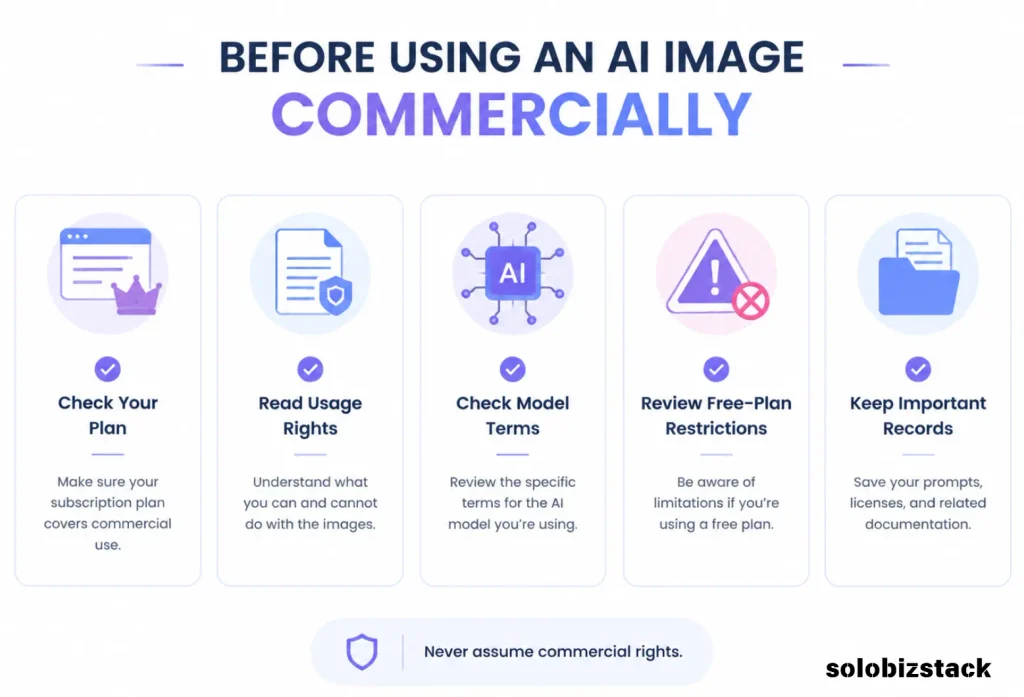
Commercial rights depend on the tool, plan, model, and current terms.
For example, Recraft explicitly says its free-plan images are publicly visible and not licensed for commercial use, while paid plans provide ownership and commercial rights under its terms.
Leonardo says its generated images can be used commercially, subject to its terms.
Midjourney provides commercial usage terms, with additional requirements for companies above certain revenue levels.
So before using an AI-generated image in a:
- Product
- Paid course
- Ebook
- T-shirt
- Client campaign
- Logo
- Advertisement
check the provider’s current terms.
This is especially important if you’re using a free plan.
Should Bloggers Use AI-Generated Featured Images?
Yes, but they don’t have to.
For many SoloBizStack articles, I’d use a combination:
Featured image: AI-generated or editorial visual
Product review: Real product screenshot
Comparison: Canva infographic
Tutorial: Real screenshot or annotated image
Pinterest: Designed graphic
This gives the site more visual variety and, more importantly, makes the images actually useful.
What I’d Use for a Content Website
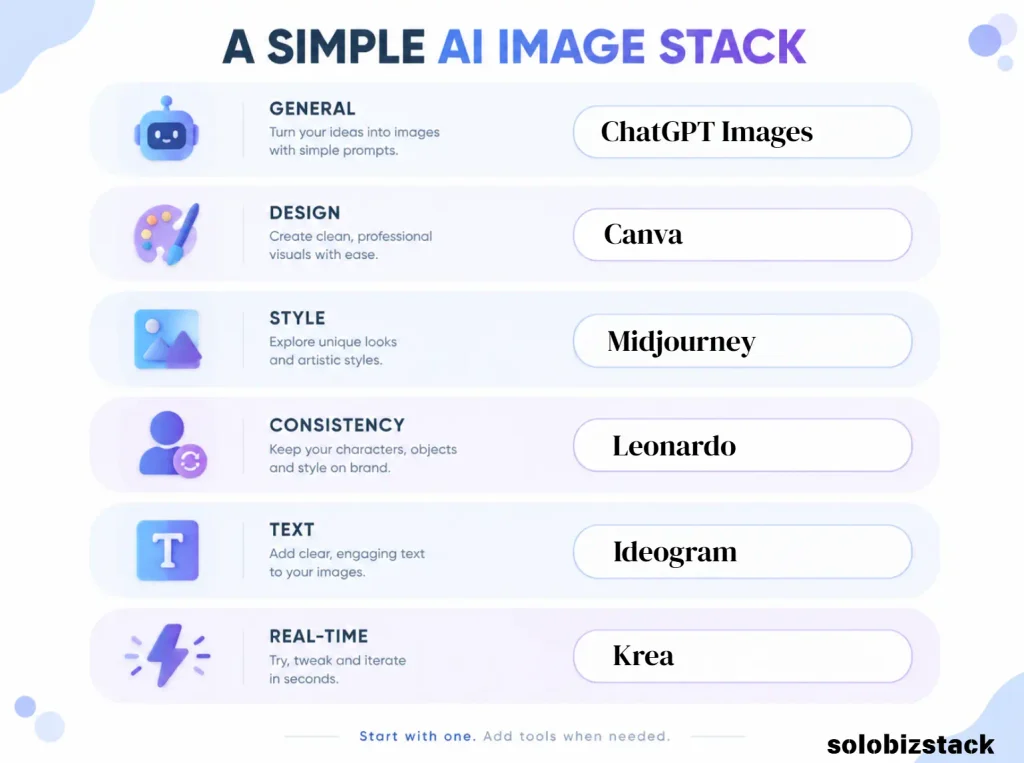
For a site like SoloBizStack, I wouldn’t subscribe to all eight tools.
A lean visual stack could be:
Everyday blog images
ChatGPT Images
Use it for concepts, hero images, and quick edits.
Brand and Pinterest graphics
Canva
Use it for finished designs, templates, and social formats.
More advanced visual creation
Midjourney or Leonardo
Pick one when you need stronger creative direction or consistency.
Special situations
Ideogram
When text inside the image matters.
Krea
When fast visual experimentation matters.
Recraft
When illustrations or vector-style assets matter.
Firefly
When you’re already working inside Adobe.
That is plenty.
Frequently Asked Questions
What is the best AI image generator for content creators?
There isn’t one tool that is ideal for every creator. ChatGPT Images is useful for general-purpose generation and editing, Midjourney is focused on creative visual generation, Canva works well for design workflows, Ideogram is useful for text-heavy graphics, Leonardo emphasizes control and consistency, and Krea focuses heavily on fast iteration and real-time generation.
What is the best AI image generator for bloggers?
For bloggers, the best choice often depends on what happens after the image is generated. ChatGPT works well for general image creation and editing, while Canva is particularly convenient when the image needs to become a finished blog or Pinterest graphic.
Is Midjourney good for blog images?
Yes. Midjourney can be useful for editorial, cinematic, artistic, and highly stylized visuals. Its current plans include commercial usage terms, and higher plans add features such as Stealth Mode.
Is Canva AI good for content creators?
Yes. Canva’s AI tools can generate images and let you continue editing the results inside Canva, which is useful for turning a generated visual into a finished social, blog, or Pinterest graphic.
Which AI image generator is best for text in images?
Ideogram is worth considering when readable text and graphic design are central to the image. Its current toolset includes features such as Magic Prompt, style references, and Remix.
Can AI image generators create images for commercial use?
Some do, but the answer depends on the specific provider and plan. Always review the current commercial-use terms before using generated images in paid products, client projects, advertising, or merchandise. Recraft, for example, distinguishes commercial rights between its free and paid plans.
Do I need more than one AI image generator?
Not necessarily. One good general-purpose generator plus Canva is enough for many bloggers. Add another tool when you have a specific requirement such as better text rendering, character consistency, vector artwork, or real-time experimentation.
Should I use AI-generated images on every blog post?
You can, but you don’t have to. Real screenshots, diagrams, product photos, and original graphics often add more value than another generic AI image.
Final Thoughts
AI image generators are becoming much more useful for content creators.
But the biggest productivity win isn’t generating 100 images.
It’s being able to create the right image quickly.
A blogger might need a simple hero image.
A Pinterest creator might need a vertical graphic.
A YouTuber might need a thumbnail concept.
A freelancer might need a client mockup.
A brand might need ten visuals that all feel like they belong together.
Those are different jobs.
Start with the one you actually need.
For a lot of bloggers, ChatGPT Images + Canva is enough to get started.
Add Midjourney, Leonardo, Ideogram, Krea, Recraft, or Firefly when your visual needs become more specific.
The goal isn’t to collect AI tools.
It’s to build a visual workflow that helps you publish better content without turning every image into a three-hour project.
[Explore More AI Tools for Solopreneurs →]
[Read Best AI Writing Tools for Bloggers →]
[Explore SoloBizStack Tools →]
Features, pricing, usage limits, commercial terms, and affiliate programs can change. Check the provider’s current website and terms before subscribing or using generated content commercially.
3 Comments