What Tools Does a Solopreneur Actually Need?
Running a business by yourself can feel strangely complicated.
You start with a website, then you need an SEO tool. Then an email platform. Then a design tool. Then analytics. Then a project management app. Then an AI writing tool. Before long, you have a dozen browser tabs open and more monthly subscriptions than actual customers.
So, what tools does a solopreneur actually need?
The answer is probably fewer than you think.
A good solopreneur tech stack is not a collection of every popular SaaS tool. It is a small group of tools that helps you do the most important jobs without creating unnecessary work.

For most online solopreneurs, those jobs are simple: build something, create something, attract people, manage the business, sell something, and understand what is working.
The Goal Is Not to Have More Tools
One of the easiest mistakes to make as a new solopreneur is confusing tools with progress.
A new app can make you feel productive for an afternoon. But a tool does not automatically bring traffic, create customers, or make your business profitable.
The real question should be:
What problem am I trying to solve, and what is the simplest tool that can solve it?
That one question can save a lot of money and a surprising amount of time.
For a content-based business like SoloBizStack, I would build the stack around six jobs: website, content, growth, measurement, operations, and monetization.
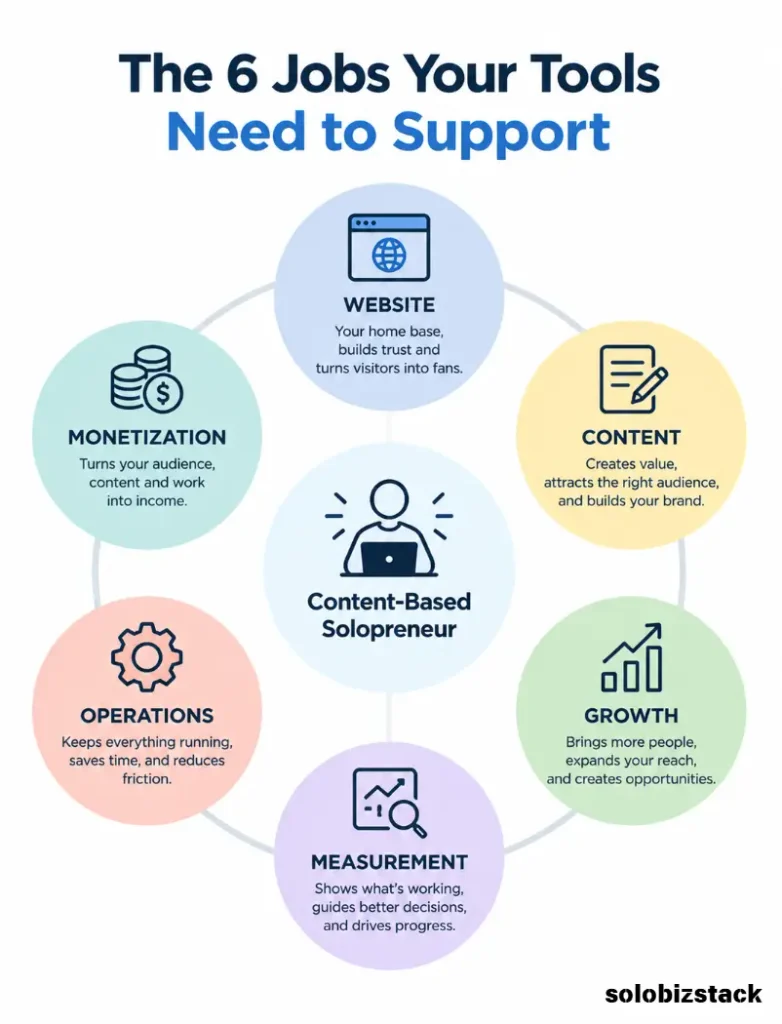
You do not need a separate app for every tiny task.
1. A Website and Content Management System
You website is the foundation of the entire system.
For a content-driven solopreneur business, WordPress is a practical choice because it gives you control over your site, content, structure, plugins, and monetization options.
The important thing is not which platform has the longest feature list.
The important thing is that you can publish content, organize it properly, add useful links, collect leads, and build pages that support your business model.
For SoloBizStack, website already sits at the center of everything else.
Build content can bring people in through website and hosting topics.
Create content can help them produce content and visuals.
Grow content can help them attract traffic.
Sell content can explain monetization, affiliate marketing, and outsourcing.
[Build Your WordPress Website →]
2. An SEO Tool
Once you have a website, you need a way to manage basic on-page SEO.
You do not need to become obsessed with SEO scores.
You need to make sure your pages have clear titles, useful meta descriptions, readable URLs, appropriate headings, internal links, and structured information where it makes sense.
For WordPress users, Rank Math can cover many of these tasks from inside the WordPress dashboard, including SEO settings, schema, sitemaps, analytics-related features, and tools for handling redirects and 404 errors.
For a beginner site, one good SEO plugin is usually enough.
You do not need Rank Math, Yoast, several keyword plugins, and three browser extensions all doing roughly the same job.
Pick one system and learn how to use it well.
3. Search Performance and Analytics
SEO tells you what you are trying to optimize.
Analytics tells you what is actually happening.
Google Search Console is especially useful for a content site because it shows how your pages appear in Google Search, including clicks, impressions, queries, and average position. You can also use it to find pages with high impressions but low click-through rates.
That makes it useful for more than simply checking rankings.
For example, imagine one of your articles receives 8,000 impressions but only 80 clicks.
That does not automatically mean the article is bad.
It may mean the search intent is slightly off, the title is weak, or your result is not attractive compared with the pages around it.
That is useful information.
You can then improve the page instead of guessing.
Google Analytics can play a different role by helping you understand what people do after they reach your website.
The important point is to measure a few useful things instead of staring at dashboards all day.
[See the Best SEO Tools for Small Websites →]
4. A Simple Content Creation Stack
If your business depends on content, you need tools for actually making that content.
But again, keep this simple.
You might need:
A writing environment
For drafting articles, outlines, emails, and notes.
A design tool
For featured images, Pinterest graphics, social visuals, and simple diagrams.
An AI assistant
For brainstorming, summarizing, outlining, research support, or repetitive tasks where appropriate.
A screenshot or image tool
For creating tutorials and explaining products or processes.
You do not need five different writing apps.
You do not need seven graphic design platforms.
And you certainly do not need an AI subscription for every new AI product that appears on social media.
Start with one tool in each category.
Then add another only when the first tool genuinely stops meeting your needs.
5. A Task and Project Management System
Working alone can create a strange problem.
Nobody is waiting for you to tell them what to do.
You are waiting for yourself.
That means tasks can easily disappear inside notebooks, browser tabs, email threads, and random ideas.
A simple task-management system helps turn your business from a collection of thoughts into a repeatable process.
You could use something as simple as a spreadsheet.
Or you could use a project management tool such as Notion, Trello, Asana, ClickUp, or another platform that fits your workflow.
The tool itself matters less than the system.
For example, your content workflow could be:
Idea → Research → Outline → Draft → Edit → SEO → Image → Publish → Promote → Update
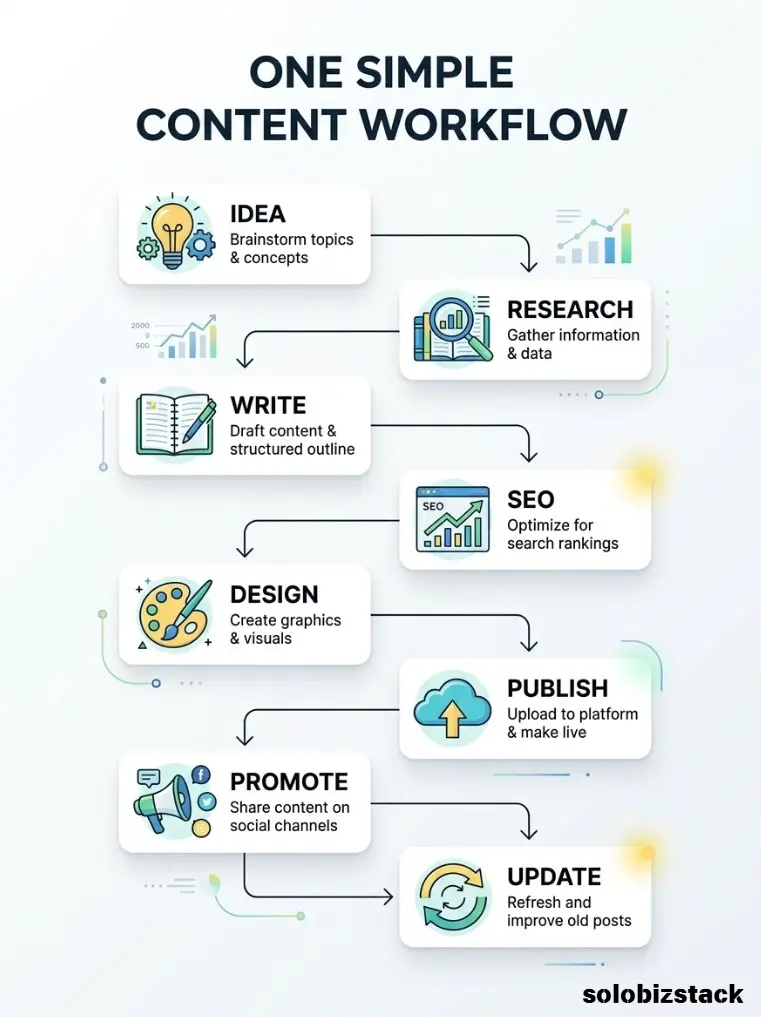
Once you have that workflow, your tool becomes a place to manage it.
Without the workflow, another productivity app usually just becomes another place to store unfinished tasks.
6. An Email Marketing Tool
An email list gives you a direct way to stay in touch with people who are interested in your topic.
For a solopreneur, that can be valuable because you are not completely dependent on search traffic or social platforms.
You can use email to:
- deliver a free resource
- send useful tips
- announce a new article
- promote a relevant product
- recommend a tool
- launch a digital product
You do not need to build a complicated newsletter operation on day one.
Start with one useful lead magnet and a simple welcome sequence.
For example:
Blog article → Free checklist → Email signup → Helpful emails → Relevant recommendation
That is enough to build the foundation.
7. A Link Management Tool for Affiliate Marketing
Once your site contains affiliate links, managing those links manually can become annoying.
A tool such as Pretty Links can help WordPress users organize links and track clicks. Its current documentation also supports per-link click tracking and nofollow settings, which can be useful when managing affiliate links.
The real benefit is organization.
Instead of having affiliate URLs scattered across dozens of articles, you can maintain a central list.
That makes it easier to update a destination if an affiliate URL changes.
It also makes it easier to see which links are receiving attention.
8. A Simple Communication System
You may start as a solo business, but you will probably communicate with other people.
That could include:
- freelance designers
- developers
- affiliate managers
- customers
- email subscribers
- potential partners
- contractors
You do not need five communication platforms.
A professional email address, your normal inbox, and one communication tool for collaborators may be enough in the beginning.
The same principle applies to customer support.
Do not build a complicated support system before you have enough customers to need one.
Build for today’s business first.
9. An Automation Tool — But Only When You Need It
Automation can save time, but it can also create a lot of unnecessary complexity.
Tools such as Zapier or Make can connect different services so that repetitive actions happen automatically.
For example:
New form submission → Add contact to email list → Create task → Send notification
That can be useful.
But automating a process that happens twice a month is not always worth the effort.
A better rule is:
First make the process work manually. Then automate the repetitive part.
This keeps you from spending four hours automating a five-minute task.
The Solopreneur Tools You Probably Do Not Need Yet
This is where things get interesting.
A lot of online business advice focuses on what you should buy.
For a beginner, it is often more useful to know what you can skip.
You probably do not need:
A complicated CRM before you have enough leads to manage.
An expensive project-management suite for a one-person business.
Multiple SEO subscriptions performing similar functions.
Five AI writing tools.
Several email platforms.
A full social media management suite if you only use one platform regularly.
A custom automation system before you understand your workflow.
A premium analytics platform before you have enough data to justify it.
The best tool is not the one with the most features.
It is the one you will actually use.
Free Tools vs Paid Tools
Another common beginner question is whether you should pay for tools at all.
The answer depends on whether the tool is solving a real problem.
Free tools are often enough when:
- you are testing an idea
- your workflow is still changing
- your traffic is low
- you are learning
- you do not yet know whether you need the feature
Paid tools make more sense when:
- they save meaningful time
- they remove a real limitation
- they improve your workflow
- they help you serve customers
- they provide useful data
- they replace several manual steps
Think of software as an expense that should have a job.
You should be able to explain why you are paying for it.
A Practical Solopreneur Tech Stack
For a beginner building a content-driven online business, I would keep the first stack surprisingly small.
Website
WordPress + Kadence
Use this as the foundation for publishing and organizing your site.
SEO
Rank Math
Use one primary SEO system instead of stacking several plugins.
Search Data
Google Search Console
Use it to understand queries, impressions, clicks, and which pages need improvement.
Analytics
Google Analytics
Use it to understand traffic and what happens after people arrive.
Design
Canva
Use one practical design tool for blog images, Pinterest graphics, simple diagrams, and other visual assets.
Affiliate Links
Pretty Links
Use a central system for organizing and tracking affiliate URLs when appropriate.
One email marketing platform
Pick one and build a simple list before worrying about advanced automation.
Automation
Zapier or Make
Add this after repetitive tasks start taking enough time to justify automation.
That is already a complete working system.
The Three-Level Tool Stack
I like to think of a solopreneur’s technology stack in three levels.
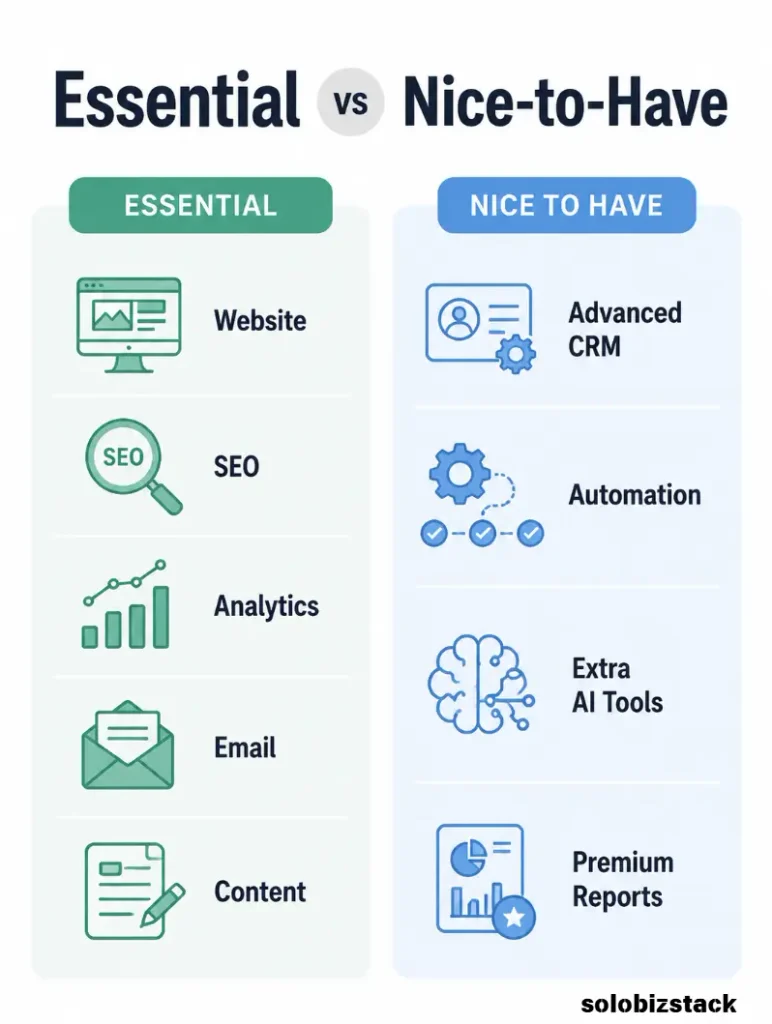
Level 1: Essential
These are tools you use to operate the business.
Your website.
Your email.
Your SEO setup.
Your analytics.
Your core content tools.
Without these, important parts of the business may simply not work.
Level 2: Useful
These improve your workflow.
A task-management system.
An affiliate link manager.
A design tool.
An AI assistant.
A scheduling tool.
These can save time, but your business can still operate without all of them.
Level 3: Scale
These become more useful once the business becomes more complicated.
Advanced automation.
CRM software.
Advanced reporting.
Team collaboration tools.
Customer support systems.
More sophisticated marketing platforms.
The mistake is buying Level 3 tools when you are still trying to solve Level 1 problems.
How to Choose a New Tool
Before paying for a new tool, ask five questions.
What exact problem does this solve?
Can you explain it in one sentence?
How often will I use it?
Once a year is probably not a good reason for another subscription.
Do I already own something that does this?
You may be paying for overlapping software.
Will it save enough time or money to justify the cost?
Not everything has to produce direct revenue, but it should create meaningful value.
What happens if I do nothing?
Sometimes the answer is: nothing.
And that is a perfectly good reason not to buy the tool.
A Better Way to Build Your Tool Stack
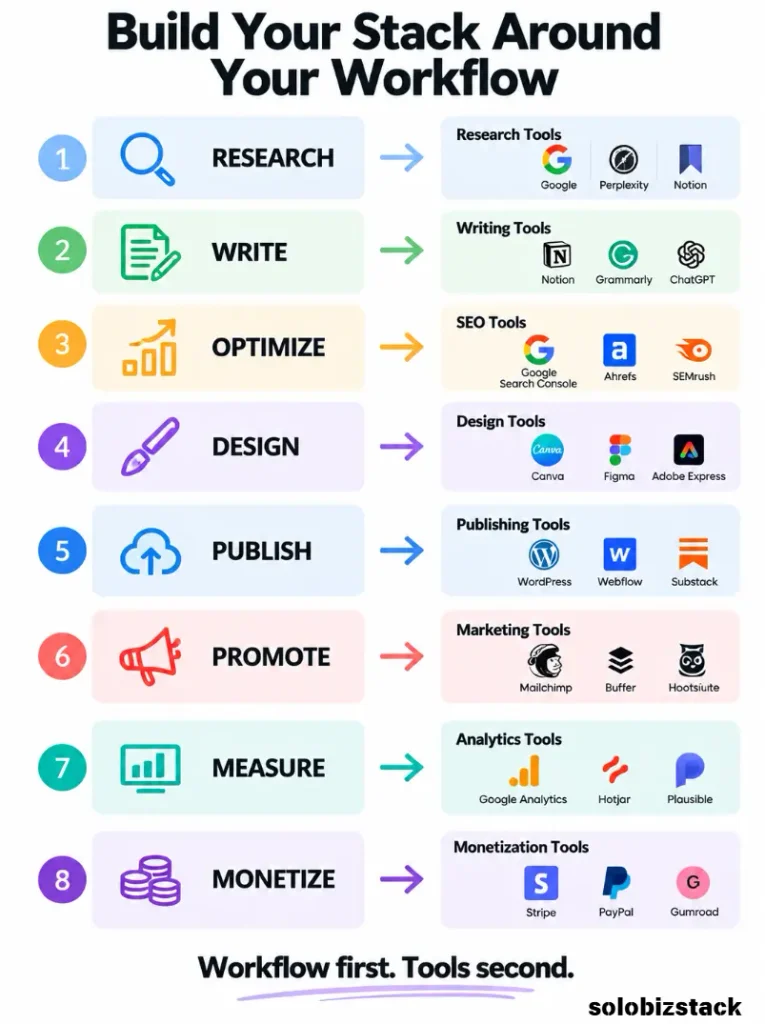
Do not build your stack from a list of “must-have tools.”
Build it from your workflow.
For example, imagine your core business is a content website.
Your workflow might look like this:
Research → Write → Optimize → Design → Publish → Promote → Measure → Monetize
Now assign one tool to each important step.
Research:
Your browser, Search Console, keyword research tools, and notes.
Write:
Your preferred writing environment and AI assistant where useful.
Optimize:
Rank Math.
Design:
Canva.
Publish:
WordPress.
Promote:
Pinterest and email.
Measure:
Search Console and Analytics.
Monetize:
Affiliate programs, digital products, and services.
That is a tech stack built around a business.
Not a business built around software.
When Should a Solopreneur Upgrade a Tool?
Upgrade when your current setup creates a real limitation.
For example, your free design tool may be enough until you need additional templates, brand controls, collaboration, or other features that save time.
Your email platform may be fine until you need more automation.
Your project-management spreadsheet may work until you have multiple recurring workflows.
Your manual affiliate links may be manageable until updating them across many articles becomes painful.
The important thing is to upgrade because your business has changed, not because a software company launched a new feature.
Watch Your Software Costs
Software subscriptions can quietly become one of the largest expenses in a small online business.
A $10 subscription does not feel expensive.
Ten $10 subscriptions cost $100 every month.
That becomes $1,200 a year.
For a small business, that matters.
Once a month, review your software list.
Ask:
Do I still use this?
Does it save me time?
Does it improve the customer experience?
Does it help me generate or protect revenue?
Could another tool replace it?
Canceling one unused subscription is a tiny business decision.
Doing it consistently is a good financial habit.
Do Solopreneurs Need AI Tools?
AI can be useful, but it should be treated as part of the workflow rather than the workflow itself.
A solopreneur might use AI for:
Brainstorming.
Outlining.
Research assistance.
Summarizing notes.
Generating ideas.
Repurposing content.
Cleaning up repetitive text.
Creating first drafts.
But the final result still needs human judgment.
That is particularly important for a content website.
Google’s current guidance says people-first content should provide original value and warns against producing large amounts of content mainly to manipulate search rankings. It also emphasizes originality, expertise, and whether the reader leaves satisfied.
In other words, AI can help you work faster.
It should not become an excuse to publish more low-value content.
Your Tools Should Support Your Business Model
This is one of the most important points in the entire article.
Your tool stack should follow your business model.
If you are a freelancer, you may need:
A portfolio.
Scheduling.
Invoices.
Client communication.
Project management.
If you run a content site, you may need:
WordPress.
SEO.
Analytics.
Design.
Email.
Affiliate link management.
If you sell digital products, you may add:
Checkout.
Email automation.
Customer delivery.
Support.
Analytics.
There is no universal “solopreneur stack.”
There is only the stack that fits the work you actually do.
[Explore Beginner-Friendly Hosting →]
The SoloBizStack Approach
For SoloBizStack, the stack can remain simple because content categories already create a natural workflow.
Build
WordPress, hosting, theme, forms, core plugins.
Create
Writing tools, AI assistants, image tools, Canva, Pinterest design tools.
Grow
Rank Math, Search Console, Analytics, Pinterest, keyword research tools.
Sell
Affiliate programs, Pretty Links, email marketing, Fiverr, digital products.
That gives a useful technology ecosystem without needing a separate app for every task.
And it creates a natural path for your readers too.
Someone can learn how to build a website, discover the tools needed to create content, learn how to attract visitors, and then explore ways to monetize the business.
[Explore the SoloBizStack Tools Hub →]
What I Would Start With
If I were starting a small content-based solopreneur business today, I would resist the temptation to build a huge stack.
I would start with:
WordPress
for the website.
Kadence
for the site design.
Rank Math
for SEO.
Google Search Console
for search performance.
Google Analytics
for traffic analysis.
Canva
for visual content.
One email platform
for building an audience.
Pretty Links
for affiliate link management when needed.
Then I would add tools only when the business creates a specific need for them.
That approach keeps the monthly software bill under control and, more importantly, keeps your attention on the actual business.
Frequently Asked Questions
What tools does a solopreneur actually need?
Most solopreneurs need only a small core stack: a website platform, email, analytics, relevant SEO tools, content creation tools, and whatever software directly supports their business model.
What is the best tool stack for a beginner solopreneur?
There is no single perfect stack. A simple website business might start with WordPress, one SEO plugin, Google Search Console, Google Analytics, Canva, one email platform, and a basic task-management system.
How many tools should a solopreneur use?
There is no ideal number. Focus on jobs rather than software count. One tool can sometimes handle several jobs, and that is usually better than subscribing to separate apps for everything.
Should a solopreneur pay for expensive software?
Only when the software solves a real problem and provides enough value to justify the cost. Free tools can be perfectly adequate while a business is still testing its model.
Do I need AI tools as a solopreneur?
No. AI is optional. It can save time with brainstorming, drafting, research support, and repetitive work, but it should support your process rather than replace judgment and original thinking.
Do I need an affiliate link management tool?
Not necessarily at the beginning. Once you have enough affiliate links across multiple articles, centralized link management can make organization and maintenance easier.
What is the biggest mistake solopreneurs make with software?
Buying tools before identifying the problem they are supposed to solve. More software can create more subscriptions, more setup work, and more places to manage information.
Final Thoughts
The best solopreneur tech stack is usually not the most impressive one.
It is the one that lets you do the important work without getting buried in software.
Build the website.
Create useful content.
Understand where visitors come from.
Build relationships with your audience.
Sell something useful.
Then improve the systems that are actually being used.
For SoloBizStack, that means thinking in terms of:
Build → Create → Grow → Sell
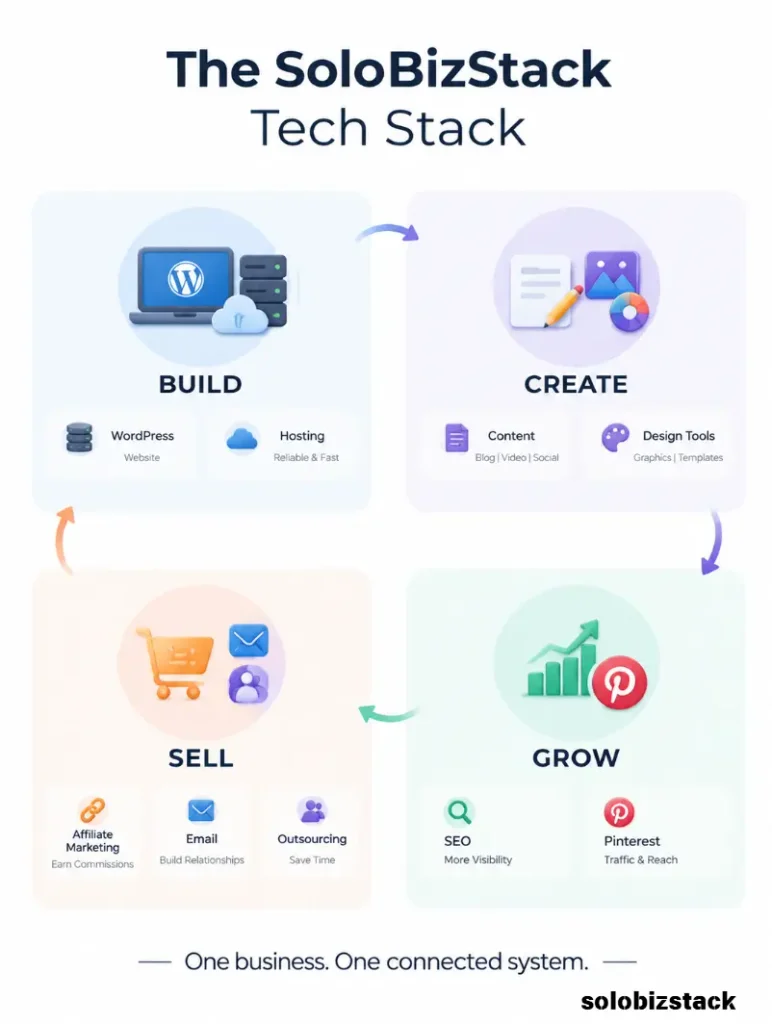
Every tool should have a clear role somewhere along that path.
When a new tool comes along, you do not need to ask, “Is this one of the best tools for solopreneurs?”
Ask a better question:
“Does this solve a real problem in my business better than what I already use?”
That question will probably save you more money than another productivity app ever will.