
Hostinger Review: Is It Good for Beginners?
Updated September 2026
If you’re building your first website, choosing a hosting provider can feel more complicated than it needs to be.
You may have come across Hostinger while comparing hosting plans and wondered:
Is Hostinger actually good for beginners?
The short answer is: Hostinger offers a fairly beginner-friendly way to start a WordPress website, particularly if you want a simple control panel, a relatively low introductory price, and several website management tools in one place.
But there are a few things you should understand before buying.
The biggest one is pricing.
Hostinger’s advertised introductory price is not the same as its renewal price, and some plans require a longer upfront commitment to get the lowest monthly equivalent price. Its entry-level plans also have different website, storage, and backup limits.
So rather than simply saying “Hostinger is good,” let’s look at how it actually works.
Hostinger at a Glance
| Feature | Hostinger |
|---|---|
| Best suited to | Beginners, bloggers, creators, small websites |
| WordPress | Yes |
| Free SSL | Yes |
| Free domain | Included for 1 year on eligible plans |
| Backups | Yes, frequency depends on plan |
| CDN | Included on current eligible plans |
| WordPress tools | Yes |
| AI tools | Available on current plans |
| Support | 24/7 |
| Entry-level Premium plan | $2.99/mo equivalent on a 48-month term* |
| Premium renewal | $10.99/mo* |
| Money-back guarantee | 30 days |
| Control panel | Hostinger hPanel |
Pricing shown is based on Hostinger’s current United States pricing page and can vary by region, currency, promotion, and billing term. Check the current checkout page before purchasing.
Is Hostinger Good for Beginners?
For many beginners, yes, Hostinger can be a practical option.
The main reason isn’t that it has every possible hosting feature.
It’s that Hostinger tries to put many of the things a beginner needs into one dashboard.
From the Hostinger control panel, you can manage websites, WordPress installations, domains, backups, SSL, email, and other hosting settings.
Hostinger’s WordPress environment also includes tools for installation and management, while its current managed WordPress offering includes automatic updates, backups, staging on eligible plans, and developer tools for users who need them.
That’s useful when you’re new because you don’t necessarily want to learn server administration before publishing your first blog post.
But Hostinger isn’t automatically the right choice for every website.
If you’re running a large, resource-heavy website or need highly specialized infrastructure, you may eventually need a different type of hosting.
For a typical new WordPress website, though, it’s worth considering.
What Is Hostinger?
Hostinger is a web hosting company that provides several types of hosting, including:
- WordPress hosting
- Web hosting
- Cloud hosting
- VPS hosting
- Website builder tools
- Domain registration
- Business email
- AI-powered website tools
For beginners, the most relevant products are usually its Web Hosting and Managed WordPress Hosting plans.
You don’t need to understand all of Hostinger’s products before starting.
If you’re building a normal WordPress blog, affiliate site, personal website, or small business website, you can start by looking at the entry-level plans.
Hostinger Pricing: What Will You Actually Pay?
This is probably the first thing you should understand before buying.
Hostinger advertises promotional monthly prices, but those prices are usually tied to a specific billing period.
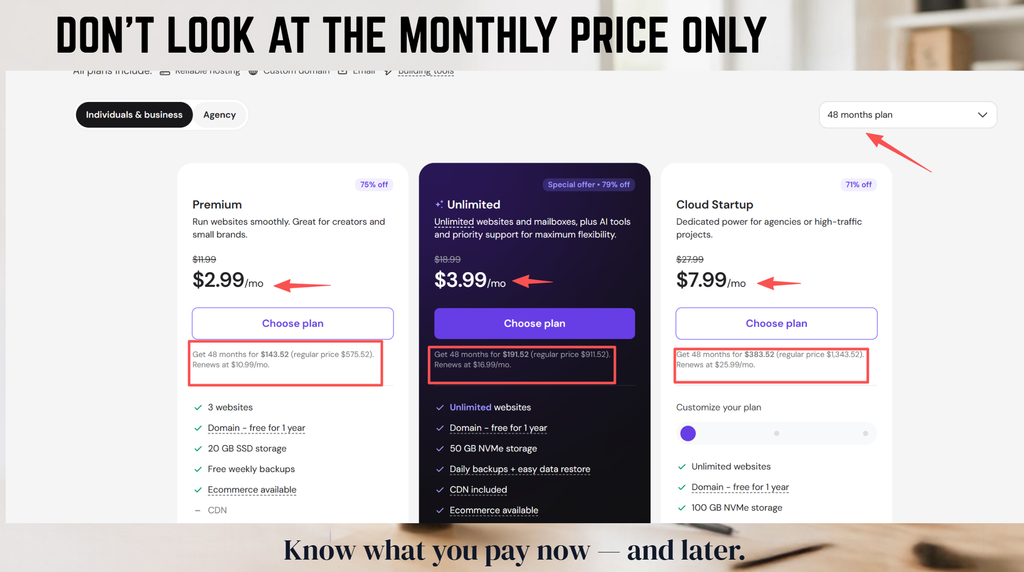
For example, at the time of writing, Hostinger’s United States site lists its Premium plan at:
$2.99/month
But that price is based on paying for 48 months upfront:
$143.52 total
The listed renewal price is:
$10.99/month
The plan currently includes three websites, 20GB SSD storage, a free domain for one year, weekly backups, CDN, AI tools, and 24/7 priority support.
That’s a perfectly reasonable offer to consider.
But don’t make the mistake of looking only at:
$2.99/month
The more useful question is:
How much am I paying today, and what will I pay when the plan renews?
That’s the number that matters when you’re planning a website for several years.
Hostinger Pricing Example
Here’s the current Premium example from Hostinger’s UK site:
| Premium | |
|---|---|
| Promotional equivalent | $2.99/month |
| Initial term | 48 months |
| Initial payment | $143.52 |
| Renewal price | $10.99/month |
| Websites | 3 |
| Storage | 20GB SSD |
| Free domain | 1 year |
| Backups | Weekly |
| CDN | Included |
These details can change, so check the current Hostinger pricing page before purchasing.
One thing I would not do
I wouldn’t choose Hostinger purely because it has a cheap promotional price.
The better reason is:
The plan gives you the features you need at a price you’re comfortable paying both now and at renewal.
What Does Hostinger Premium Include?
The current Premium plan is aimed at creators and small brands.
According to Hostinger’s current plan information, it includes:
- Up to 3 websites
- 20GB SSD storage
- Free domain for one year
- Free weekly backups
- CDN
- SSL
- AI tools
- WordPress
- Ecommerce capability
- 24/7 priority support
It also includes email-related features for a limited period under the current offer.
For a beginner, that’s enough infrastructure for many types of websites.
You could use it for:
- A blog
- A personal website
- A small business site
- An affiliate website
- A portfolio
- A content website
- A small online store
You don’t need a VPS just because you’re building a business website.
Start with the resources you actually need.
Hostinger for WordPress
This is where Hostinger becomes particularly relevant to SoloBizStack readers.
WordPress is one of the main platforms beginners use to build content websites, blogs, affiliate sites, and small business websites.
Hostinger offers managed WordPress hosting with tools designed to make WordPress management easier.
Its current WordPress hosting page highlights:
- Automatic WordPress updates
- Automatic backups
- One-click staging on eligible plans
- WP-CLI
- SSH
- Git integration
- PHP version control
- CDN
- Caching and optimization tools
Not every feature necessarily applies to every plan, so check the plan details before purchasing.
For someone who simply wants to publish articles, most of the advanced developer features won’t matter immediately.
And that’s fine.
You don’t need to use every feature you’re paying for.
Is Hostinger Easy to Use?
This is one of Hostinger’s more noticeable strengths.
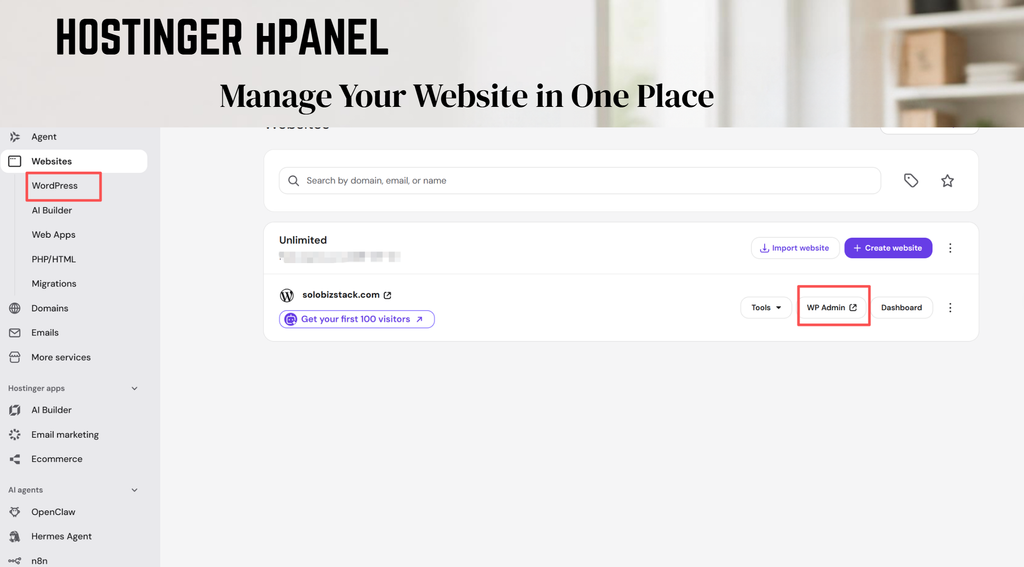
Instead of using a traditional hosting interface that can feel overwhelming when you’re new, Hostinger uses its own control panel called hPanel.
The dashboard brings common website management tasks into one interface.
For example, Hostinger’s WordPress Overview lets users access WordPress-related information and tools directly from the hosting dashboard, including WordPress access, database information, PHP and WordPress version information, and backup controls depending on the setup.
For a beginner, this can save some frustration.
You don’t necessarily need to know where every WordPress file lives.
You can do many common tasks through the hosting dashboard.
Setting Up WordPress With Hostinger
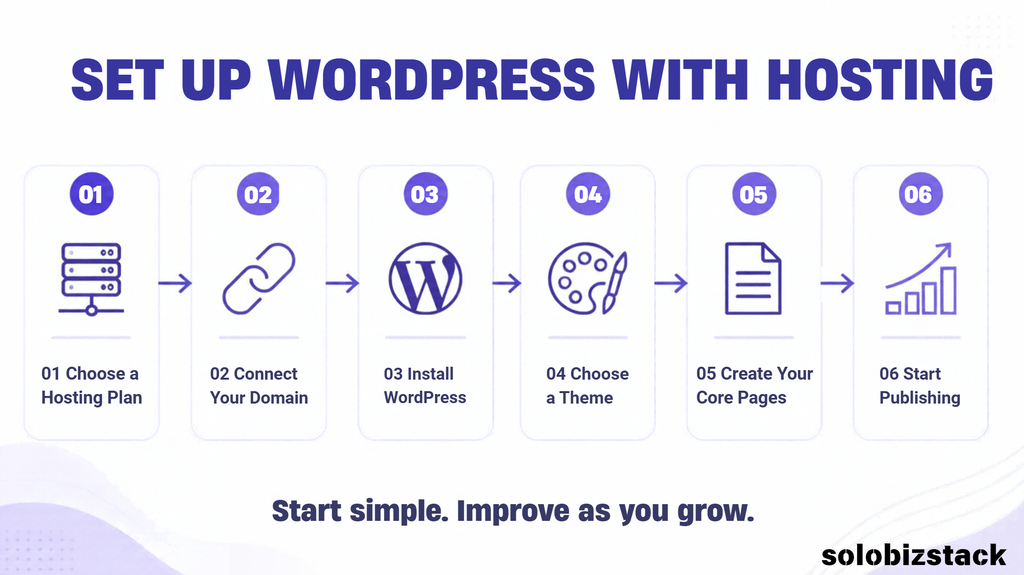
The basic process looks something like this:
Step 1: Choose your hosting plan
Choose a plan based on the number of websites, storage, and features you actually need.
Step 2: Choose or connect your domain
You can register a new domain or connect one you’ve already purchased.
Step 3: Install WordPress
Hostinger provides WordPress installation tools through its dashboard.
Step 4: Log into WordPress
Once WordPress is installed, you can access your WordPress dashboard.
Step 5: Choose your theme
For example, you could install Kadence and build your website with Gutenberg/Kadence Blocks.
Step 6: Create your core pages
Start with:
- Home
- About
- Contact
- Blog
- Privacy Policy
- Terms
- Affiliate Disclosure, if applicable
Step 7: Start publishing
Don’t wait until everything is perfect.
Get the basic structure working, then improve it as you learn.
If you’re starting from zero, follow our complete guide:
How to Build a WordPress Website for Beginners →
Hostinger Backups: What You Need to Know
Backups are one of those features that seem boring until something goes wrong.
Hostinger currently provides backup protection across its hosting plans, but the frequency depends on the plan. Its current documentation states that Premium includes weekly automatic backups, while Business and Cloud plans include daily backups.
Hostinger also provides tools for restoring websites from backups.
Its documentation explains that a WordPress restoration can restore both the website files and database to a selected backup point.
That’s useful if:
- A plugin breaks your site
- An update causes problems
- You accidentally change something important
- Your website gets corrupted
- You need to roll back to an earlier version
One practical recommendation
Don’t treat your host’s backup system as your only backup.
For an important website, having another backup method gives you an additional layer of protection.
Does Hostinger Include SSL?
Yes.
Current Hostinger hosting plans include SSL certificates, which allow your site to use HTTPS.
So your website can use:
rather than:
http://yourwebsite.com
For a new website, HTTPS should be considered standard rather than an optional extra.
Does Hostinger Include a Free Domain?
On eligible plans, Hostinger currently includes a domain for the first year.
For example, the current Premium plan lists a free domain for one year.
But remember:
Free for one year doesn’t mean free forever.
You’ll still need to consider the domain’s renewal cost.
This is another reason to look at the total cost rather than just the introductory offer.
Hostinger Customer Support
Hostinger currently advertises 24/7 customer support with its hosting plans.
For beginners, support can be particularly useful when you’re dealing with things such as:
- Domain connection
- DNS settings
- SSL
- WordPress installation
- Website migration
- Email configuration
- Server errors
One thing worth knowing is that support availability and channels can vary by product and region.
So if having telephone support is important to you, check what is available before purchasing.
For many beginners, online support and documentation may be enough.
Hostinger Website Performance
This is an area where it’s easy for hosting reviews to become misleading.
You’ll often see statements such as:
“Host X is the fastest.”
Real-world WordPress performance isn’t that simple.
Your website speed can be affected by:
- Hosting
- Theme
- Plugins
- Image sizes
- Caching
- CDN
- Database
- Third-party scripts
- Traffic levels
- Website configuration
Hostinger currently promotes LiteSpeed servers, caching, CDN, and optimization features as part of its hosting environment.
Those are useful tools.
But that doesn’t mean every WordPress website hosted on Hostinger will automatically be fast.
A well-optimized website on a modest hosting plan can perform better than a poorly optimized website on a more expensive server.
So I’d look at hosting as one part of your performance setup, not the entire solution.
Hostinger AI Tools
Hostinger has expanded beyond traditional hosting.
Its current plans also include various AI-powered tools, depending on the plan and product.
These can help with things such as:
- Website creation
- Content
- Images
- Website management
- Email marketing
- Troubleshooting
Hostinger currently promotes AI tools within its WordPress hosting and website builder ecosystem.
For beginners, this can be useful if you want assistance getting a website started.
But you don’t need to use the AI features just because they’re included.
If you’re already comfortable with WordPress, Kadence, Gutenberg, and your own content workflow, you may barely use them.
That’s perfectly fine.
Hostinger Pros and Cons
Instead of calling Hostinger “perfect,” here’s a more realistic look.
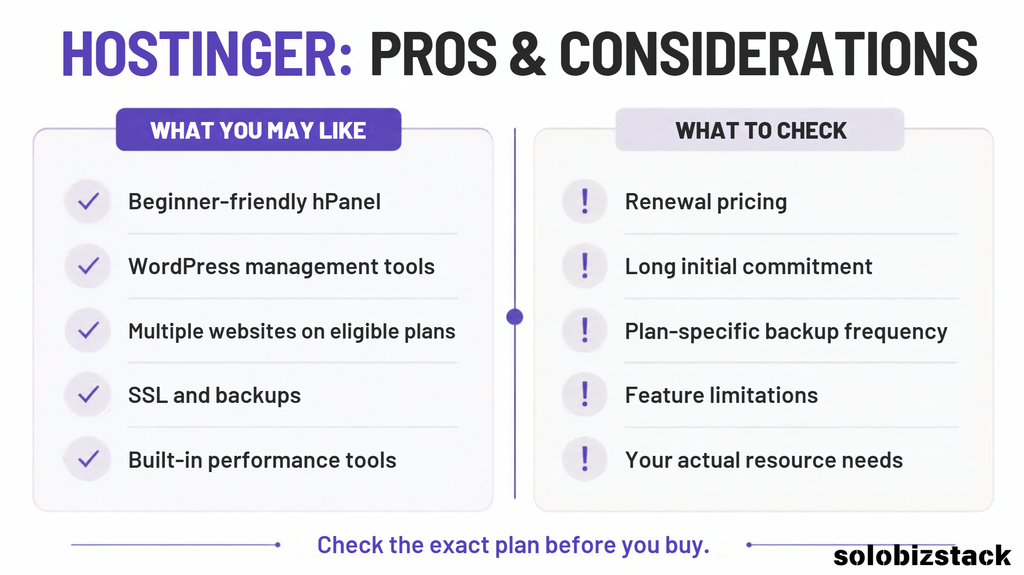
What I Like About Hostinger
Beginner-friendly dashboard
hPanel puts many common hosting tasks in one place.
Low introductory price
The current introductory pricing can make it relatively inexpensive to get started, although you need to consider the upfront term and renewal price.
Multiple websites on some plans
The current Premium plan allows up to three websites.
That can be useful if you plan to build more than one project.
WordPress tools
Hostinger provides WordPress-specific installation and management tools.
Backups
Automatic backups are included, with frequency depending on the plan.
CDN and performance tools
Current plans include CDN access and Hostinger also provides caching/optimization features.
Things to Consider Before Buying Hostinger
Renewal pricing
The renewal price is significantly higher than the current introductory equivalent price.
This is normal in the hosting industry, but you should know about it before purchasing.
Long initial commitment
The lowest advertised monthly equivalent price requires a 48-month term on the current Premium offer.
If you’re not comfortable paying several years upfront, compare shorter-term options.
Backup frequency depends on the plan
Premium currently lists weekly backups, while higher plans include daily backups.
Not every advanced feature is included everywhere
Some tools and resources vary by plan.
Always compare the exact plan rather than the company’s overall feature list.
Hostinger Premium vs Higher Plans
If you’re a beginner, you may wonder whether you should immediately choose a higher plan.
Probably not unless you have a reason.
A simplified way to think about it:
| Need | Plan level to investigate |
|---|---|
| One simple website | Entry-level |
| Blog / affiliate site | Premium or equivalent |
| Multiple websites | Premium or higher |
| More frequent backups | Business or higher |
| Growing traffic | Higher resources / Cloud |
| Advanced development | Higher plan / VPS |
The exact plan names and included features can change, so use this as a starting framework rather than a permanent pricing table.
Hostinger vs SiteGround
If you’re deciding between Hostinger and SiteGround, don’t make the decision based on brand reputation alone.
Look at:
- Introductory price
- Renewal price
- Initial commitment
- Storage
- Number of websites
- Backup frequency
- Support
- WordPress tools
- Migration
- Upgrade options
We’ve already published a dedicated comparison:
Hostinger vs SiteGround: Which Web Host Is Better for Beginners? →
And if you’re researching hosting more broadly:
Best Website Hosting for Beginners →
Who Is Hostinger a Good Fit For?
Hostinger is worth considering if you’re:
Building your first website
The dashboard and WordPress tools can reduce the amount of technical setup you need to handle.
Starting a blog
You can start with a relatively simple hosting plan and upgrade later.
Building an affiliate website
A standard WordPress hosting setup is generally enough for a new content-based affiliate site.
Running a small business website
The current plans provide the basic hosting infrastructure needed for many small websites.
Planning several small websites
Some plans allow multiple websites, which can be useful for people building more than one project.
Who Might Want Something Different?
Hostinger isn’t necessarily the right fit if you need:
Highly specialized infrastructure
A large application or resource-heavy website may require cloud infrastructure, VPS, or dedicated resources.
Extensive server-level control
Developers with specialized requirements may want a hosting environment with more granular control.
A very specific support setup
If you strongly prefer a particular type of customer support, check the exact support channels available in your region and plan.
The point isn’t that Hostinger is “bad” for these users.
It’s simply that different websites have different requirements.
Is Hostinger Worth It for an Affiliate Website?
For a new affiliate website, the question I’d ask isn’t:
“Is Hostinger the best hosting?”
I’d ask:
“Does Hostinger give me enough infrastructure to publish useful content without making my setup unnecessarily complicated?”
For a new WordPress affiliate site, the answer can reasonably be yes.
You need:
- WordPress
- Reliable hosting
- SSL
- Backups
- A good theme
- SEO tools
- Analytics
- Content
- Internal links
You don’t need an expensive technical stack before you’ve even published your first 20 articles.
In fact, your content and site structure will probably have a much bigger impact on your early progress than moving between similar entry-level hosting plans.
Hostinger for a SoloBizStack-Style Website
For a site like SoloBizStack, the hosting requirements are fairly straightforward.
You need to support:
- WordPress
- Kadence
- Gutenberg
- Blog posts
- Images
- SEO plugins
- Affiliate links
- Pinterest traffic
- Email forms
- Analytics
- Multiple content categories
You don’t need an enterprise server when you’re starting.
A normal WordPress hosting plan is enough to build the initial site and publish content.
As traffic grows, you can revisit your hosting setup.
That’s a much better approach than buying expensive infrastructure “just in case.”
How to Buy Hostinger Without Overpaying
Before you click the purchase button, go through this checklist.
1. Check the billing period
Is it 12, 24, or 48 months?
2. Check the total payment
Don’t only look at the monthly equivalent.
3. Check the renewal price
Write it down.
You’ll thank yourself later.
4. Check how many websites are included
Especially if you plan to build multiple sites.
5. Check the backup frequency
Weekly and daily backups are not the same thing.
6. Check the storage
20GB may be plenty for one content site.
7. Check the domain terms
Make sure you understand what happens after the first year.
8. Check the refund policy
Hostinger currently advertises a 30-day money-back guarantee on its hosting plans. Check the applicable terms for the exact product before purchasing.
Check Hostinger’s Current Plans
If you’ve gone through the details and Hostinger looks like it fits your needs:
Check Hostinger WordPress Plans →
Or:
View Hostinger Hosting Plans & Pricing →
Pricing, promotions, plan names, and included features can change. Check the current Hostinger page before purchasing.
Frequently Asked Questions
Is Hostinger good for beginners?
Hostinger offers several features aimed at simplifying website setup and management, including a custom control panel, WordPress tools, SSL, backups, and 24/7 support.
Whether it’s a good fit depends on your website, budget, and the specific plan you choose.
Is Hostinger good for WordPress?
Yes, Hostinger provides managed WordPress hosting with WordPress-specific setup and management tools. Its current offering also includes automatic updates, backups, staging on eligible plans, and developer tools.
How much does Hostinger cost?
Pricing depends on your region, plan, billing period, and current promotion. At the time of writing, Hostinger’s UK site lists Premium at £2.99/month equivalent for a 48-month term, totaling £143.52, with renewal at £10.99/month.
Does Hostinger have a free domain?
Eligible plans currently include a domain free for the first year.
Does Hostinger provide backups?
Yes. Backup frequency depends on the hosting plan. Current documentation lists weekly backups on Premium and daily backups on Business and Cloud plans.
Does Hostinger provide SSL?
Yes. SSL is included with current hosting plans.
Can I host multiple websites with Hostinger?
Some plans allow multiple websites. The current Premium plan allows up to three websites.
Can I move my WordPress website to Hostinger?
Yes. Hostinger provides website migration tools and services for supported websites.
Does Hostinger have a money-back guarantee?
Hostinger currently advertises a 30-day money-back guarantee for its hosting products, subject to the applicable terms.
Final Thoughts
So, is Hostinger good for beginners?
For someone building a new WordPress website, Hostinger offers a combination of:
- Beginner-oriented website management
- WordPress tools
- SSL
- Backups
- CDN
- Multiple website options on eligible plans
- AI tools
- 24/7 support
- Relatively low introductory pricing
Those features make it a hosting provider worth considering for a new website.
But there are two things I would pay particular attention to:
The initial commitment
and
The renewal price.
The current Premium offer looks inexpensive when viewed as a monthly equivalent, but that price assumes a 48-month term, and the listed renewal price is considerably higher.
That’s not necessarily a reason to avoid it.
It’s simply something you should understand before buying.
For a beginner building a blog, affiliate site, small business website, or personal brand, the most important thing is getting a reliable foundation without making your setup unnecessarily complicated.
And that’s really what good hosting should do.
It should get out of your way and let you build your website.
Ready to Start Your Website?
If you’re still choosing your hosting, compare Hostinger with another popular option:
Hostinger vs SiteGround: Which Web Host Is Better for Beginners? →
If you want to understand the full cost of getting online:
How Much Does It Cost to Build a Website? →
And if you’re ready to build WordPress from scratch:
How to Build a WordPress Website for Beginners →
Or explore the tools we cover across SoloBizStack:
Explore the SoloBizStack Toolkit →
Disclosure
Some links on this website may be affiliate links. If you purchase a product or service through an affiliate link, we may earn a commission at no additional cost to you.
Affiliate relationships do not determine whether a tool is included, but they may influence which products we review in greater detail.

3 Comments