How Much Does It Cost to Build a Website?
Updated September 2026
If you’re thinking about building a website, one of the first questions you’ll probably ask is:
How much money do I actually need to get started?
The answer can be surprisingly simple.
You can build a basic website for relatively little money if you’re willing to do some of the work yourself. For a typical beginner using WordPress, your main costs are usually a domain name and web hosting. Everything else—premium themes, plugins, email tools, design services, and other extras—depends on what you want your website to do.
For a simple blog, personal brand, portfolio, or small business website, you don’t need to spend thousands of dollars to get started.
In this guide, we’ll break down the actual costs, what you need from day one, what you can skip, and where it makes sense to spend more as your website grows.
How Much Does It Cost to Build a Website?
Quick answer
A basic self-managed website can start with the cost of hosting and a domain name, while more advanced websites can cost hundreds or thousands of dollars depending on design, functionality, content, and professional services.
For a beginner WordPress website, think about your costs in four groups:
| Cost | Do You Need It? | Typical Purpose |
|---|---|---|
| Domain name | Yes | Your website address |
| Web hosting | Yes | Stores and serves your website |
| WordPress | No extra software cost | Website platform |
| Theme | Not necessarily | Website design |
| Plugins | Not necessarily | Extra functionality |
| Optional | Business communication | |
| Professional services | Optional | Design, development, writing, etc. |
| Marketing | Optional | Traffic and customer acquisition |
The important part is that you don’t need to buy everything at once.
A lot of beginners make the mistake of treating every possible website expense as a startup requirement. It isn’t.
What Are the Main Costs of Building a Website?
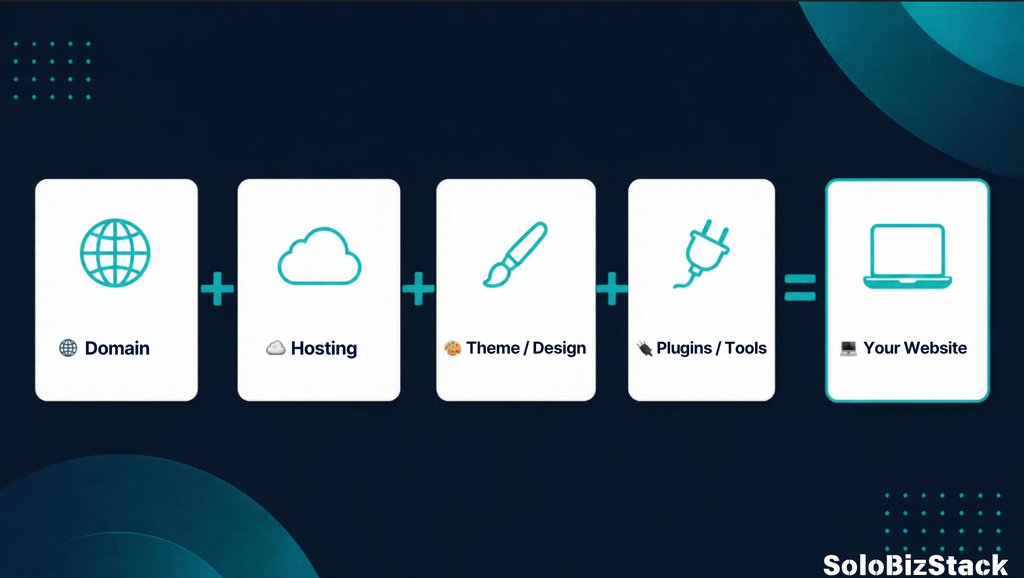
For most beginners, website costs come down to five main areas:
- Domain name
- Web hosting
- Website platform
- Theme and plugins
- Optional professional services
Let’s look at each one.
1. Domain Name
Your domain is the address people type into their browser to find your website.
For example:
yourwebsite.com
For a business website, a .com domain is often a straightforward choice because it’s familiar and easy to remember.
Domain prices vary depending on the extension, registrar, and whether the domain is considered a premium name.
Some hosting companies also include a free domain for the first year with selected hosting plans.
The important thing to remember is that free for the first year does not necessarily mean free forever. Check the renewal price before purchasing.
How much does a domain cost?
For a normal domain, expect to pay an annual registration fee. The exact price depends on the extension and registrar.
You may also find that a desirable domain name is already registered. In that case, buying it from the current owner can cost considerably more.
For a beginner, there’s usually no reason to spend hundreds or thousands of dollars on a domain before the website has proven its potential.
A simple rule
Choose a domain that is:
- Easy to spell
- Easy to remember
- Relevant to your brand
- Short enough to type
- Not overly dependent on trends
And don’t spend weeks trying to find the “perfect” name.
Your website will matter much more than the domain itself.
2. Web Hosting
If your domain is your website’s address, hosting is the place where your website lives.
When someone visits your website, the hosting server delivers your website’s files, images, database, and other content to their browser.
For a beginner, hosting is usually the first major recurring website expense.
The price depends on the type of hosting, the provider, the resources included, and the length of the initial subscription.
For example, current advertised entry-level WordPress plans from major providers can start around a few dollars per month when paid for a longer introductory term. Hostinger currently lists a Premium WordPress plan at $2.99/month on a 48-month term, while SiteGround currently lists its StartUp WordPress plan at $2.99/month with a 12-month prepaid term. Both providers also show higher renewal prices after the introductory period.
That last part is important.
Don’t look only at the promotional price
When comparing hosting companies, look at:
- Initial price
- Renewal price
- Contract length
- Number of websites allowed
- Storage
- Backups
- SSL
- CDN
- Customer support
- Migration options
- Upgrade options
A $2.99/month promotional price can look very different from the regular renewal price.
If you’re just starting out, you usually don’t need an expensive VPS or dedicated server.
A basic WordPress hosting plan is enough for many new blogs, personal websites, and small online businesses.
A good starting point
If you haven’t chosen hosting yet, you can compare two popular options in our beginner-focused comparison:
Hostinger vs SiteGround: Which Web Host Is Better for Beginners? →
Check current hosting plans
Check Hostinger WordPress Plans →
Check SiteGround WordPress Plans →
3. Is WordPress Free?
This is one of the confusing parts for beginners.
The WordPress software itself is open-source software and is available under the GPL license. You don’t have to buy a WordPress software license to use it.
That doesn’t mean a WordPress website is completely free.
You still need somewhere to host it, and you’ll probably eventually spend money on things such as a domain, premium tools, email services, or other resources.
Think about it this way:
WordPress = the software
Hosting = the place where the software and website live
Domain = the address people use to find you
These are separate things.
If you’re new to WordPress, our step-by-step guide can walk you through the entire setup:
How to Build a WordPress Website for Beginners →
4. Do You Need to Pay for a WordPress Theme?
Not necessarily.
A WordPress theme controls much of the visual appearance and layout of your website.
There are thousands of free themes available, so you don’t need to buy a premium theme just to launch your first website.
A good free theme can give you:
- Responsive design
- Basic customization
- Typography controls
- Layout options
- Header and footer customization
- Compatibility with common plugins
For a beginner website, starting with a free theme can actually be a smart approach.
You can learn what your website needs before spending money on additional design features.
What about Kadence?
Kadence is one example of a WordPress theme with a free version.
It’s particularly useful if you want to build a clean website using the WordPress block editor without immediately committing to a premium theme.
You can start with the free version and upgrade later if you actually need additional features.
The same principle applies to many other WordPress tools:
Start with what you need. Upgrade when you have a reason.
You don’t need to buy every premium feature on day one.
5. Do You Need to Pay for WordPress Plugins?
Again, no.
Plugins add functionality to WordPress.
For example, you might use plugins for:
- SEO
- Contact forms
- Analytics
- Caching
- Security
- Email subscriptions
- Backups
- Affiliate link management
- Ecommerce
Many useful plugins have free versions.
The mistake beginners often make is installing too many plugins before they know what they actually need.
You don’t need 30 plugins to build a useful website.
In fact, starting with a small set of genuinely useful tools makes your website easier to manage.
A simple approach
Start with the essentials.
Then ask:
“What problem am I actually trying to solve?”
If a free plugin solves that problem, you may not need the premium version.
If a paid tool saves significant time or gives you functionality you genuinely need, then the cost may be easier to justify.
Website Cost Example #1: The Simple Beginner Website
Let’s say you want to build:
- A personal blog
- A small business website
- A portfolio
- A basic content website
You could keep your setup relatively simple:
Required
Domain
Basic WordPress hosting
Optional
Free WordPress theme
Free plugins
Free analytics tools
Free SEO tools
Free design tools
In this situation, your biggest initial expenses are likely to be hosting and the domain.
You don’t need:
- Custom development
- Expensive themes
- A custom logo agency
- A dedicated server
- Dozens of premium plugins
This is one reason WordPress can be a practical option for people starting small.
Website Cost Example #2: A Content Website
Now imagine you’re building a website designed around:
- Blog articles
- SEO
- Pinterest traffic
- Affiliate marketing
- Email subscribers
Your costs may gradually increase.
You might eventually pay for:
- Hosting
- Domain
- Email marketing software
- Premium SEO tools
- Affiliate link management
- Graphic design tools
- AI tools
- Premium WordPress plugins
But you still don’t need to buy everything immediately.
A sensible approach is to build the basic website first.
Then add tools as your traffic and workload increase.
Website Cost Example #3: An Online Store
An ecommerce website is different.
You may need:
- Hosting
- Domain
- Ecommerce software
- Payment processing
- Product photography
- Store design
- Shipping tools
- Email marketing
- Inventory management
- Security tools
- Customer support tools
You may also have transaction fees depending on the payment provider and ecommerce platform.
This means the cost of an online store can be significantly higher than a simple blog.
The important thing is to calculate the costs based on your business model rather than assuming every website needs the same budget.
How Much Does It Cost to Build a Website Yourself?
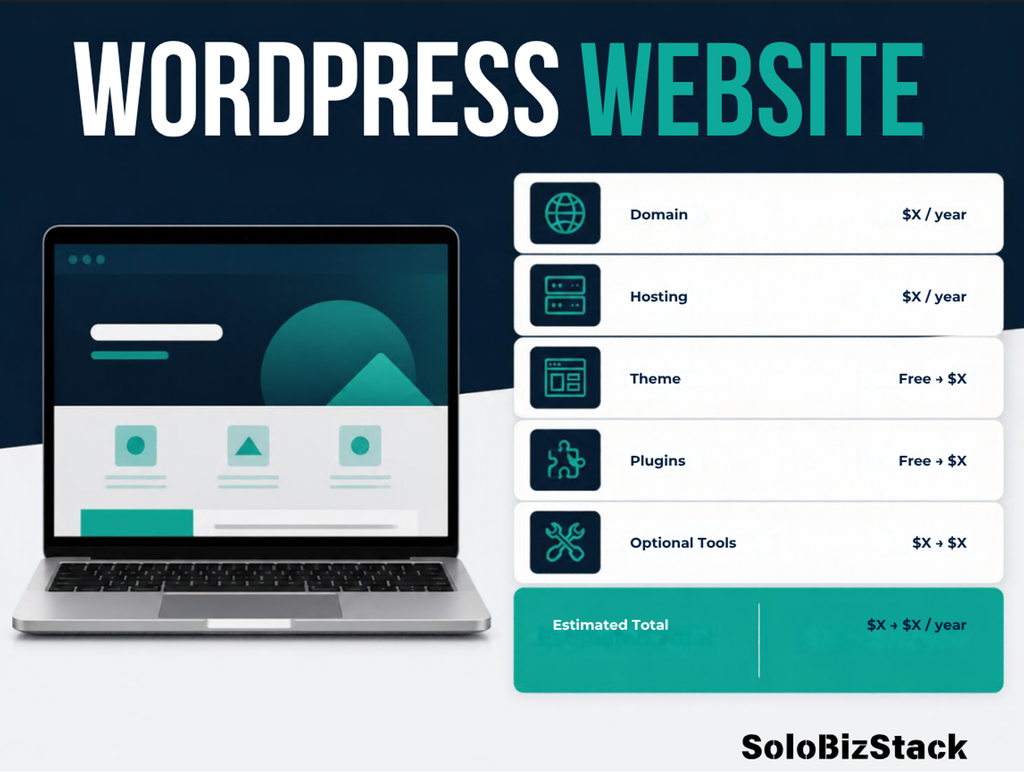
If you build the website yourself, you can keep the initial cost relatively low.
Your main expenses could be:
Domain + Hosting + Optional Tools
The biggest advantage isn’t only saving money.
You also gain control over the website.
You can:
- Change your design
- Publish new pages
- Add blog posts
- Install plugins
- Change your navigation
- Update your content
- Experiment with new ideas
You don’t have to contact a developer every time you want to change a heading or publish an article.
For a simple website, this can be a much more practical approach than paying someone for every small update.
How Much Does It Cost to Hire Someone to Build a Website?
Hiring a professional changes the calculation.
You might pay someone for:
- Website design
- WordPress setup
- Custom development
- Copywriting
- Branding
- Logo design
- SEO
- Ecommerce setup
- Website maintenance
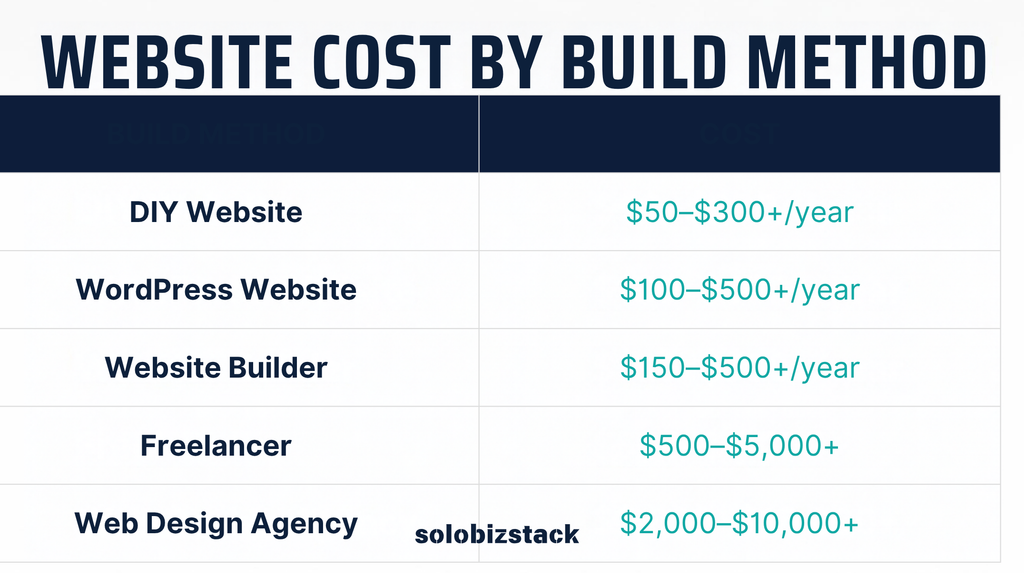
The price can vary dramatically depending on the complexity of the project and the person or agency you hire.
A basic website built from an existing theme is very different from a completely custom website.
That’s why there’s no single “average website price” that applies to every business.
The more custom work you need, the more you should expect to pay.
For example:
DIY website
You handle most of the work.
→ Lower cash cost
Template-based professional website
Someone helps you set up and customize an existing system.
→ Moderate cost
Custom website
A designer/developer creates a tailored experience.
→ Higher cost
None of these approaches is automatically right or wrong.
The better question is:
What is your time worth, and how much customization does your business actually need?
DIY vs Hiring a Freelancer vs Using an Agency
Here’s a simple way to think about it.
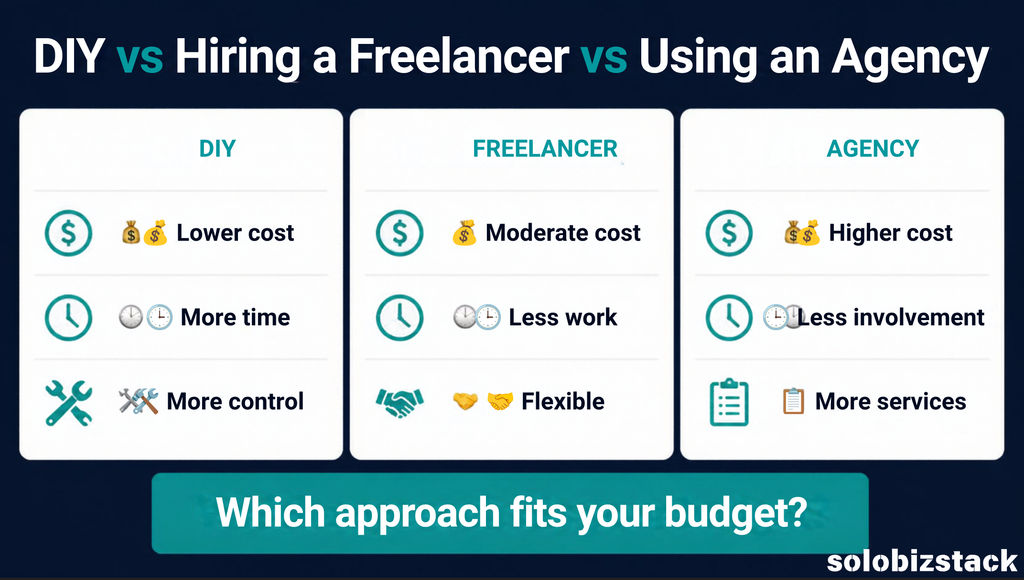
If you’re learning and have a limited budget, DIY can make sense.
If you’re already running a business and your time is more valuable than the setup cost, outsourcing some of the work may make more sense.
That’s one reason SoloBizStack also covers outsourcing.
See What You Can Outsource as a Solopreneur →
What Website Costs Can You Avoid at the Beginning?
This is probably the most useful part of the entire article.
You don’t need to buy everything you see recommended online.
When you’re starting, you can often postpone:
Premium WordPress themes
Start with a quality free theme.
Upgrade when you need something specific.
Premium plugins
Use free versions where they are sufficient.
Custom logo design
You can start with a simple brand identity and improve it later.
Expensive SEO software
Learn the basics first.
You don’t necessarily need a large SEO platform when your website has only five articles.
Paid AI tools
Free plans can be enough while you’re learning your workflow.
Professional website design
If you’re comfortable learning WordPress, you may be able to build your first version yourself.
Expensive hosting
A small website usually doesn’t need enterprise-level hosting.
Where Should You Spend More Money?
Being careful with your budget doesn’t mean you should always choose the cheapest option.
Some expenses can save you a lot of time later.
For example, it can make sense to pay for:
Reliable hosting
Your website needs a stable foundation.
Backup solutions
A backup can save you from a major headache if something goes wrong.
Email marketing
If building an audience is part of your business model, an email list can become an important asset.
Tools that save significant time
If a paid tool saves you several hours every week, the cost may be easier to justify.
Professional help
If you’re stuck on something that would take you 10 hours to learn but a freelancer can complete in one hour, outsourcing may be practical.
The goal isn’t:
“Spend as little as possible.”
The goal is:
Spend money where it saves time, reduces unnecessary complexity, or helps your business move forward.
A Simple Website Budget for Beginners
Instead of asking:
“How much does a website cost?”
Try asking:
“What kind of website am I building?”
Here are some rough planning scenarios.
Scenario 1: Personal Blog
You may only need:
- Domain
- Basic hosting
- Free theme
- A few free plugins
Focus: Keep the setup simple.
Scenario 2: Small Business Website
You may need:
- Domain
- Hosting
- WordPress
- Professional-looking theme
- Contact form
- Basic SEO
- Business email
Focus: Make it easy for customers to understand what you offer and contact you.
Scenario 3: Affiliate Website
You may need:
- Domain
- Hosting
- WordPress
- SEO tools
- Affiliate link management
- Content creation tools
- Analytics
- Email marketing
Focus: Useful content, search visibility, internal linking, and conversion paths.
Scenario 4: Ecommerce Website
You may need:
- Hosting
- Domain
- Ecommerce platform
- Payment processing
- Product management
- Security
- Shipping
- Customer support
Focus: Product experience, reliability, payments, and operations.
Is WordPress a Cheap Way to Build a Website?
It can be.
The WordPress software itself is open source, and WordPress provides extensive themes and plugins that allow you to start with relatively little upfront software cost.
But “WordPress is free” doesn’t mean the entire website is free.
You still need to consider:
Domain
Hosting
Premium tools
Professional services
Business expenses
The advantage is flexibility.
You can start small and add functionality as your needs change.
What About Website Builders Like Wix or Squarespace?
WordPress isn’t the only option.
You can also use hosted website builders such as Wix or Squarespace.
The difference is mainly how much control and responsibility you want.
With a hosted website builder, many technical details are handled for you.
With self-hosted WordPress, you generally have more control over the website, themes, plugins, hosting environment, and future changes.
For beginners, the better choice depends on what you’re building and how much control you want.
If you’re planning a content-heavy website, affiliate website, blog, or long-term online business, it’s worth understanding the differences before choosing a platform.
What Is the Cheapest Way to Build a Website?
If your goal is to keep costs low, here’s a practical approach:
Step 1
Choose a domain carefully.
Step 2
Choose affordable, reliable hosting.
Step 3
Install WordPress.
Step 4
Use a quality free theme.
Step 5
Install only the plugins you actually need.
Step 6
Create your core pages.
Step 7
Start publishing useful content.
Step 8
Upgrade tools only when there’s a clear reason.
This approach prevents one of the most common beginner mistakes:
spending money before you know what you actually need.
How to Reduce Your Website Costs
Here are a few practical ways to keep your budget under control.
1. Start with a free theme
Don’t buy a premium theme simply because it looks impressive in a demo.
Your content and structure matter more.
2. Avoid unnecessary plugins
Every additional tool adds another thing to manage.
3. Compare renewal prices
Don’t look only at the introductory hosting price.
4. Buy tools when you need them
You don’t need a complete software stack on day one.
5. Learn basic WordPress skills
Knowing how to publish a page, edit menus, change images, and install plugins can save you money over time.
6. Outsource specific tasks
You don’t need to become an expert at everything.
If design, video editing, technical development, or another task is slowing you down, outsourcing may be more efficient.
Website Cost Checklist
Before launching your website, make sure you’ve considered these expenses:
Essential
- Domain name
- Web hosting
- Website platform
- SSL
Useful
- Professional email
- Backup system
- SEO tools
- Analytics
- Security tools
- Email marketing
Hidden Costs You Should Know About
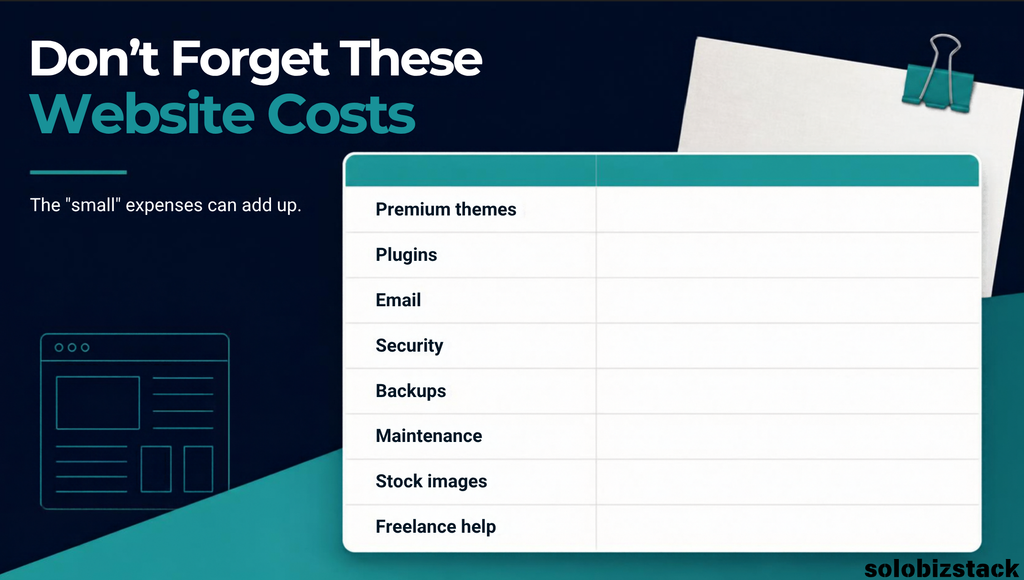
You don’t need to check every box before launching.
Common Mistakes When Budgeting for a Website
Mistake #1: Only Looking at the First-Year Price
A hosting plan might look cheap initially but cost considerably more at renewal.
Always check both.
Mistake #2: Buying Too Many Tools
A large collection of software doesn’t automatically make a better website.
Mistake #3: Spending Too Much on Design
A beautiful website won’t help much if visitors can’t understand what you offer.
Mistake #4: Paying for Features You Don’t Use
If you’re building a simple blog, you probably don’t need an enterprise-level setup.
Mistake #5: Forgetting Your Time
DIY saves money, but it costs time.
That doesn’t make DIY a bad choice. It simply means your budget has two parts:
Money + Time
Both matter.
Frequently Asked Questions
How much does it cost to build a website for a small business?
It depends on whether you build it yourself or hire someone. A DIY WordPress website can start with relatively modest domain and hosting costs, while professional design, custom development, content, and other services can increase the budget substantially.
Is it possible to build a website for free?
Yes, there are free website platforms and free tools available. However, a professional website usually has at least some ongoing costs, such as a custom domain, hosting, business email, or paid tools.
How much does a WordPress website cost?
The WordPress software itself is free and open source. Your actual website cost depends on hosting, domain registration, themes, plugins, and any professional services you choose to use.
Do I need to pay for a WordPress theme?
No. There are many free WordPress themes. You can start with a free theme and upgrade later if you need additional features.
Do I need to hire a web designer?
No. Many beginners can build a basic WordPress website themselves. Hiring a professional becomes more useful when you need custom design, advanced functionality, or want to save time.
Is hosting a monthly expense?
It depends on the hosting provider and plan. Some providers advertise a monthly equivalent price but require payment upfront for a longer period. Always check the total amount paid and the renewal price.
What is the most important website expense?
For most beginners, reliable hosting and a suitable domain are the basic foundation. After that, spend based on your actual needs rather than buying every available tool.
So, How Much Should You Budget for Your Website?
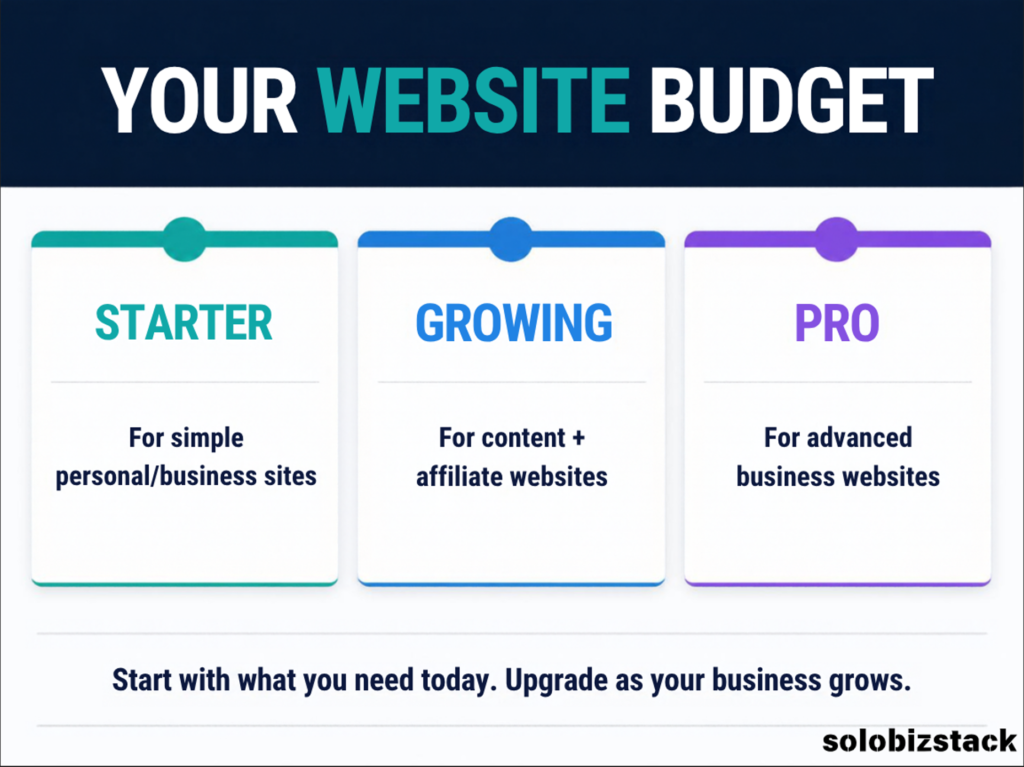
There’s no single number that works for every website.
A simple blog and a full ecommerce store have very different requirements.
If you’re starting a small website, blog, personal brand, or online business, you can keep your initial setup relatively lean:
Domain + Hosting + WordPress + Free/low-cost tools
Then grow from there.
As your website starts getting traffic and generating revenue, you can invest in better tools, premium features, professional services, and marketing.
That’s a much healthier approach than trying to build the “perfect” website before you’ve published anything.
The goal isn’t to build the most expensive website.
The goal is to build a website that does what you need it to do.
Ready to Build Your Website?
If you’re still at the beginning, don’t let the number of choices slow you down.
Start with the basics:
Domain → Hosting → WordPress → Theme → Pages → Content → Traffic
Then improve the site as you learn what your visitors actually need.
If you haven’t built your website yet, start here:
How to Build a WordPress Website for Beginners →
Or compare two popular hosting options before you choose your hosting:
Hostinger vs SiteGround: Which Web Host Is Better for Beginners? →
And if you’re looking for the tools that can help you build, create, grow, and monetize your site:
Explore the SoloBizStack Toolkit →
Disclosure
Some links on this website may become affiliate links as we add affiliate partnerships. If you purchase a product or service through an affiliate link, we may earn a commission at no additional cost to you. Affiliate relationships do not determine whether a tool is included, but they may influence which products we review in greater detail.
3 Comments