
Best AI Tools for Solopreneurs (2026): 8 Tools That Actually Save Time
Running a business by yourself means doing a little bit of everything.
One day you’re writing a blog post. The next day you’re researching a new idea, designing a Pinterest graphic, answering emails, editing a video, or trying to figure out why a workflow stopped working.
That is where AI can be genuinely useful.
The goal isn’t to replace everything you do with AI. In most cases, that’s not even a good idea. The real benefit is getting help with the repetitive parts of the work so you can spend more time on decisions that actually matter.
There are now hundreds of AI tools aimed at freelancers, creators, bloggers, marketers, and small business owners. The problem isn’t finding an AI tool anymore. It’s deciding which ones are actually worth adding to your workflow.
That’s why choosing the best AI tools for solopreneurs is less about finding the biggest list and more about finding the right tools for the work you actually do.
This guide focuses on 8 practical AI tools for solopreneurs. Each one has a different job, from writing and research to design, video, organization, and automation.
Quick answer: Most solopreneurs do not need a huge collection of AI tools. A simple stack might include one general AI assistant, one research tool, one design or content tool, and one automation platform. Start with the tasks that take up the most time, then add tools only when there’s a clear reason.
Affiliate disclosure: Some links in this article may be affiliate links. If you purchase through one of those links, SoloBizStack may earn a commission at no extra cost to you. We only recommend tools that fit the use case being discussed.
How We Selected the Best AI Tools for Solopreneurs
Choosing the right AI tools is not about finding the tool with the most features.
For this guide, we focused on tools that help solopreneurs save time, improve productivity, and build online businesses more efficiently.
We considered:
- Ease of use for beginners
- Practical business applications
- Pricing value
- Integration with existing workflows
- Long-term usefulness
The Best AI Tools for Solopreneurs at a Glance
Here’s the quick comparison before we get into the details.
| AI Tool | Best For | Why It Stands Out |
|---|---|---|
| ChatGPT | Everyday business tasks | Writing, brainstorming, research, analysis, planning |
| Claude | Long-form work | Documents, analysis, projects, research, content refinement |
| Perplexity | Research | Web research with sources and citations |
| Canva AI | Design and visuals | Images, creative work, presentations, social content |
| Descript | Video and podcasts | Transcript-based editing and AI-powered video tools |
| Notion AI | Organization | Notes, knowledge, planning, research, meeting summaries |
| Grammarly | Editing | Clearer writing, rewrites, tone, AI assistance |
| Zapier | Automation | Connecting apps and adding AI to business workflows |
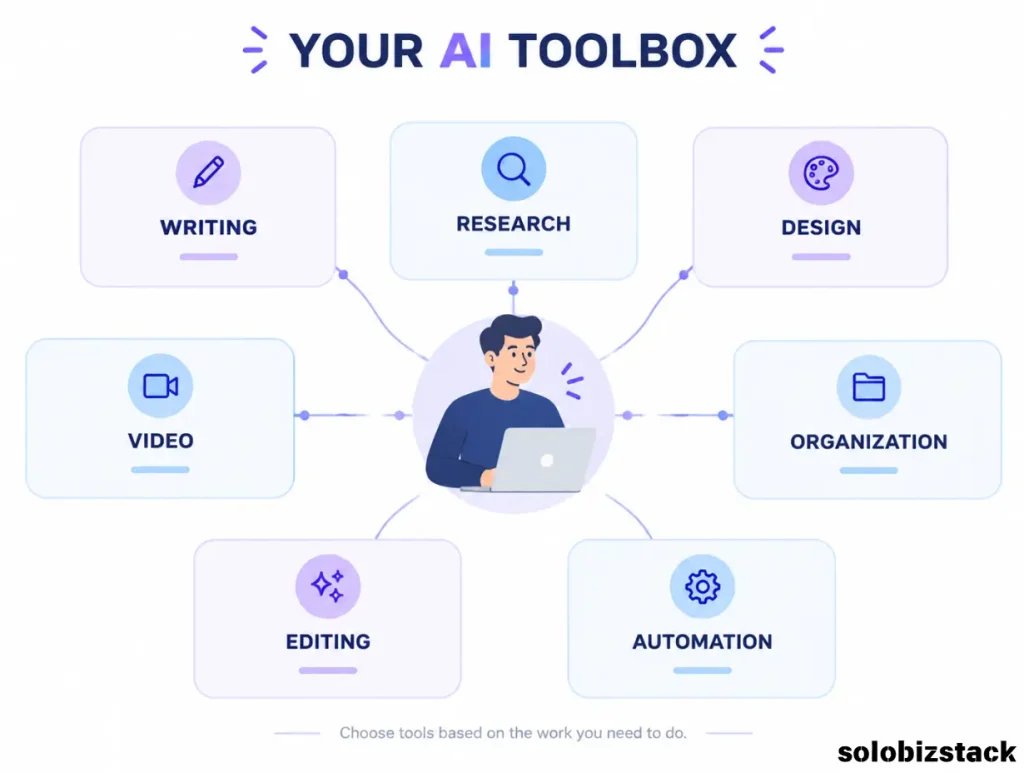
The point isn’t to use all eight.
In fact, using all eight from day one would probably make your workflow more complicated, not less.
Think of this list as a toolbox. Pick the tools that solve problems you actually have.
1. ChatGPT — Best All-Around AI Assistant for Solopreneurs
For many solopreneurs, a general-purpose AI assistant is the most useful place to start.
ChatGPT can help with brainstorming, drafting, research, summarizing information, analyzing files, creating plans, and working through business questions. Its current research features can also search the web and produce source-backed research, while Projects can keep related chats, files, and instructions together for ongoing work.
That makes it useful for the kind of work solo business owners deal with every week.
For example, you could use it to:
- Turn a rough idea into a content outline
- Research a topic before writing
- Brainstorm article titles
- Review a landing page
- Create a first draft of an email
- Analyze a spreadsheet
- Turn one article into several social media ideas
- Build a simple weekly work plan
The important part is how you use it.
Don’t ask AI to “write my entire business strategy” and then blindly follow the result. Give it the context, constraints, and information that actually matter.
A better prompt might be:
“I run a beginner-friendly WordPress and online business blog. Give me 10 article ideas for people who are starting their first website. Avoid highly competitive topics and focus on problems beginners are actively trying to solve.”
That gives you something to work with rather than a generic list.
Read Our WordPress Beginner Guide →
Best for: One tool that can help with many different parts of your business.
2. Claude — Best for Long-Form Writing, Documents, and Detailed Work
Claude is another general-purpose AI assistant, but it can be particularly useful when you’re working with longer documents, ongoing projects, or more structured analysis.
Claude supports document and image analysis, web search, Projects for persistent context, and Artifacts for creating and editing things such as documents, code, diagrams, and interactive outputs.
For a solopreneur, that can be useful when the task is bigger than a quick question.
For example:
Instead of:
“Write a blog post about email marketing.”
Try:
“Here are my audience notes, content guidelines, and three articles I’ve already published. Find the gaps, suggest a structure for a new article, and make sure it doesn’t repeat the existing topics.”
That’s where persistent project context becomes useful.
Claude’s current Pro plan also includes access to Projects and Research, although plan availability and usage limits can change.
You don’t need both Claude and ChatGPT just because they are popular.
For many people, one strong general-purpose AI assistant is enough. Choose based on the type of work you do most often.
Best for: Longer documents, content projects, analysis, and work where keeping context matters.
3. Perplexity — Best AI Tool for Research
Research is one of the areas where AI can save a surprising amount of time.
Perplexity is built around search and research rather than simply generating an answer from a conversation. Its current Pro offering includes deeper research, file and photo analysis, access to multiple AI models, and more citations per answer. Its Research mode is designed for more complex, multi-step research tasks.
That makes it useful when you need to answer questions like:
- What are the current features of a software product?
- What changed recently?
- What are competitors offering?
- What sources support a particular claim?
- What are people searching for in a specific niche?
- Which facts should I verify before publishing an article?
For a content website, research can become one of the biggest time sinks. A research-focused tool can help you get from “I need to understand this topic” to “I know which sources I should read” much faster.
Still, don’t treat an AI-generated research summary as the final word.
Open the sources. Read the important ones. Check dates. Check whether the source is actually relevant to the claim you’re making.
AI can speed up research. It doesn’t remove the need for judgment.
Best for: Current information, source gathering, competitor research, and fact checking.
4. Canva AI — Best for Blog Graphics, Pinterest, and Marketing Visuals
You don’t need to become a professional designer to create decent visuals anymore.
Canva combines its regular design platform with AI-powered features through Magic Studio and newer Canva AI tools. Canva says its AI features can help with things such as generating and editing creative content, images, designs, documents, and other visual assets.
For a solopreneur, the value is less about making “cool AI art” and more about creating useful marketing assets quickly.
You can use it for:
- Blog graphics
- Pinterest pins
- Social media posts
- Presentation slides
- Lead magnets
- Simple diagrams
- Visual checklists
- Branded templates
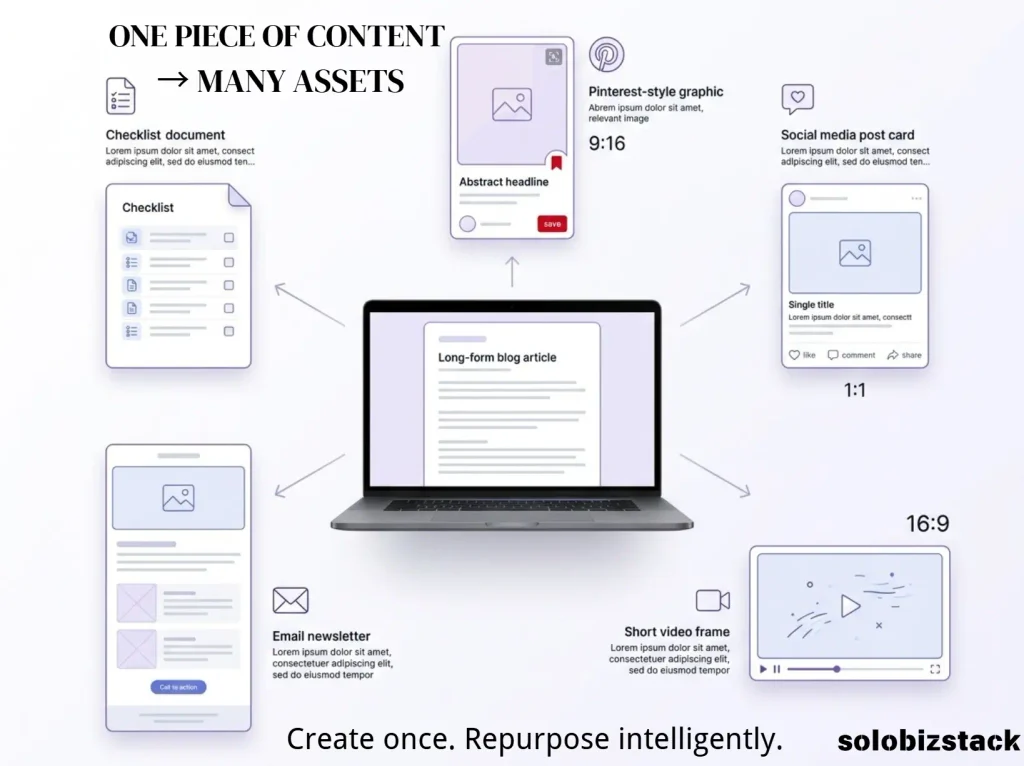
This is especially useful for a content site because one article can become several pieces of visual content.
For example:
One blog post →
- 1 hero image
- 1 comparison infographic
- 2 Pinterest pins
- 1 quote graphic
- 1 checklist
You don’t have to design each one from scratch.
The trick is to keep your visual style consistent. Use the same fonts, spacing, colors, and general layout instead of making every image look like it came from a different website.
Best for: Bloggers, Pinterest creators, marketers, and anyone who needs visuals without hiring a designer for every task.
5. Descript — Best AI Tool for Video and Podcasts
If you create videos, podcasts, tutorials, or screen recordings, editing can quickly become one of the most repetitive parts of running a content business.
Descript takes a different approach by letting you work with video and audio through a transcript-based editing workflow. Its current plans include features such as text-based editing, transcription, captions, filler-word removal, clips, and other AI-powered editing tools.
This can be useful for a solopreneur who wants to turn one recording into several pieces of content.
For example:
One 20-minute tutorial →
- Full YouTube video
- Short clips
- Blog transcript
- Newsletter summary
- Social media snippets
That kind of repurposing is where a tool like Descript starts to make sense.
You don’t need to become a full-time video editor just to publish a useful tutorial. The goal is to remove some of the tedious editing work while keeping the important creative decisions in your hands.
Best for: Video creators, podcasters, tutorial publishers, and content repurposing.
6. Notion AI — Best for Organizing a Solo Business
The bigger your project gets, the harder it becomes to remember where everything lives.
Ideas are in one notebook. Content plans are in a spreadsheet. Research is buried in browser tabs. Client notes are sitting in your email.
Notion can act as a central workspace, while Notion AI adds features for writing, research, meeting notes, search, and task-related work.
Current Notion AI features include Notion Agent, Enterprise Search, Research Mode, AI Meeting Notes, and AI-powered writing and database assistance. Some features and AI access depend on the plan.
For a solo website business, you could build a simple workspace containing:
- Content calendar
- Keyword ideas
- Affiliate programs
- Article briefs
- Product research
- Pinterest ideas
- Website tasks
- SOPs
- Important notes
The real benefit isn’t “AI writes my notes.”
It’s having one place where the information behind your business can live.
Best for: Content planning, knowledge management, project organization, and keeping a growing solo business under control.
7. Grammarly — Best for Editing and Polishing Your Writing
AI can help you write faster, but faster writing isn’t automatically better writing.
That’s why a separate editing layer can still be useful.
Grammarly’s current AI tools can help with brainstorming, drafting, rewriting, tone, and polishing text across the places where you write. Its paid plans also offer more advanced AI and writing features.
This can be especially useful for solopreneurs writing in English as a second language.
Instead of asking AI to rewrite an entire article, you might use Grammarly to clean up:
- Awkward sentences
- Repeated wording
- Tone
- Grammar mistakes
- Long or confusing paragraphs
- Emails
- Product descriptions
- Social media copy
The goal should be to make the writing clearer—not to make every sentence sound polished to the point that it loses your personality.
Best for: Editing English content, polishing articles, emails, landing pages, and everyday business writing.
8. Zapier — Best AI Tool for Automation
Eventually, the problem stops being “How do I do this faster?” and becomes:
“Why am I still doing this manually?”
That’s where automation comes in.
Zapier connects apps and workflows so that one action can trigger another. Its current platform also includes AI-powered steps and agentic workflows that can use AI for tasks such as summarizing, classifying, drafting, making decisions, and working across connected tools. Zapier says its platform now connects more than 9,000 apps.
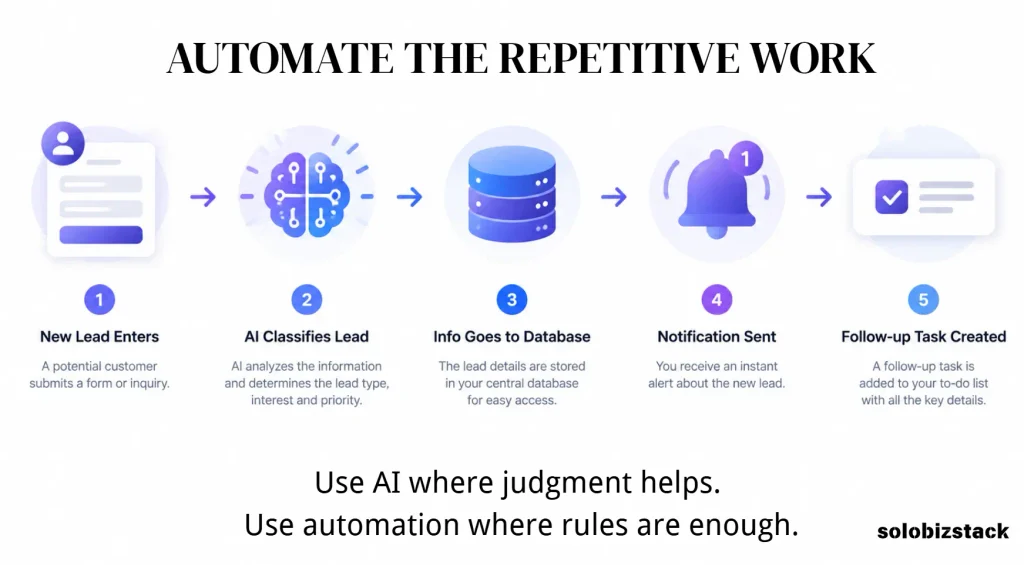
Imagine a simple workflow like:
New form submission
→ classify the lead with AI
→ add it to your CRM
→ send a notification
→ create a follow-up task
Or for a content business:
New article published
→ summarize the article
→ create social snippets
→ add them to a content queue
That’s much more interesting than using AI to write another 500-word blog post.
Not every workflow needs AI, either. Zapier itself points out that regular rule-based automation can be cheaper and more predictable for tasks that don’t require judgment.
That’s a useful principle for any solopreneur:
Use AI where judgment helps. Use normal automation where rules are enough.
Best for: Connecting tools, removing repetitive admin work, and building automated business workflows.
Which AI Tools Should a Solopreneur Actually Start With?
This is where many AI tool lists go wrong.
They make it sound as though you need ten subscriptions.
You don’t.
A better approach is to build your stack around the work you already do.
If you run a content website
A simple setup could look like:
ChatGPT or Claude
For brainstorming, outlining, drafting, analysis, and planning.
Perplexity
For research and checking current information.
Canva
For blog graphics, Pinterest, and other visual content.
Grammarly
For the final writing pass.
That may already cover most of your content workflow.
If you create video content
Add:
Descript
Use it to turn recordings into edited videos, clips, transcripts, and other content.
If you’re drowning in information
Add:
Notion AI
Use it to organize your content calendar, research, project notes, and business information.
If you’re doing the same task every week
Look at:
Zapier
Don’t automate a process just because you can. Automate it when the saved time is actually worth the setup.
You Don’t Need an AI Tool for Everything
This may be the most useful advice in the entire article.
Some tasks are better done manually.
If you’re choosing a business niche, for example, AI can help you brainstorm possibilities and organize research. It should not be the only thing deciding whether the niche is actually worth pursuing.
If you’re writing an expert article, AI can help you build an outline and spot gaps. You still need to check facts and add your own judgment.
If you’re creating a brand, AI can generate ideas. But consistency and a recognizable point of view still come from you.
And if a five-minute manual task can be done once every month, building a complicated automation system for it may not be worth the effort.
AI is a tool.
It isn’t the business.
A Simple AI Workflow for a Solo Blogger
Let’s make this practical.
Imagine you’re publishing one article every week.
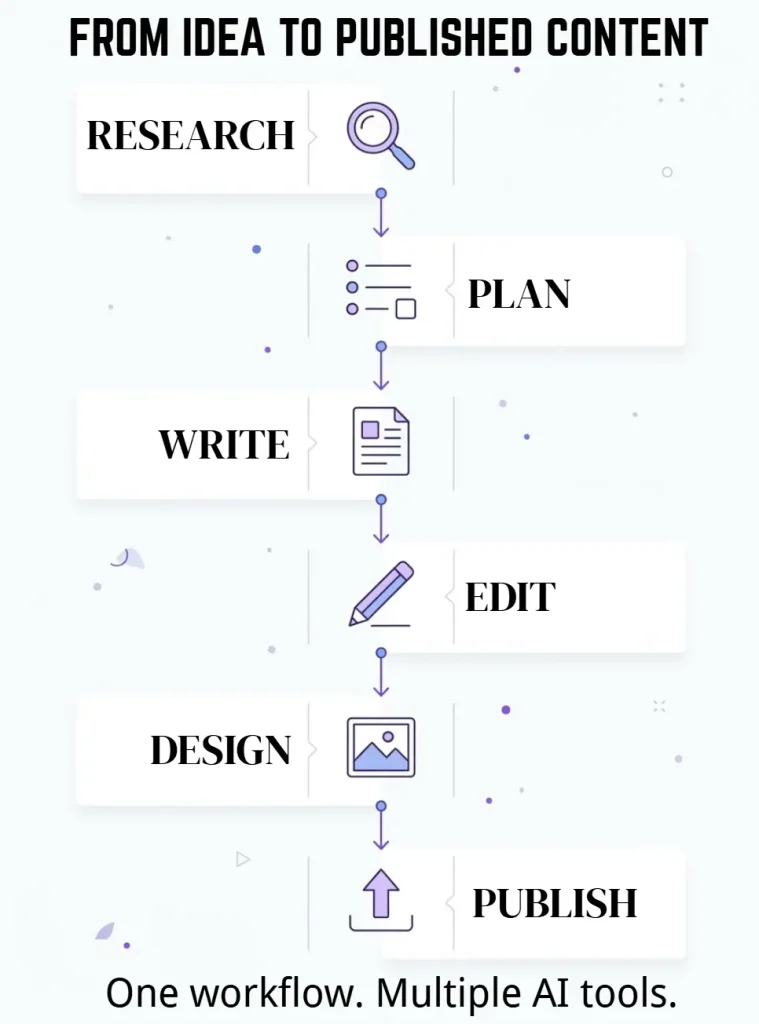
Here’s a simple workflow:
Step 1: Research
Use Perplexity or ChatGPT to collect current information, questions, competitors, and useful sources.
Step 2: Plan
Use ChatGPT or Claude to turn the research into a clean article structure.
Step 3: Write
Create the first draft, then rewrite and fact-check it yourself.
Step 4: Edit
Use Grammarly for the final language and clarity pass.
Step 5: Design
Use Canva to create your hero image, infographic, and Pinterest graphics.
Step 6: Publish
Upload everything to WordPress and add your internal links, external sources, and affiliate links.
Step 7: Repurpose
Turn the finished article into Pinterest pins, social posts, newsletter ideas, or a short video.
Step 8: Automate
When you notice the same manual task happening repeatedly, decide whether Zapier can remove it.
That’s a much more realistic use of AI than trying to automate your entire business on day one.
Best Website Hosting for Beginners →
How Much Should You Spend on AI Tools?
You can spend a lot.
You don’t have to.
A beginner solopreneur can easily end up paying for several overlapping AI subscriptions without realizing how little of each one is actually being used.
Before subscribing, ask:
What specific problem does this tool solve?
Then ask:
How often do I have that problem?
And finally:
Will the tool save me enough time or improve the result enough to justify the cost?
If the answer is unclear, don’t subscribe yet.
Start with the free version when possible. Use it on a real task. Then decide whether the paid plan gives you something you actually need.
This simple approach will save you more money than chasing every new AI launch.
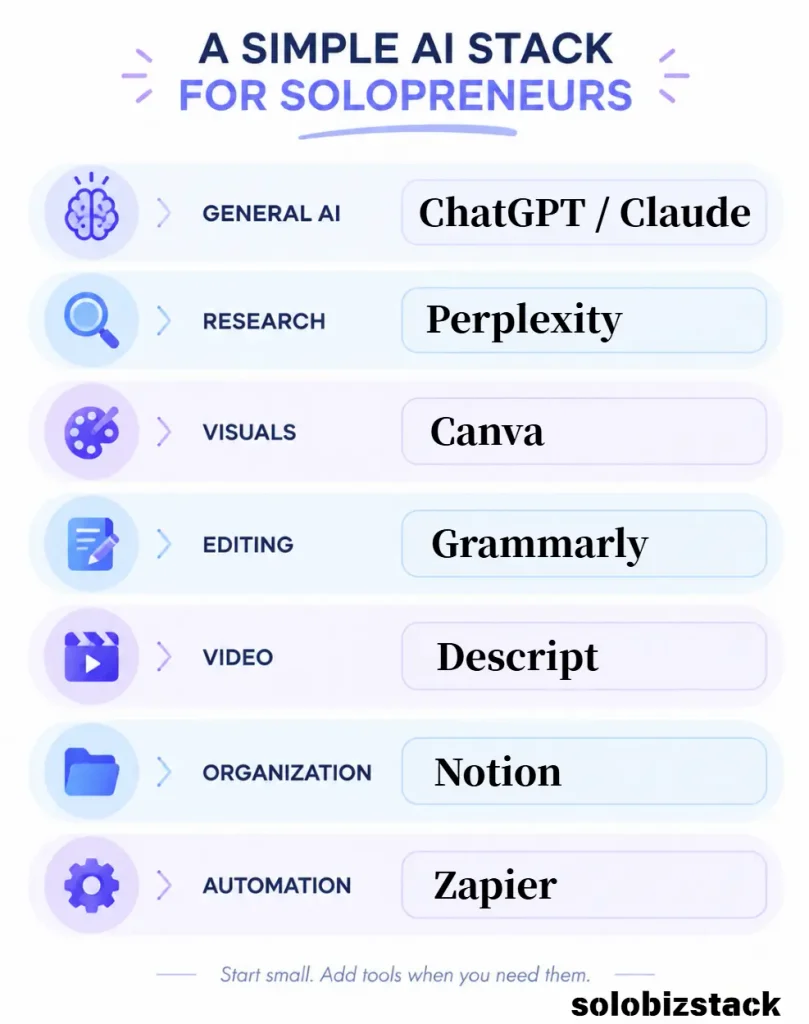
Best AI Stack for SoloBizStack
For a website like SoloBizStack, I would keep the workflow relatively simple.
Core AI
ChatGPT or Claude
Use one as your main general-purpose assistant rather than constantly switching between several models.
Research
Perplexity
Use it when you need current information, sources, and faster research.
Visual Content
Canva
Use it for blog images, Pinterest graphics, simple diagrams, and downloadable resources.
Writing Polish
Grammarly
Use it as the final editing layer rather than relying on AI-generated text without review.
Video
Descript
Add it when video becomes part of your content strategy.
Organization
Notion
Use it when your content ideas, research, and projects start getting difficult to manage.
Automation
Zapier
Add it after you’ve identified repetitive workflows worth automating.
This gives you a flexible stack without turning your business into a collection of subscriptions.
Frequently Asked Questions
What is the best AI tool for solopreneurs?
There isn’t one AI tool that is best for every solopreneur. A general-purpose assistant such as ChatGPT or Claude can handle many everyday tasks, while tools such as Perplexity, Canva, Descript, Notion, Grammarly, and Zapier are more specialized.
What AI tools should a beginner solopreneur use?
Start with one general AI assistant and one tool that solves your biggest bottleneck. For a content website, that might be ChatGPT or Claude plus Canva. Add research, editing, video, or automation tools only when you actually need them.
Can AI help me run a solo business?
Yes. AI can help with research, writing, planning, content repurposing, customer communication, data analysis, design, and repetitive workflows. It works best as an assistant rather than a replacement for your judgment.
Are AI tools worth paying for?
They can be, but it depends on how often you use them and how much time or effort they save. A tool you use every day may justify a subscription. A tool you open twice a month probably doesn’t.
Can I run a blog using AI tools?
AI can help with many parts of running a blog, including research, outlining, editing, image creation, content repurposing, and workflow management. You still need to verify facts, add useful original information, and make sure the content genuinely helps readers.
Should I use ChatGPT and Claude together?
You can, but you don’t have to. For many solopreneurs, one general-purpose assistant is enough. Using both makes more sense when you have different workflows that benefit from different capabilities or when you want a second perspective.
What is the best AI tool for content creation?
It depends on the type of content. ChatGPT and Claude are useful for written content, Canva is useful for visual content, and Descript is useful for video and audio content.
What is the best AI tool for business automation?
Zapier is a practical option when you need to connect different business apps and automate repetitive workflows. Its current AI features can add AI reasoning and actions to those workflows.
Final Thoughts
The best AI stack for a solopreneur isn’t the one with the most tools.
It’s the one that removes the most unnecessary work without making your business harder to manage.
Start with the problem.
Maybe writing takes too long. Start with an AI writing assistant.
Maybe research is slowing you down. Add a research tool.
Maybe every blog post needs hours of design work. Use Canva.
Maybe you’re repeating the same admin tasks every week. Look at automation.
Then stop.
You can always add another tool later.
For most solo businesses, a small group of useful tools will beat a giant collection of subscriptions that nobody has time to learn.
[Explore More Business Tools →]
[Read Our WordPress Beginner Guide →]
[Compare Website Hosting Options →]
Prices, features, usage limits, and availability can change. Check each provider’s official website before subscribing.





2 Comments