
Pinterest Keyword Research for Beginners: Find Keywords That Get Traffic
Pinterest keyword research can make the difference between creating Pins that get discovered and creating Pins that nobody searches for.
You do not need expensive SEO software or a huge Pinterest account to get started. With a few simple research methods, you can find the words and phrases people are already using on Pinterest and build your content around them.
In this guide, you’ll learn Pinterest Keyword Research for Beginners step by step, including how to find Pinterest keywords, use Pinterest Trends, choose the right keywords for your blog, and turn those keywords into Pins that can drive visitors to your website.
The goal is simple: find the right topic, match it with the language your audience uses, and create useful content around it.

Read Next: How to Use Pinterest to Drive Traffic to Your Blog
What Is Pinterest Keyword Research?
Pinterest keyword research is the process of finding the words and phrases people use when searching for ideas, solutions, products, tutorials, recipes, inspiration, or other content on Pinterest.
For example, someone interested in starting a blog might search for phrases such as “blog ideas,” “how to start a blog,” “blog post ideas,” or “Pinterest marketing for beginners.”
Those phrases give you clues about what your audience wants to discover.
Instead of guessing what to put on your Pin, you can use these search terms to guide your content, Pin titles, descriptions, boards, and related topics. Pinterest itself provides tools and search features that can help you understand what people are searching for and how interest changes over time.
The important part is that keyword research should start with what your audience wants, not with a list of keywords you want to rank for.
Why Pinterest Keywords Matter for Bloggers
Pinterest is a visual discovery platform, but search still plays an important role in how people find content.
When someone types a phrase into Pinterest, the platform needs to understand which Pins are relevant to that search. Your keywords help provide that context.
That does not mean adding the same keyword everywhere.
A better approach is to create a clear connection between the search query, your Pin, and the page someone reaches after clicking. Pinterest also considers how people interact with Pins when determining what content may be relevant to users.
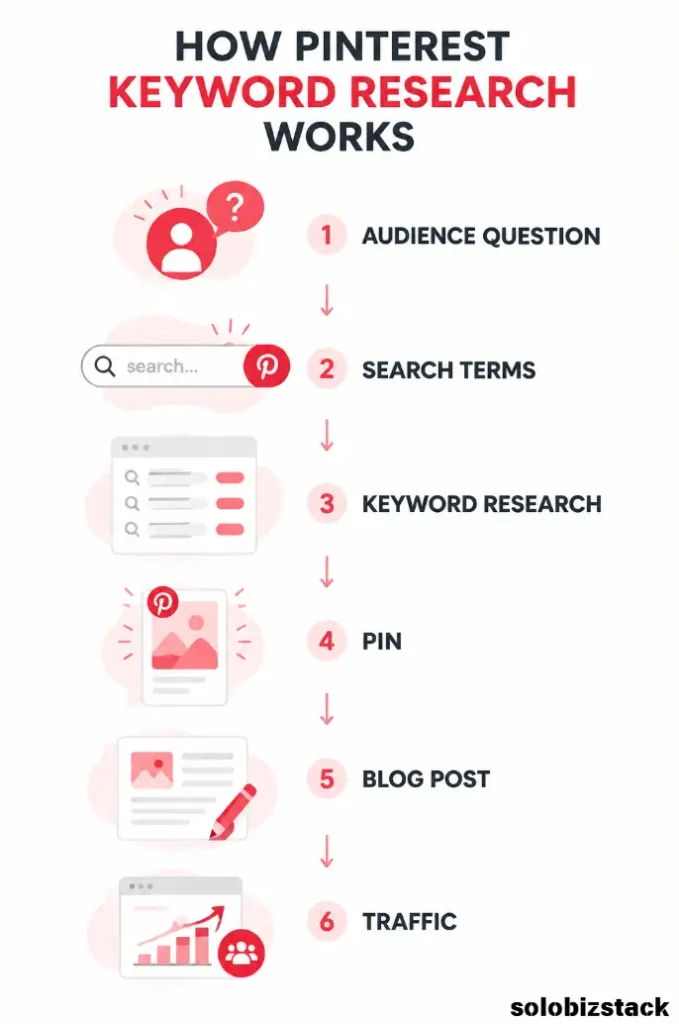
For a blogger, this creates a simple path:
Search query → keyword → Pin → click → useful article
The closer these pieces match, the easier it is for a visitor to understand what they are getting.
Continue Reading: Pinterest SEO for Beginners: How to Get More Traffic
Pinterest Keyword Research vs. Google Keyword Research
Pinterest and Google keyword research have something important in common: both start with understanding what people search for.
But the platforms are not identical.
Google searches often focus on finding a specific answer, website, product, or service. Pinterest searches frequently involve ideas, inspiration, planning, visual examples, tutorials, and future projects.
For example, a Google search might be very specific:
“how to create a WordPress website”
On Pinterest, someone might search for:
“WordPress website ideas”
“blog website layout”
“small business website design”
or
“website checklist for beginners”
The search intent can overlap, but the wording may be different.
That is why copying a Google SEO keyword list and using it unchanged for Pinterest is not always the best approach.
Pinterest keyword research should reflect the way Pinterest users discover and save ideas.
Where to Find Pinterest Keywords
You do not need to begin with complicated keyword software.
There are several simple places where beginners can find useful Pinterest keywords.
1. Start With Pinterest Search
The Pinterest search bar is one of the easiest places to begin.
Type a broad topic into Pinterest and pay attention to the related suggestions that appear.
For example, start with:
blogging
You may discover more specific searches related to blogging, such as beginner blogging, blog post ideas, blogging tips, blog design, or other variations.
The exact suggestions will vary, so treat them as research clues rather than permanent keyword lists.
Write down phrases that closely match the type of content you can realistically create.
2. Use Pinterest Trends
Pinterest Trends is one of the most useful tools for serious keyword research.
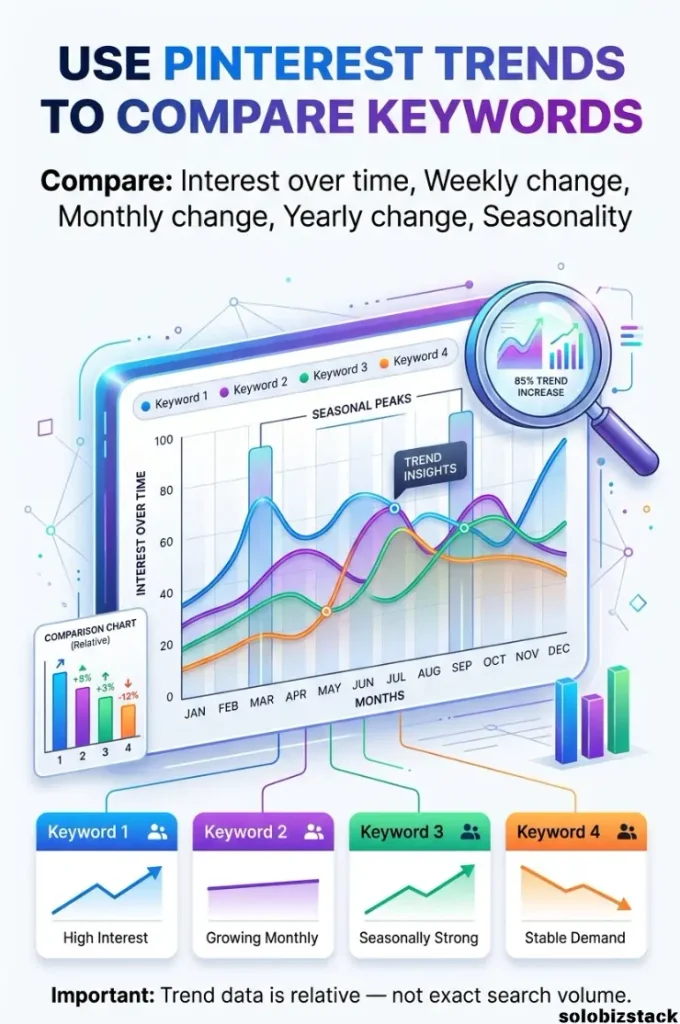
Pinterest says its Trends tool can show historical search, save, and shopping trends across regions and countries, with historical views going back up to two years. You can also compare up to four keywords and review weekly, monthly, and yearly changes.
One important detail is easy to miss.
Pinterest Trends uses a normalized index rather than giving you an exact number of searches. The highest point on a selected graph is indexed to 100 and the lowest to 0, making it useful for comparing interest between terms, but not for interpreting a number as an exact search volume.
So if one keyword shows 80 and another shows 40, do not assume the first keyword receives exactly twice as many searches.
Instead, think of the data as a way to compare relative interest and identify patterns.
Research Keywords: Explore Pinterest Trends
Pinterest Trends can also help you spot seasonal behavior. A keyword might become much more popular several weeks or months before an event, holiday, or seasonal activity.
That can be especially useful for bloggers because it gives you time to create content before the topic reaches its peak.
3. Look at Related Searches and Topics
Pinterest itself gives you more clues beyond the original keyword.
When researching a topic, look for related searches, related topics, and other phrases that appear around the content you are exploring.
These terms can help you expand a single keyword into a small topic cluster.
For example:
Main topic: Pinterest marketing
Related ideas could include:
- Pinterest SEO
- Pinterest keywords
- Pinterest traffic
- Pinterest business account
- Pinterest analytics
- Pinterest content ideas
You do not need to create six separate articles immediately.
Instead, use related terms to understand the broader topic and decide which ones belong naturally in the same article.
4. Study Popular Pins
Search for your target topic on Pinterest and look at the Pins that appear.
Do not simply copy them.
Instead, study the language they use.
Look at:
- Pin titles
- Headline wording
- Article topics
- Repeated phrases
- Questions being answered
- Types of visuals
- The promise made by the Pin
You are trying to understand the search language and content expectations around a topic.
This can also help you identify content gaps.
For example, perhaps most Pins explain what Pinterest SEO is, but very few explain how beginners can actually do Pinterest keyword research step by step.
That gap may become your article angle.
5. Use Your Own Pinterest Analytics
Once your account starts getting data, your own analytics become one of your most valuable research sources.
Pinterest Analytics includes metrics such as impressions, saves, Pin clicks, and outbound clicks. Outbound clicks are especially relevant to bloggers because they measure actions that take people from Pinterest to a destination outside Pinterest.
Look for patterns.
Which topics are getting saves?
Which Pins are getting clicks?
Which Pins are actually sending people to your website?
A Pin with modest impressions but strong outbound clicks can teach you something valuable about search intent and content relevance.
A Simple Pinterest Keyword Research Process for Beginners
You can make Pinterest keyword research much easier by following the same workflow every time.
Step 1: Start With a Broad Topic
Start with a topic rather than a perfect keyword.
For example:
website design
Then think about what a beginner might want to know about that topic.
They might search for:
- website design ideas
- small business website design
- WordPress website design
- website homepage ideas
- website layout ideas
- simple website design
Your first goal is to create a list.
Do not judge every keyword immediately.
Step 2: Expand the List
Now use Pinterest search suggestions and Pinterest Trends to expand your list.
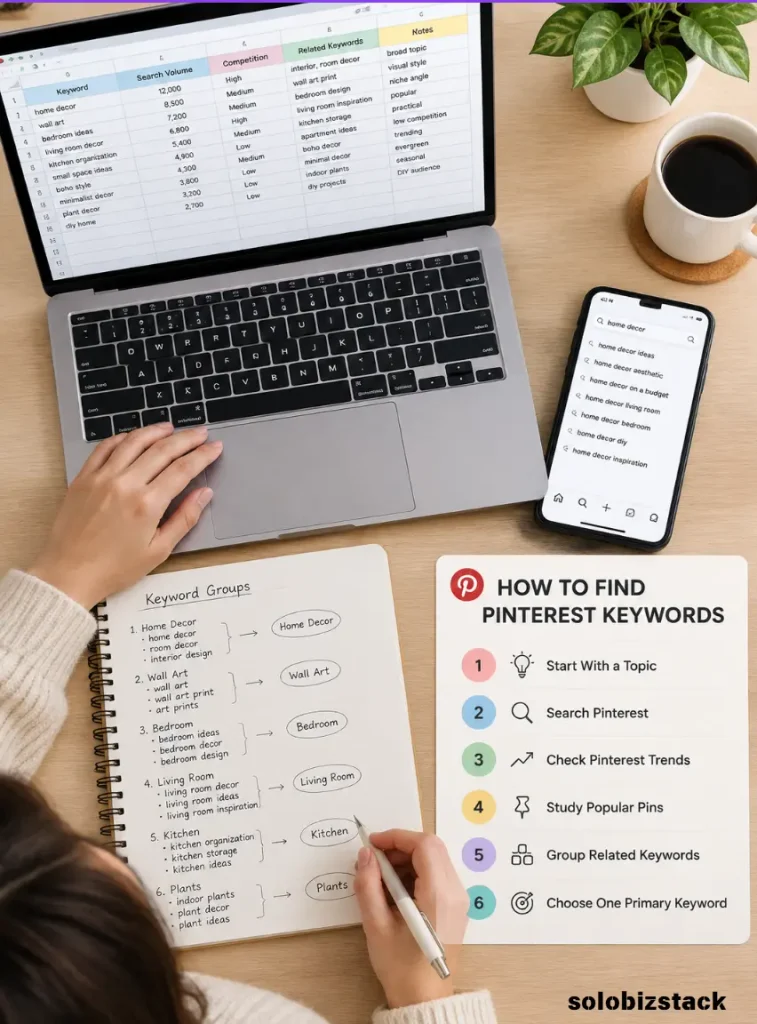
Create a simple spreadsheet with columns such as:
| Keyword | Topic | Search Trend | Seasonal? | Content Idea | Priority |
|---|---|---|---|---|---|
| Pinterest SEO | Growing/Stable | No | Beginner guide | High | |
| Pinterest keywords | Growing/Stable | No | Keyword research guide | High | |
| Blog traffic ideas | Blogging | Seasonal/Stable | No | Traffic guide | Medium |
| Pinterest content ideas | Seasonal/Stable | Sometimes | Content ideas post | Medium |
You do not need complicated software.
A spreadsheet is enough when you are starting.
Step 3: Check Search Intent
This is one of the most important steps.
Ask:
What does someone actually want when they search this phrase?
Suppose you find the keyword:
Pinterest keywords
That could mean several things.
Someone might want a definition.
Someone else might want a keyword list.
Another person might want to learn how to find keywords.
These are different intents.
Your article should match the most likely intent instead of trying to answer every possible question.
For a beginner-focused article, a phrase like Pinterest keyword research for beginners gives you a very clear direction.
The reader is not just looking for a list. They want to understand the process.
Step 4: Compare Similar Keywords
Pinterest Trends allows you to compare multiple terms on the same graph, which makes it easier to see relative interest over the selected time period. Pinterest currently allows up to four keywords in a comparison.
For example, you might compare:
Pinterest SEO
Pinterest keywords
Pinterest marketing
Pinterest traffic
The goal is not simply to pick the keyword with the highest line.
Look at the bigger picture.
Ask:
Does this keyword match my audience?
Can I create genuinely useful content around it?
Does it fit my website?
Is the interest stable or highly seasonal?
Can the keyword support other related articles?
A keyword that fits your site well can be more useful than a broader term that attracts the wrong audience.
Step 5: Check Seasonality
Some Pinterest searches are heavily seasonal.
Think about topics such as:
- Christmas content
- wedding planning
- Halloween ideas
- holiday recipes
- back-to-school activities
- gift guides
- New Year planning
Pinterest Trends can help you see seasonal patterns over time.
This matters because Pinterest content may need to be published before the peak of interest.
For a blogger, timing can therefore become part of keyword research.
You are not only asking:
“Is this keyword popular?”
You are also asking:
“When should I create and publish content around this keyword?”
Step 6: Group Keywords Into Topics
Once you have a larger list, stop thinking about every phrase as a separate article.
Group related keywords together.
For example:
Main topic: Pinterest SEO
Cluster:
- Pinterest SEO for beginners
- Pinterest keywords
- Pinterest keyword research
- Pinterest Pin SEO
- Pinterest board SEO
- Pinterest traffic
This creates a clearer content structure.
One strong article can cover several closely related phrases naturally.
Then separate articles can target subtopics that deserve more depth.
This is much more manageable than publishing dozens of thin posts.
Step 7: Create One Primary Keyword
Once the research is complete, choose one main phrase for the article.
For this article, the primary keyword is:
Pinterest Keyword Research for Beginners
Then use closely related phrases naturally throughout the article.
You do not need to repeat the exact phrase in every section.
Search engines and modern AI systems are much better at understanding related concepts and context than they were years ago.
Focus on covering the topic thoroughly rather than writing for a keyword density score.
Where Should You Use Pinterest Keywords?
Once you have your keywords, the next question is where to use them.
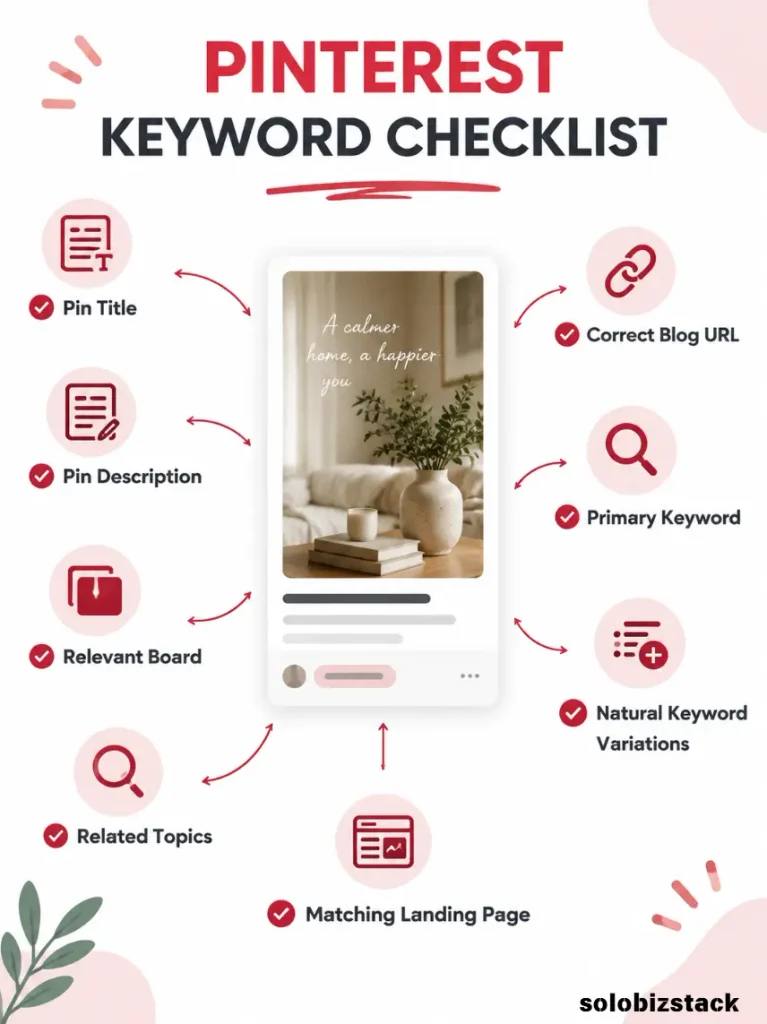
Pinterest currently allows creators to add a Pin title, description, link, board, and related topics. Pinterest says creators can add up to 10 related topics to a Pin.
Here is a practical way to use your research.
Pin Title
Use your main idea naturally in the Pin title.
Instead of:
Tips You Need to Know
Try something more descriptive:
Pinterest Keyword Research for Beginners: A Simple Guide
The second version gives both users and Pinterest much more context.
Pin Description
Write a short, natural description that explains what the reader will learn.
Include the main keyword or a close variation when it genuinely fits.
For example:
Learn how to find Pinterest keywords using Pinterest search, Pinterest Trends, related topics, and simple keyword research methods.
That is much better than repeating the same keyword several times.
Board Name
Your boards should also have clear names.
Instead of:
My Favorite Stuff
Use something specific to the topic:
Pinterest SEO Tips
or:
Blog Traffic Strategies
Board descriptions can also provide additional context.
Related Topics
Use relevant topics when Pinterest provides them.
Do not add unrelated topics just because they seem popular.
The goal is relevance.
Your keyword research should help you decide which topics actually describe your Pin.
Your Blog Post
The keyword should also match the page you are sending visitors to.
This is where many Pinterest beginners make a mistake.
They create a Pin about:
Pinterest Keyword Research
and then send visitors to a generic homepage.
That creates a disconnect.
A better path is:
Pinterest keyword → relevant Pin → matching article → useful next step
The landing page should deliver what the Pin promised.
A Real Example of Pinterest Keyword Research
Let’s say you run a blog for beginner bloggers.
Your broad topic is:
Pinterest marketing
After researching Pinterest search suggestions and Trends, you might identify related ideas such as:
Pinterest SEO
Pinterest keywords
Pinterest keyword research
Pinterest traffic
Pinterest Pin ideas
Instead of writing one giant article targeting every phrase, you could build a small content cluster.
Your main article could be:
Pinterest SEO for Beginners: How to Get More Traffic
Then supporting articles could include:
Pinterest Keyword Research for Beginners
How to Create Pinterest Pins for Your Blog
Best Tools for Creating Pinterest Pins
How to Use Pinterest to Drive Traffic to Your Blog
Now the articles can naturally link to each other.
That gives your readers a better path through the topic and creates a stronger internal-linking structure for your website.
Read the Related Guide: How to Create Pinterest Pins for Your Blog
How to Turn One Keyword Into Multiple Content Ideas
One of the best things about keyword research is that one topic can lead to several useful pieces of content.
For example:
Keyword: Pinterest keywords
Possible content ideas:
- How to Find Pinterest Keywords
- Pinterest Keyword Research for Beginners
- Pinterest Keywords for Bloggers
- How to Use Pinterest Trends
- Common Pinterest SEO Mistakes
- Pinterest Keyword Research Checklist
You can then create different Pin designs for the same article.
For example, one article could have:
Pin 1: Pinterest Keyword Research for Beginners
Pin 2: How to Find Pinterest Keywords
Pin 3: 7 Pinterest Keyword Research Tips
Pin 4: Pinterest SEO Keyword Checklist
The destination article can remain the same as long as the Pin accurately represents the content.
This gives you more creative angles without having to write a completely new article every time.
Don’t Confuse Search Volume With Search Intent
A common beginner mistake is choosing the keyword that looks biggest.
But bigger does not always mean better.
Imagine you have two keywords.
Keyword A: very broad, high interest
Keyword B: smaller but highly specific
Keyword A may attract a much wider audience, but many of those people may not be interested in your particular article.
Keyword B might have a smaller audience but a much clearer reason to click.
For a small website, relevance is often a more useful starting point than simply chasing the biggest topic.
Pinterest keyword research should help you answer one question:
“What specific problem can my content solve?”
Don’t Ignore Existing Content
Keyword research is not only for new articles.
You can also use it to improve content you have already published.
Look through your existing blog posts and ask:
Does this article match a Pinterest search topic?
Does the headline make sense for a Pinterest audience?
Can I create several Pins around the article?
Is the Pin linked to the most relevant page?
Could the article answer the search query more directly?
This can help you get more value from content you already created.
Use Pinterest Analytics to Improve Your Keyword Strategy
Keyword research should not stop after you publish.
Once your Pins have data, use that information to guide your next decisions.
Pinterest Analytics provides information such as impressions, saves, Pin clicks, and outbound clicks.
These metrics tell you different things.
Impressions can tell you whether your content is being shown.
Saves can indicate that people found the content useful enough to keep.
Pin clicks show that people opened or interacted with the Pin.
Outbound clicks are particularly useful for bloggers because they measure clicks that lead to your website or another destination outside Pinterest.
For a blog, do not look only at impressions.
A Pin with many impressions but very few website visits may need a stronger topic match, headline, visual, or call to action.
Check Performance: Pinterest Analytics
Claim Your Website
If you are using Pinterest to grow a blog, claiming your website is another important setup step.
Pinterest says claiming your website can give you insight into how often your content is shared on Pinterest. It also connects saved content from your website with your Pinterest profile.
You need to own the domain, subdomain, or subpath you are claiming and be able to edit the site source. Pinterest currently offers verification methods including an HTML tag, HTML file, and DNS TXT record, with Google Merchant Center available for some accounts.
For a WordPress website, completing this setup is worth doing early because it connects your Pinterest activity more closely with your website.
Claim Your Website: Pinterest Business
Common Pinterest Keyword Research Mistakes
Using only broad keywords
A keyword such as blogging is very broad.
It may be useful as a starting topic, but it does not tell you exactly what the user wants.
Go one level deeper.
Stuffing the same keyword everywhere
Repeating the exact same phrase in your Pin title, description, board name, image text, article heading, and every paragraph can make your content feel unnatural.
Use variations when appropriate.
For example:
- Pinterest keyword research
- Pinterest keywords
- keyword research for Pinterest
- Pinterest SEO keywords
- finding keywords on Pinterest
They all support the same overall topic without sounding repetitive.
Choosing keywords that do not match your website
A trending keyword can look attractive.
That does not mean it belongs on your site.
SoloBizStack focuses on topics related to online business, blogging, tools, outsourcing, Pinterest, and digital growth.
A random viral topic may attract impressions but do little for the business goal of the website.
Relevance matters.
Ignoring seasonal trends
A keyword can look quiet for most of the year and become important at a predictable time.
Use Pinterest Trends to check the pattern rather than judging a keyword based on one moment.
Sending traffic to the wrong page
Your Pin and landing page should make sense together.
If a Pin promises a keyword research tutorial, the visitor should arrive at the keyword research tutorial—not a generic homepage.
Assuming every high-impression Pin is successful
Impressions are useful, but they are only one part of the picture.
For a blog, outbound clicks may be much more closely connected to your actual traffic goal.
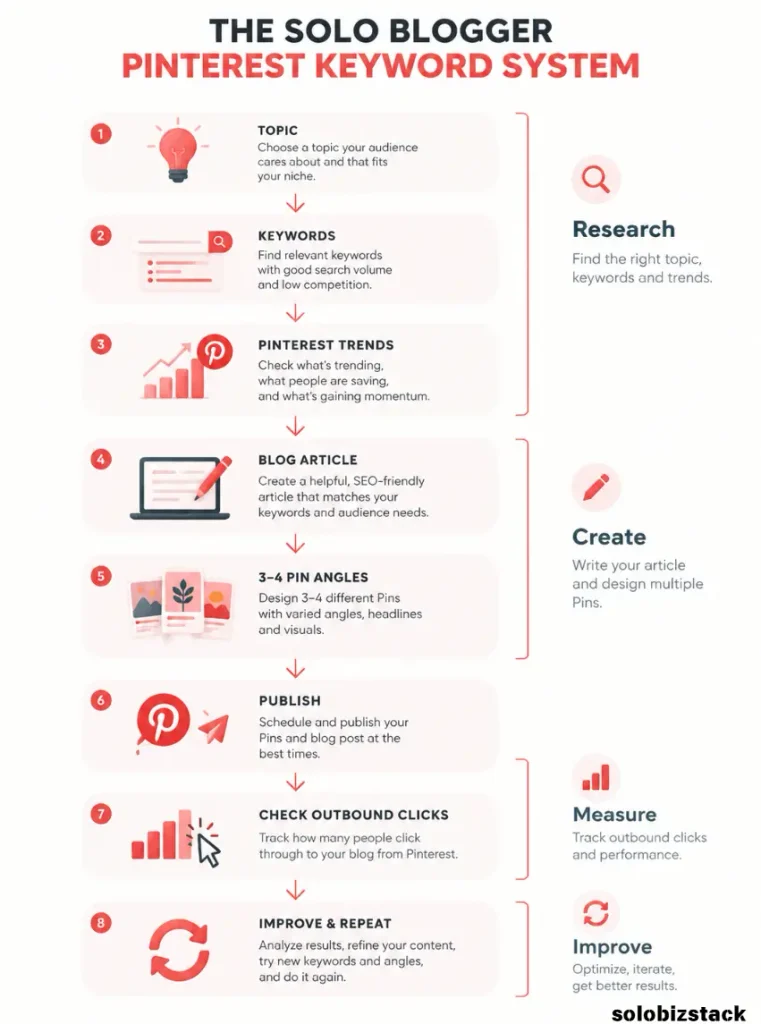
A Simple Pinterest Keyword Research Workflow
Here is the beginner workflow I recommend using for each new article:
1. Choose a broad topic
Start with a subject your audience actually cares about.
2. Search Pinterest
Type the topic into Pinterest and record useful search phrases.
3. Check Pinterest Trends
Compare relevant keywords and look for seasonality or changes in interest.
4. Study existing Pins
Look for common wording, questions, and content angles.
5. Check your own analytics
Use your existing data to see which topics and Pins are getting attention and website clicks.
6. Choose one primary keyword
Pick the phrase that best matches the article’s purpose.
7. Build related keywords
Add natural variations and closely related questions.
8. Create the article
Make sure the article genuinely answers the search intent.
9. Create multiple Pins
Use different headlines and visual angles while keeping the destination page relevant.
10. Review the data
Use Pinterest Analytics and your website analytics to see what happens after publishing.
This process is simple enough to repeat every week.
A Beginner-Friendly Pinterest Keyword Research Checklist
Before publishing, run through this checklist:
- I know the main topic of the article.
- I found relevant Pinterest search terms.
- I checked Pinterest Trends.
- I considered seasonality.
- I understand the search intent.
- I selected one primary keyword.
- I added related terms naturally.
- My Pin title clearly describes the content.
- My Pin description explains what readers will learn.
- My board is relevant to the topic.
- My related topics are relevant.
- My Pin links to the correct article.
- I can measure website traffic from Pinterest.
- I will review analytics after publishing.
You do not need a complicated system.
You need a repeatable one.
Continue Building Your Pinterest System: Best Tools for Creating Pinterest Pins
Frequently Asked Questions
What is Pinterest keyword research?
Pinterest keyword research is the process of finding the words and phrases people use when searching for ideas and content on Pinterest, then using those insights to guide your Pins and related website content.
How do beginners find Pinterest keywords?
Start with Pinterest’s search suggestions, then use Pinterest Trends to compare relevant terms and study seasonality. You can also analyze related topics, popular Pins, and your own Pinterest Analytics.
Is Pinterest Trends free?
Pinterest provides its Trends tool through Pinterest Business features. Availability and some features can vary by region or account, so the interface you see may not be identical to someone else’s.
How many Pinterest keywords should I use?
There is no magic number.
Start with one primary keyword and several closely related terms. Use them naturally where they help explain the topic.
The goal is relevance, not keyword density.
Should Pinterest keywords be the same as Google keywords?
Not necessarily.
Some keywords will overlap, but Pinterest users often search for ideas, inspiration, planning, tutorials, and visual examples. Research the language people actually use on Pinterest instead of assuming your Google keyword list will work unchanged.
How long does Pinterest SEO take?
There is no fixed timeline.
Pinterest says Pins do not have a set engagement window, and a Pin can receive engagement hours, days, months, or even years after publication.
That means it is worth evaluating content over time rather than judging every Pin immediately after publishing.
Final Thoughts
Good Pinterest keyword research is not about finding a magical keyword.
It is about understanding what people are looking for and creating something genuinely useful around that need.
Start with a broad topic, explore Pinterest’s search suggestions, compare terms in Pinterest Trends, study existing Pins, and then use your own analytics to learn what actually brings people to your site.
Once you have a repeatable process, keyword research becomes much easier.
Instead of asking “What should I Pin today?”, you can ask a better question:
“What is my audience already looking for, and how can I help them?”
That is the foundation of a sustainable Pinterest traffic strategy.
Next Step: How to Create Pinterest Pins for Your Blog
Design Pinterest Pins with ready-made templates and simple visual tools.
Create Pinterest Pins with Canva





One Comment