How to Create a Content Strategy for a New Blog: A Step-by-Step Guide
How to create a content strategy for a new blog is one of the first challenges you face after setting up your website. You have plenty of ideas, but you’re not sure which articles to write first, how to organize them, or how to turn individual posts into a blog that grows over time.
It’s tempting to start publishing whatever comes to mind. You might write about a trending topic one day, review a tool the next, and switch to a completely different subject the following week. That can be enjoyable at first, but it often leaves a blog without a clear direction.
A content strategy gives your writing a purpose. It helps you decide who you’re writing for, what problems your blog will solve, which topics deserve attention, and how each article fits into the bigger picture.
You don’t need an expensive SEO platform or a complicated marketing plan to get started. In this guide, we’ll build a practical strategy you can follow, even if your blog is brand new and has little or no search traffic.

Affiliate Disclosure: This article may contain affiliate links. If you purchase a service or sign up through one of our links, SoloBizStack may earn a commission at no additional cost to you.
What Is a Blog Content Strategy?
A blog content strategy is a plan for deciding what to publish, who each article is for, and how your content will support your website’s goals.
It goes beyond keeping a list of article titles. A useful strategy connects several decisions:
- Audience: Who do you want to help?
- Purpose: What should your blog help readers accomplish?
- Topics: Which subjects belong on your website?
- Search intent: What does someone want when they search for a topic?
- Publishing plan: What will you write first, and how often can you publish?
- Distribution: How will people discover your articles?
- Measurement: How will you decide what’s working and what needs improvement?
Think of your strategy as a map. It doesn’t tell you exactly what will happen, but it helps you avoid wasting time moving in random directions.
A new blog doesn’t need hundreds of articles. It needs a clear focus, a sensible starting plan, and a process you can maintain.
Step 1: Set a Clear Goal for Your Blog
Before researching keywords, decide what you want your blog to accomplish.
The right goal depends on your business model. A personal blog might focus on building an audience. A small business blog might help potential customers understand its services. An affiliate blog might aim to attract relevant visitors who eventually click through to useful products and tools.
Choose one main goal and one or two supporting goals.
For example, a beginner affiliate blog might have these goals:
- Help a specific audience solve practical problems.
- Build a library of useful articles that can attract search traffic over time.
- Introduce relevant products or services when they genuinely help readers.
- Grow an email list or another audience that the site owner can communicate with directly.
These goals should influence what you publish. If your blog is about helping beginners build an online business, an article explaining how to choose website hosting fits naturally. A random article about a completely unrelated hobby probably doesn’t.
Set goals you can actually measure
Avoid making your first goal simply “get more traffic.” It is too vague to guide your decisions.
Instead, track actions you can control, such as publishing a planned set of high-quality articles, completing internal links, creating Pinterest graphics, or reviewing Search Console data monthly.
You can track results such as impressions, clicks, click-through rate, affiliate-link clicks, and email sign-ups as your website begins collecting data.
Search performance takes time to develop, and results are not guaranteed. Your initial goal should be to establish a useful content system, not to promise yourself a certain number of visitors by a fixed date.
Step 2: Define Your Target Reader
A blog becomes easier to plan when you know exactly whom you’re trying to help.
You do not need a detailed fictional customer profile with a name, favorite coffee, and every possible personal preference. Start with three questions:
- Who is the reader?
- What are they trying to accomplish?
- What is stopping them from getting there?
For example, imagine you’re building a blog for beginner solopreneurs.
Your target reader might be someone who wants to start an online business but has a limited budget, little technical experience, and no large team to help with content, marketing, or website maintenance.
That reader may search for questions such as:
- How do I build a WordPress website?
- Which tools do I really need?
- How do I find blog topics people are searching for?
- How can I create content faster?
- How do I attract visitors without a large advertising budget?
- What tasks should I outsource first?
Notice how these questions naturally suggest related articles. They also give the blog a clear purpose: helping people build, operate, and grow an online business with manageable tools and processes.
If you can explain your target reader’s main problem in one or two sentences, you’re ready to start organizing your content.
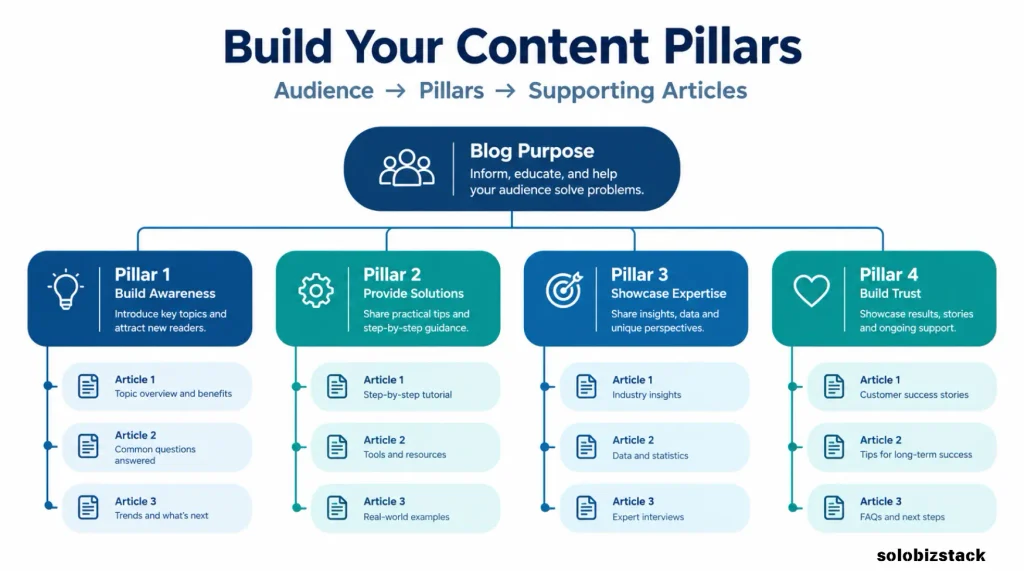
Step 3: Choose Three to Five Main Content Pillars
Content pillars are the main subject areas that organize your blog. They prevent your site from becoming a collection of unrelated posts.
For a new blog, three to five pillars are usually easier to manage than a long list of categories. You can always adjust them as you learn more about your audience.
Suppose your website helps beginners grow an online business. Your pillars might look like this:
| Content Pillar | Reader’s Main Need | Example Articles |
|---|---|---|
| Website Setup | Build a reliable website | WordPress tutorials, hosting guides, theme comparisons |
| Content Creation | Create useful content efficiently | Writing workflows, AI writing tools, image creation |
| Traffic Growth | Help people discover the website | SEO, keyword research, Pinterest strategy |
| Monetization | Turn content into business opportunities | Affiliate marketing, product comparisons, outsourcing |
Each pillar represents a group of related problems your blog can help solve.
The specific pillars will depend on your niche. A cooking blog might focus on recipes, meal planning, ingredients, and kitchen techniques. A finance blog might organize content around budgeting, saving, debt, and investing.
The important point is to choose topics that support the same audience and overall purpose.
Don’t create a new category every time you think of a new article. First ask whether the topic fits one of your existing pillars. If it doesn’t fit anywhere, it may belong on a different website—or it may simply not be a priority right now.
Step 4: Research Topics Before You Start Writing
Once you have your pillars, collect the questions people ask within each one.
Start with Google Search suggestions, the questions shown in search results, relevant forums and communities, competitor articles, and keyword research tools.
You can also use Google Trends to compare interest in related topics. Remember that Trends shows normalized interest rather than exact search volume, so treat it as one research signal rather than a precise traffic forecast.
For a more detailed process, read our guide to How to Find Blog Topics People Are Searching For.
When researching a topic, ask:
- Is this a real problem for my target reader?
- Does the topic fit one of my content pillars?
- Is there evidence that people are looking for this information?
- Can I create an answer that is useful, accurate, and specific?
- Do I already have an article that answers essentially the same question?
That last question matters. Publishing another article about a topic you have already covered may not be the best use of your time. Sometimes the better choice is to improve the existing article or make its purpose clearer.
Build a topic list before choosing what to publish
Create a simple spreadsheet and save potential topics as you discover them.
You might use columns for the topic, target reader, main keyword, search intent, content pillar, priority, planned URL, and publication status.
You do not have to validate every idea immediately. Collect first, compare second, then select the strongest opportunities for your site.
A list of 30 relevant ideas is more useful than 100 random titles that don’t support your audience or business goals.
Step 5: Use Keyword Research to Prioritize Your Topics
Topic research helps you discover what to write about. Keyword research gives you another way to evaluate how people search for those subjects.
Start by assigning one primary keyword or search theme to each proposed article. Then look at related phrases, current search results, and the kinds of pages that appear.
Our guide to How to Do Keyword Research as a Beginner explains how to approach this process without relying on expensive tools.
For each potential article, review four things.
Audience relevance: Does the topic solve an important problem for your target reader?
Search intent: Is the person looking for a tutorial, a list of recommendations, a product comparison, or a direct answer?
Competition: Are the current results dominated by established sites, or can you identify an area where your article could provide a clearer or more useful answer?
Business relevance: Does this topic support your blog’s purpose and future plans?
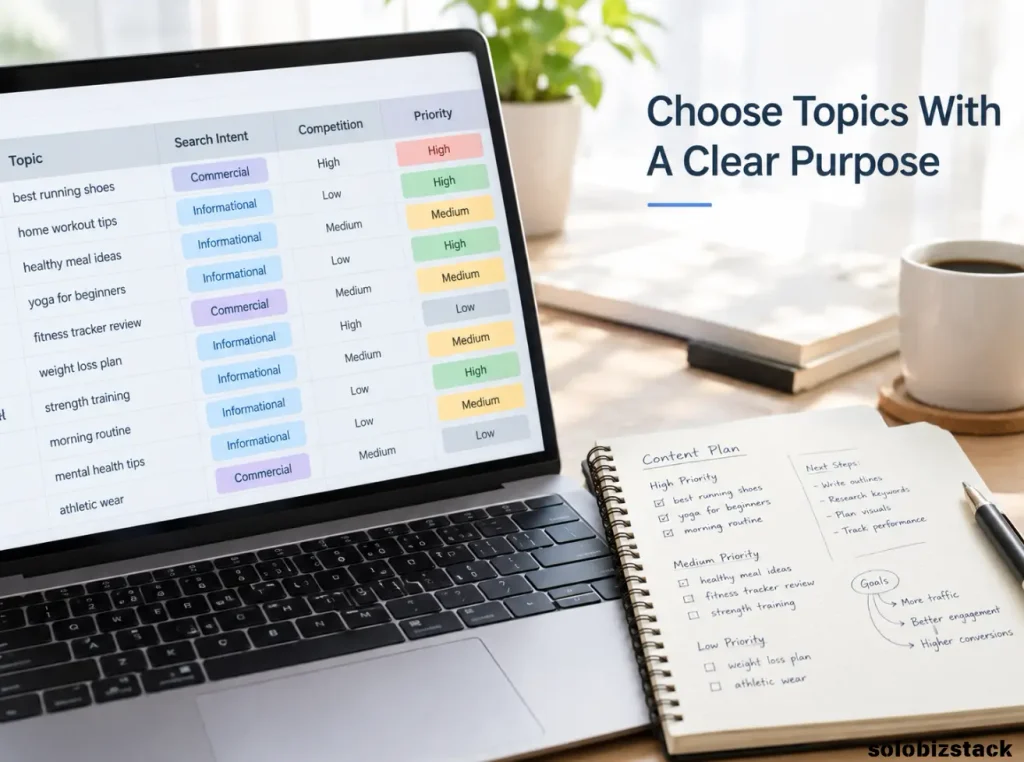
You don’t need to assign perfect scores to every keyword. A simple high, medium, or low rating can help you compare ideas consistently.
A topic with modest search demand may still be worth covering if it solves a real problem for your audience. On the other hand, a large search-volume estimate does not automatically make a keyword a good choice for a new website.
Treat keyword tools as decision aids, not as guarantees of organic traffic.
Step 6: Organize Articles Into Topic Clusters
One of the most useful parts of a content strategy is deciding how your articles will connect.
A topic cluster is a group of related articles that help readers explore one subject in more depth. It often includes a broad guide and supporting articles that answer narrower questions.
For example, a content strategy cluster might look like this:
Main guide: How to Create a Content Strategy for a New Blog
Supporting articles:
- How to Find Blog Topics People Are Searching For
- How to Do Keyword Research as a Beginner
- Best SEO Tools for Small Websites
- How to Create Blog Content Faster as a Solopreneur
- Pinterest SEO for Beginners
Each supporting article addresses a different stage of the process. One helps you find ideas, another helps evaluate keywords, another covers tools, and others focus on content production and promotion.
This creates a more useful experience for readers. Someone who lands on one article can follow a relevant link to the next resource when they need it.
It also helps you plan internal links before publication instead of trying to add them randomly afterward.
Avoid creating articles that compete with each other
Before adding a new topic to your calendar, compare it with articles already published or planned.
Two articles can cover related subjects without being duplicates. The key question is whether they answer meaningfully different needs.
For example, “How to Find Blog Topics People Are Searching For” focuses on discovering topics. “How to Do Keyword Research as a Beginner” focuses on evaluating keywords and understanding search intent. They can support each other because their main tasks are different.
If two planned articles would answer the same question in almost the same way, consider combining them or giving one a more distinct purpose.
Step 7: Choose the Right Content Format
Not every keyword should lead to the same kind of article.
Your content format should match what the reader expects to find and what will help them complete their task.
| Content Format | Best Used For | Example |
|---|---|---|
| Beginner guide | Explaining a process from start to finish | How to Do Keyword Research as a Beginner |
| Step-by-step tutorial | Helping someone complete a task | How to Build a WordPress Website |
| List article | Comparing several options or ideas | Best SEO Tools for Small Websites |
| Product review | Evaluating one product or service | Hostinger Review |
| Comparison | Helping readers choose between alternatives | Hostinger vs SiteGround |
| Checklist | Helping readers take action | WordPress Security Checklist for Beginners |
Search the primary keyword before you start writing and review the types of pages that currently appear. This helps you understand whether readers expect a tutorial, comparison, checklist, or something else.
Then decide what your article will contribute beyond the title. It might offer a simpler explanation, a practical workflow, a decision table, a worked example, or a checklist readers can actually use.
Google’s people-first content guidance encourages creators to focus on useful, reliable information for people rather than producing pages primarily to manipulate search rankings.
That’s a good standard for your content strategy: every article should have a clear reason to exist.
Step 8: Build a Realistic Editorial Calendar
An editorial calendar turns your topic list into an actual publishing plan.
It doesn’t need to be complicated. A spreadsheet or simple project board is enough. The goal is to decide what you’ll publish, roughly when you’ll publish it, and what needs to happen before the article goes live.
A practical calendar might include these columns:
| Field | What to Record |
|---|---|
| Article title | The working title |
| Content pillar | The category it supports |
| Primary keyword | The main search phrase or theme |
| Search intent | The reader’s goal |
| Internal links | Relevant articles to connect |
| Draft date | When writing should be completed |
| Publish date | Planned publication date |
| Promotion | Pinterest, email, or other channels |
| Status | Idea, research, draft, editing, published, or update needed |
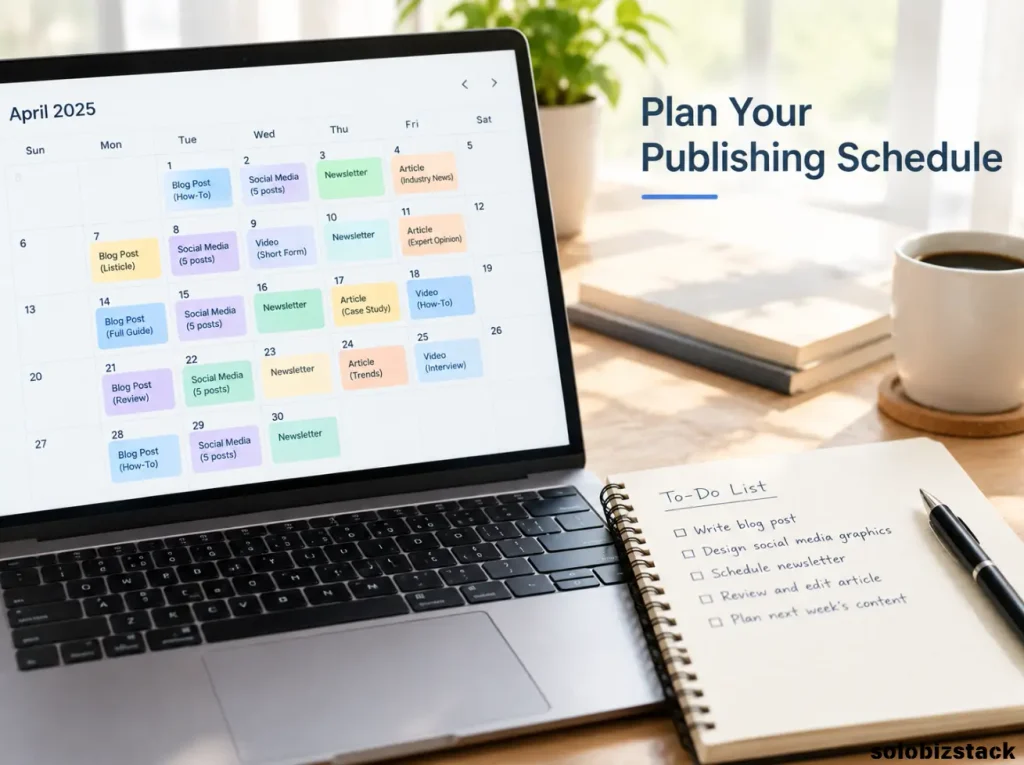
How often should a new blog publish?
Choose a schedule you can maintain without sacrificing quality.
One helpful article each week may be more realistic than trying to publish something every day and running out of time after two weeks. If you have very limited time, two substantial articles each month can still give you a workable starting point.
The right frequency depends on the complexity of your topics, your available time, and whether you’re working alone.
Plan a little flexibility into your calendar. Research may take longer than expected, a tool may change, or you may discover that an existing article needs updating.
Your calendar is there to help you stay organized, not to force you to publish a weak article just to meet a deadline.
Step 9: Create a Repeatable Writing and Publishing Workflow
A strategy only works when you can carry it out consistently. Create a basic process that every article follows.
1. Research. Confirm what the reader needs, inspect current search results, and collect reliable sources.
2. Outline. Write the main sections before drafting. Each heading should contribute something useful to the reader’s task.
3. Draft. Explain the topic in plain English. Use examples and practical instructions where they add value.
4. Edit. Check factual accuracy, clarity, repetition, and whether the article delivers what the title promises.
5. Optimize. Add the title, meta description, appropriate headings, internal links, descriptive image ALT text, and relevant structured data where appropriate.
6. Publish and test. Check the page on desktop and mobile. Test buttons, links, forms, and images.
7. Promote and review. Share the article through relevant channels and record what you learn over time.
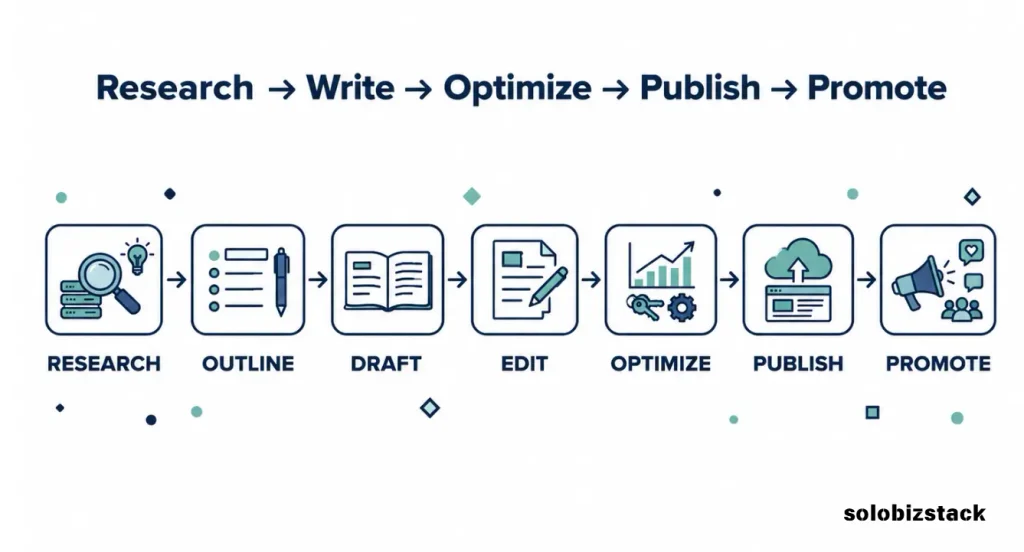
You can refine this workflow as your blog grows. For additional ideas, read How to Create Blog Content Faster as a Solopreneur.
Use AI as an assistant, not an automatic publishing system
AI tools can help brainstorm possible angles, organize research notes, produce an initial outline, or identify sections that need clearer explanations. They can also produce inaccurate details or generic content if you rely on them without reviewing the output.
Check important claims, add your own editorial judgment, and make sure the finished article answers the reader’s question. If you haven’t personally used a tool, don’t write as though you have. You can still create a useful comparison based on verifiable features, official documentation, and clearly explained evaluation criteria.
The goal is not to make every article sound identical. It is to create a consistent process while preserving the usefulness and distinct purpose of each piece.
Step 10: Plan How You’ll Promote Your Articles
Publishing an article is not the final step. Readers need a way to discover it.
Choose one or two promotion channels that suit your audience rather than trying to be active everywhere.
For a beginner blog, possible channels include:
- Google Search: Create helpful pages around relevant reader needs and make the website easy to navigate.
- Pinterest: Design useful Pins that represent the article accurately and link to the relevant page.
- Email: Build a small email list if you have something useful to send subscribers.
- Relevant communities: Share genuinely helpful information where promotion is permitted and the topic fits the conversation.
If you’re using Pinterest to support your content plan, our guide to Pinterest SEO for Beginners explains how to connect Pins with relevant search terms and landing pages.
You can also repurpose an article into several useful formats. A detailed tutorial might become a vertical Pinterest graphic, a short checklist, an email tip, or a summary of the most important steps.
Repurposing should make the original content more accessible, not create several thin copies of the same article.

Step 11: Add Monetization Without Letting It Control Your Strategy
If your goal is to earn money from your blog, plan for monetization—but don’t let affiliate commissions decide every topic you publish.
A useful content mix can include informational articles that build trust, tutorials that solve practical problems, product comparisons that help readers make decisions, and reviews when you have a clear and credible basis for evaluating the product.
For example, a reader learning how to create a content strategy might benefit from a related keyword research tool guide. A reader comparing hosting providers may appreciate a more detailed comparison before choosing a plan.
The relationship should be natural. Recommend a product only when it fits the reader’s needs, explain meaningful limitations, and disclose affiliate relationships where required. Do not turn an educational article into a list of unrelated products.
You can start planning these connections before you join affiliate programs. Identify the pages where a recommendation might genuinely help, but keep ordinary educational links in place until you have a suitable, valid affiliate link.
A sustainable content strategy serves readers first and creates appropriate business opportunities as a result.
Step 12: Measure Results and Improve Your Plan
Your first content strategy is a starting point, not a permanent document. Once your articles begin collecting data, use that information to decide what to do next.
Google Search Console’s Performance report shows search clicks, impressions, click-through rate, average position, and the queries or pages associated with your site’s search performance.
You can use that information to ask useful questions:
- Which pages are receiving search impressions?
- What queries are bringing people to your website?
- Are some pages getting impressions but relatively few clicks?
- Which topics appear to be attracting the audience you want?
- Does an article need clearer headings, better internal links, updated information, or a more useful answer?
A new blog may have limited data at first. That’s normal. Avoid making major decisions based on a handful of impressions or a short period of activity.
As the site develops, consider reviewing its performance monthly. Some articles may deserve updates, while others may suggest new supporting topics. In some cases, the best next step will be improving an existing page rather than publishing another one.
You can also review the conversion actions that matter to your business, such as email sign-ups or affiliate-link clicks, if you have the relevant tracking in place.
Don’t treat one metric as the whole story. Traffic, reader usefulness, business relevance, and the quality of the content all matter.
A Practical 90-Day Content Strategy for a New Blog
If you’re starting from scratch, you don’t need to plan every article you’ll ever publish. Begin with a 90-day roadmap that provides direction while leaving room to learn.
Days 1–30: Build the Foundation
Focus on planning rather than publishing as many articles as possible.
- Define your target reader and the main problem your blog will solve.
- Choose three to five content pillars.
- Research relevant topics and validate the most promising keywords.
- Review competing pages to understand what readers expect.
- Set up an editorial calendar and a repeatable writing workflow.
- Plan the first group of core articles and the internal links between them.
By the end of the first month, aim to have a clear set of priorities and several well-developed article briefs.
Days 31–60: Publish Core Content
Start publishing the most important articles for your audience.
- Publish a manageable number of useful guides and tutorials.
- Make sure each article has a clear purpose and fits a content pillar.
- Add internal links to related articles that already exist.
- Create relevant images and prepare a basic promotion plan.
- Check each article on mobile before considering it finished.
If you have limited time, choose fewer articles and do them well. The exact number will depend on your workflow and the complexity of your subjects.
Days 61–90: Expand and Learn
Once the first group of articles is live, develop supporting content and begin reviewing early signals.
- Publish supporting articles that answer related questions.
- Strengthen internal links between relevant pages.
- Promote useful content through your chosen channels.
- Check Search Console for emerging queries and pages with impressions.
- Update articles where you spot factual problems or clear improvements.
- Adjust the next content calendar based on what you’ve learned.
Don’t expect every article to produce meaningful traffic within 90 days. The purpose of this roadmap is to build a coherent content library and a repeatable process, then use available evidence to guide the next stage.
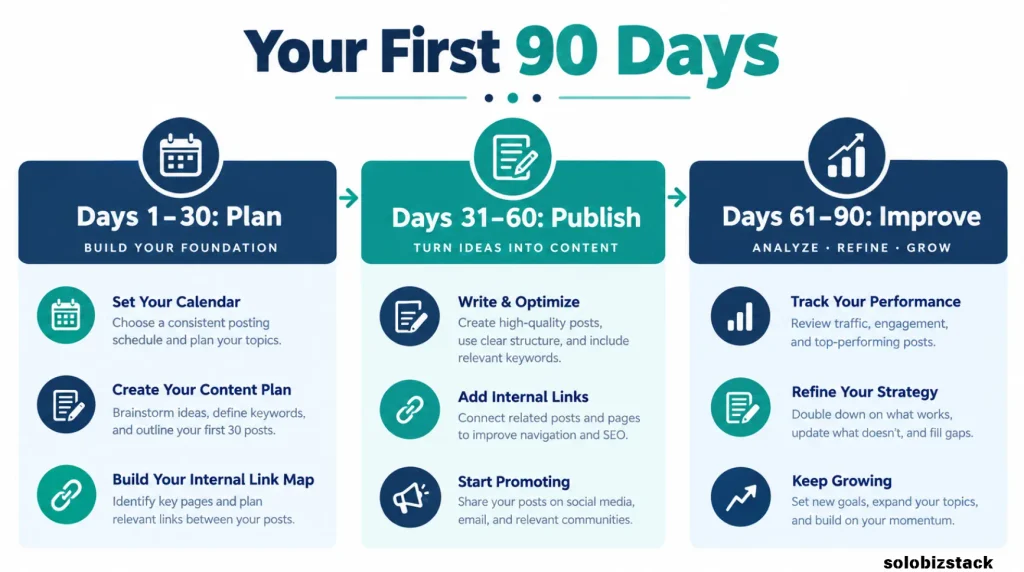
A Simple Content Strategy Template
Before writing your next article, complete this short brief. You can keep it in a spreadsheet, document, or content management tool.
| Planning Field | Questions to Answer |
|---|---|
| Target reader | Who needs this article? |
| Reader problem | What are they trying to solve? |
| Content pillar | Where does the topic fit? |
| Main keyword | What is the main search phrase or topic? |
| Search intent | What kind of answer does the reader expect? |
| Article format | Guide, tutorial, checklist, review, or comparison? |
| Main takeaway | What should the reader understand or be able to do? |
| Internal links | Which related pages should they read next? |
| Promotion | Where will the article be shared? |
| Success measure | What evidence will help you evaluate the page later? |
If you cannot explain why an article belongs on your website or what problem it solves, pause before adding it to the publishing calendar.
That simple habit can prevent a lot of wasted writing time.
Common Content Strategy Mistakes to Avoid
Publishing Without a Clear Focus
A blog that jumps between unrelated subjects can be difficult for readers to understand and maintain. Keep your topics connected to your intended audience and main purpose.
Choosing Topics Only Because They Are Popular
A trending topic is not automatically right for your website. Research audience relevance, search intent, competition, and whether you can provide a useful answer.
Planning More Articles Than You Can Finish
An ambitious calendar may look impressive, but it won’t help if every deadline becomes stressful. Start with a realistic cadence and increase it only when your workflow supports it.
Focusing on SEO Scores Instead of Content Quality
SEO checks are useful for spotting missing titles, descriptions, links, or other improvements. They cannot tell you everything about how useful an article is. Review whether the content answers the reader’s question and supports your site’s purpose.
Ignoring Older Articles
A content strategy should cover maintenance as well as creation. When you publish a related article, check whether it should link to an older one. Periodically review pages that could benefit from updated information, clearer explanations, or better internal linking.
Treating Every Article as a Sales Page
Some readers are learning the basics, while others are comparing options. Give them the information they need at that stage. Helpful product recommendations can fit into a content strategy without dominating every article.
Frequently Asked Questions
How do I create a content strategy for a new blog?
Start by defining your audience and blog goals. Choose three to five content pillars, research topics and keywords, organize related articles into clusters, and build a realistic editorial calendar. Publish useful content, promote it through relevant channels, and review available performance data regularly.
How many articles should a new blog publish each month?
There is no single ideal number. The right amount depends on your time, topic complexity, and ability to maintain quality. One useful article per week can be a practical target for some beginners, while others may prefer two articles per month. Consistency matters more than choosing an unrealistic schedule.
Should I do keyword research before writing blog posts?
Keyword research is useful before writing articles intended to attract search traffic. It helps you understand how people phrase questions and what types of results they expect. It should support your understanding of the audience, not replace it.
What is the difference between a content strategy and an editorial calendar?
A content strategy defines your audience, goals, main topics, and approach to creating and distributing content. An editorial calendar turns that strategy into a schedule, showing which articles you plan to publish and when.
Do new blogs need content clusters?
Content clusters can help new blogs organize related articles and make internal linking more useful. You don’t need a complicated site structure, but grouping relevant guides and supporting articles helps readers find the next piece of information they need.
When should I review my content strategy?
Review the plan periodically, such as once a month, and make a more detailed assessment every few months. Use publishing progress, Search Console data where available, reader feedback, and changes in your business goals to identify useful adjustments.
Final Thoughts
A successful blog is rarely built by publishing articles at random. It grows through a series of useful decisions: choosing an audience, understanding its problems, planning connected topics, publishing on a manageable schedule, and improving content as you learn.
You don’t need to predict every search trend or build a perfect strategy before publishing your first article.
Start with a clear purpose, a handful of content pillars, and a realistic 90-day plan. Make every article serve a genuine reader need, connect it to relevant resources, and review what you learn along the way.
The goal isn’t simply to publish more. It’s to build a blog that becomes more useful, more organized, and more valuable to its audience over time.