
How to Find Blog Topics People Are Searching For (2026 Guide)
If you want to learn how to find blog topics people are searching for, start by looking at the questions your audience already asks instead of guessing what might make an interesting article.
This sounds simple, but it changes how you approach blogging. Rather than spending hours writing about a topic and hoping people discover it, you begin with a problem, check whether there is evidence of search interest, and then create content that provides a useful answer.
The good news is that you do not need an expensive SEO subscription to get started. Google Search, Google Trends, Google Keyword Planner, and your own website data can help you discover and evaluate topic ideas.
In this guide, you will learn how to find potential blog topics, assess their search intent, choose realistic opportunities for a small website, and organize those ideas into a content plan.

Why Finding the Right Blog Topics Matters
A well-written article can still receive very little traffic if it targets a question few people ask or a topic that does not match what searchers need.
That does not mean every article must have a large search volume. A specific question searched by a smaller, relevant audience may be more useful to your business than a broad topic that attracts people who are unlikely to read your other content.
For example, a new website about online business could target a broad topic such as “AI tools.” But a more specific article like “Best AI Writing Tools for Bloggers” gives readers a clearer reason to click and creates a natural connection to a tool comparison.
The goal is to find topics that balance four things: audience demand, realistic competition, search intent, and relevance to your website.
How to Find Blog Topics People Are Searching For: 8 Practical Methods
1. Start With Problems Your Audience Wants to Solve
Before opening a keyword tool, define the audience you are writing for.
For SoloBizStack, that audience includes people who want to build, create, grow, and monetize an online business. They may be new bloggers, solo entrepreneurs, or creators trying to choose tools and make better use of their time.
Write down the questions these people might ask at different stages of their journey.
Build: How do I start a website? What does web hosting do? Which WordPress theme should I choose?
Create: How can I make blog images without a designer? How do I write articles more efficiently?
Grow: How do I find keywords? How can Pinterest bring traffic to my blog?
Sell: How does affiliate marketing work? What should I outsource first?
Each question is a potential starting point for a blog post.
Do not turn every question into a separate article immediately. First, collect the ideas in a spreadsheet or content planning tool. You will evaluate them in the next steps.
2. Use Google Search Suggestions to Discover Topic Ideas
One of the easiest ways to find blog topic ideas is to search for your main subject in Google.
Start with a broad phrase and observe the suggestions that appear as you type. Then run the search and look at People Also Ask, related searches, and the questions that appear in relevant results.
For example, start with:
- best AI tools for
- how to start a blog
- Pinterest keyword research
- how to make money from a blog
Depending on your query and search context, you may discover more specific phrases such as “best AI tools for bloggers” or “how to use Pinterest to drive traffic to a blog.”
Treat these suggestions as research clues, not proof of search volume. They help you discover how a topic can be phrased, but you should validate promising ideas with additional research.
For each useful suggestion, ask yourself:
- Does it describe a clear problem?
- Can I answer it in a dedicated article?
- Does it fit my website?
- Would the answer be different from the articles I already have?
If you can answer yes to these questions, add the idea to your topic list.

3. Use Keyword Research Tools to Check Potential Demand
After collecting ideas, use keyword research tools to investigate them.
Google Keyword Planner can discover keyword ideas related to a topic or website and provide estimates of average monthly searches. Its data is designed for Google Search advertising, so use it as one source of information rather than a guarantee of organic traffic. Access to some features requires completing the account setup process. Google Keyword Planner guide
You can also use SEO platforms such as Ahrefs or Semrush to explore related keywords, estimated search volumes, competition indicators, and ranking pages.
When reviewing a potential keyword, record these details:
| What to check | Why it matters |
|---|---|
| Search demand | Is there evidence that people look for this topic? |
| Competition | Are the current results difficult for a small site to compete with? |
| Search intent | What does the searcher actually want to accomplish? |
| Site relevance | Does the topic support your website’s main purpose? |
| Monetization fit | Could the article naturally connect to a relevant tool or service? |
Do not automatically choose the keyword with the highest search volume. Broad terms often have broader intent, while a more specific search may fit your audience much better.
[Explore a Keyword Research Tool →]
[Explore SEO Tools for Small Websites →]
4. Use Google Trends to Compare Topics and Spot Seasonality
Search volume is not the only useful signal. You also need to understand whether interest in a topic is steady, seasonal, or changing.
Google Trends lets you compare search interest across terms, regions, and time periods. Its scores are normalized on a scale of 0 to 100, so they represent relative interest rather than absolute search volume. Two terms with similar Trends scores do not necessarily have the same number of searches. Google Trends data explained
For example, you could compare several topics relevant to SoloBizStack:
- AI writing tools
- AI image generators
- Pinterest SEO
- WordPress hosting
Select a country and time range that fit your intended audience. Look at both recent changes and longer-term patterns.
Use the results to ask better questions:
- Is interest steady or seasonal?
- Is one topic gaining attention?
- Does the trend appear relevant to my target audience?
- Is this a timely topic or an evergreen one?
Trends is particularly helpful when you are deciding between several related topics. It should not be used alone to decide which keyword will bring the most traffic.

5. Find New Ideas in Google Search Console
If your website is already verified in Google Search Console, your own performance data can reveal opportunities that generic keyword tools cannot show as clearly.
The Performance report includes information such as queries, clicks, impressions, click-through rate, and average position. These metrics can help you see which searches already bring your pages into Google results. Google Search Console Performance report
Open the report and review the queries associated with your website.
Look for three types of opportunities.
Pages receiving impressions but few clicks. Your title or description may not match the searcher’s expectations, although ranking position and other factors also affect click-through rate.
Queries related to existing articles. If a page about Pinterest SEO appears for specific keyword research questions, you may be able to improve that article or create a separate guide if the search intent is genuinely different.
Topics you have not covered directly. A query might reveal an unanswered question that deserves its own article.
For a new website, there may not be much data yet. That is normal. Use the other research methods first, then revisit Search Console as your site gains visibility.

6. Study Search Results and Competitor Content
Keyword tools can tell you that a phrase may be worth researching. The current search results help you understand what a useful answer should look like.
Search your chosen phrase and review the pages that appear.
Do not just copy their headings. Investigate what readers are being offered and where the existing answers fall short.
Ask yourself:
- Are the results mainly tutorials, comparisons, product reviews, or list articles?
- Are the pages written for beginners or experienced users?
- Do they answer the main question early?
- Is important information missing or difficult to understand?
- Can I provide clearer examples, better organization, or a more useful decision-making process?
For instance, if most results for “blog topic ideas” are long lists of unrelated ideas, you could create a guide that shows readers how to validate each idea and organize the results into a content plan.
That gives your article a distinct purpose.
You do not need to outperform every competing website on every topic. You need to find relevant opportunities where your website can provide a satisfying and genuinely useful answer.
This approach aligns with Google’s guidance to prioritize original, people-first content rather than simply reproducing material that already exists. Google’s people-first content guidance
7. Choose Topics Using a Simple Scoring System
By now, you may have a long list of possible articles. The next step is deciding which ones deserve your time first.
Use a simple 1–5 rating for each factor:
| Factor | Score 1 | Score 5 |
|---|---|---|
| Audience relevance | Weak fit | Directly solves a key audience problem |
| Search evidence | Little evidence | Several useful demand signals |
| Competition | Very difficult | Realistic opportunity to compete |
| Business value | Little connection | Supports an important site goal |
| Content readiness | Not enough knowledge or resources | Clear plan for a useful answer |
Add the scores for a total out of 25.
This is an internal planning aid, not a prediction of Google rankings. Its purpose is to help you compare ideas consistently rather than choosing topics based on excitement alone.
A topic with a strong audience fit and a clear way to add value may be worth pursuing even if its search volume estimate is modest.
Before selecting the topic, also check whether you already have an article that targets the same intent. You may need to update or expand an existing page instead of publishing another one.
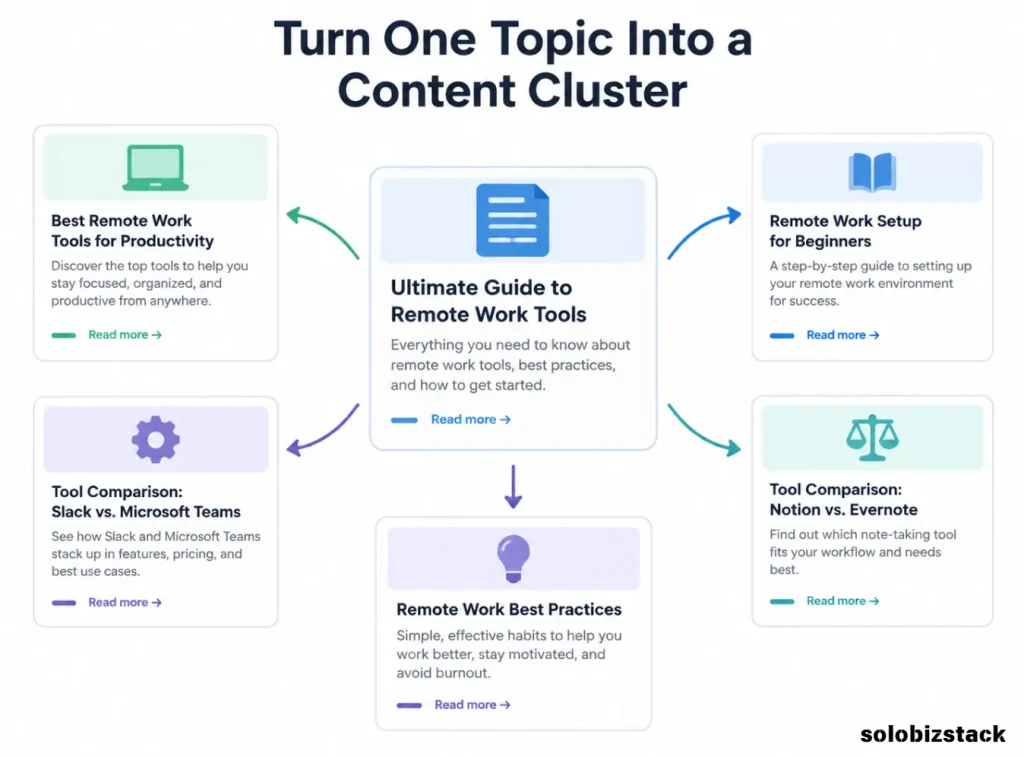
8. Turn Individual Ideas Into a Content Cluster
One useful topic should connect to related questions your audience is likely to have.
For example, a reader researching blog content might follow this path:
How to Find Blog Topics People Are Searching For
↓
How to Create Blog Content Faster as a Solopreneur
↓
Best AI Writing Tools for Bloggers
↓
How to Create Blog Images Without a Designer
The first article helps the reader find a topic. The next explains how to produce the content. The tool and image articles support the next steps.
This structure gives readers a logical journey through your site.
It also makes internal linking more useful because each link points to a related resource, not simply another page you want to promote.
For SoloBizStack, organize clusters around your existing Build, Create, Grow, and Sell categories. That keeps your content connected to the needs of solopreneurs instead of becoming a collection of unrelated keyword targets.
[Learn How to Create Blog Content Faster →]
[Explore the Best AI Writing Tools →]
A Worked Example: Finding Blog Topics for SoloBizStack
Let’s put the methods together.
Suppose you want to publish content for beginner bloggers who need more website traffic.
Start with the audience problem: they have a website, but they are unsure what to write about or how to attract visitors.
Next, collect a few possible topics and evaluate their purpose.
| Potential topic | Main intent | Suitable next step |
|---|---|---|
| How to Find Blog Topics People Are Searching For | Learn a repeatable research process | Keyword research guide |
| Pinterest Keyword Research for Beginners | Discover Pinterest-specific terms | Pinterest SEO guide |
| Best SEO Tools for Small Websites | Compare software options | Tool reviews and comparisons |
| How to Create Blog Content Faster as a Solopreneur | Improve content workflow | AI writing tool guide |
These are topic examples, not verified search-volume rankings. Before assigning priorities, check current search results, available keyword data, and how well each topic fits your existing content.
Then create a content brief for the topic you choose. Record the primary keyword, reader’s main question, search intent, article outline, relevant internal links, sources to consult, and one clear next action for the reader.
This brief makes the writing stage easier because you already know what the article needs to accomplish.
Common Blog Topic Research Mistakes
Choosing Only High-Volume Keywords
Large search-volume estimates can be tempting, but they do not tell you how realistic the competition is or whether visitors will find your website useful. Consider relevance and search intent along with demand.
Treating Keyword Tool Estimates as Exact Numbers
Tools use different data sources and estimation methods. Treat their numbers as guidance, then compare multiple signals instead of trusting a single metric.
Copying Competitor Topics Without Adding Value
A topic can have demand and still be a poor choice if your article adds nothing new. Look for a clearer explanation, a useful example, a better workflow, or information relevant to your audience.
Publishing Several Articles for the Same Search Intent
Similar keywords do not always need separate articles. Check the current search results and decide whether each proposed page serves a meaningfully different reader need. If not, one stronger article may be the better option.
Ignoring Existing Content
New articles are not the only route to growth. Sometimes an existing page can be improved with better examples, updated details, clearer headings, or useful internal links. Search Console can help you identify which pages deserve closer attention.
A Simple Weekly Blog Topic Research Routine
You do not need to spend an entire day researching topics.
Set aside a short, regular session and follow the same process each week.
| Task | What to do |
|---|---|
| Collect ideas | Note audience questions and Google suggestions |
| Validate | Check keyword tools and Trends where relevant |
| Inspect results | Review the current pages ranking for promising terms |
| Prioritize | Score the strongest topics against your goals |
| Plan | Assign a keyword, intent, outline, and internal links |
| Review | Check Search Console when enough data is available |
At the end of the session, choose a small number of realistic topics rather than keeping an enormous list that never turns into published content.
A focused plan you can execute is more useful than hundreds of unvalidated ideas.

[Explore Pinterest Keyword Research →]
Frequently Asked Questions About Finding Blog Topics
How do I find blog topics people are searching for?
Start with real audience problems, then use Google search suggestions, keyword research tools, Google Trends, competitor research, and Search Console data where available. Validate the search intent before deciding to write an article.
What is the easiest way to find blog post ideas?
Google search suggestions are a simple starting point. Enter a broad topic, explore related questions, and save promising ideas. Then check whether each idea fits your website and whether you can provide a useful answer.
Do I need paid SEO tools to find blog topics?
No. You can begin with Google Search, Google Trends, Google Keyword Planner, and Search Console. Paid tools may offer additional data or workflow features, but they are not a substitute for understanding your audience and reviewing the search results.
How many blog topics should I research before writing?
There is no required number. Building a small list of 10–20 relevant ideas is a practical starting point for many beginners. Prioritize the best opportunities rather than trying to write about every idea you collect.
Should I choose trending topics or evergreen topics?
Choose based on your audience and content strategy. Evergreen topics can remain useful over time, while trending topics may be valuable when they are relevant and timely. Google Trends can help you investigate the direction and seasonality of interest, but its scores do not represent absolute search volume.
Final Thoughts
Learning how to find blog topics people are searching for is not about collecting the biggest possible list of keywords. It is about identifying questions your audience cares about and deciding which ones your website can answer well.
Use search suggestions to discover ideas, keyword tools to investigate demand, Trends to compare interest, Search Console to learn from your own data, and competitor analysis to find ways to provide a better answer.
Then connect each article to the next useful resource.
For SoloBizStack, that means choosing topics that help readers build their websites, create better content, grow their traffic, and eventually monetize their work.
Find a real problem. Validate the topic. Create a useful answer. Build the next logical link.
That is a more sustainable way to grow a blog than publishing articles based on guesses alone.






One Comment